26
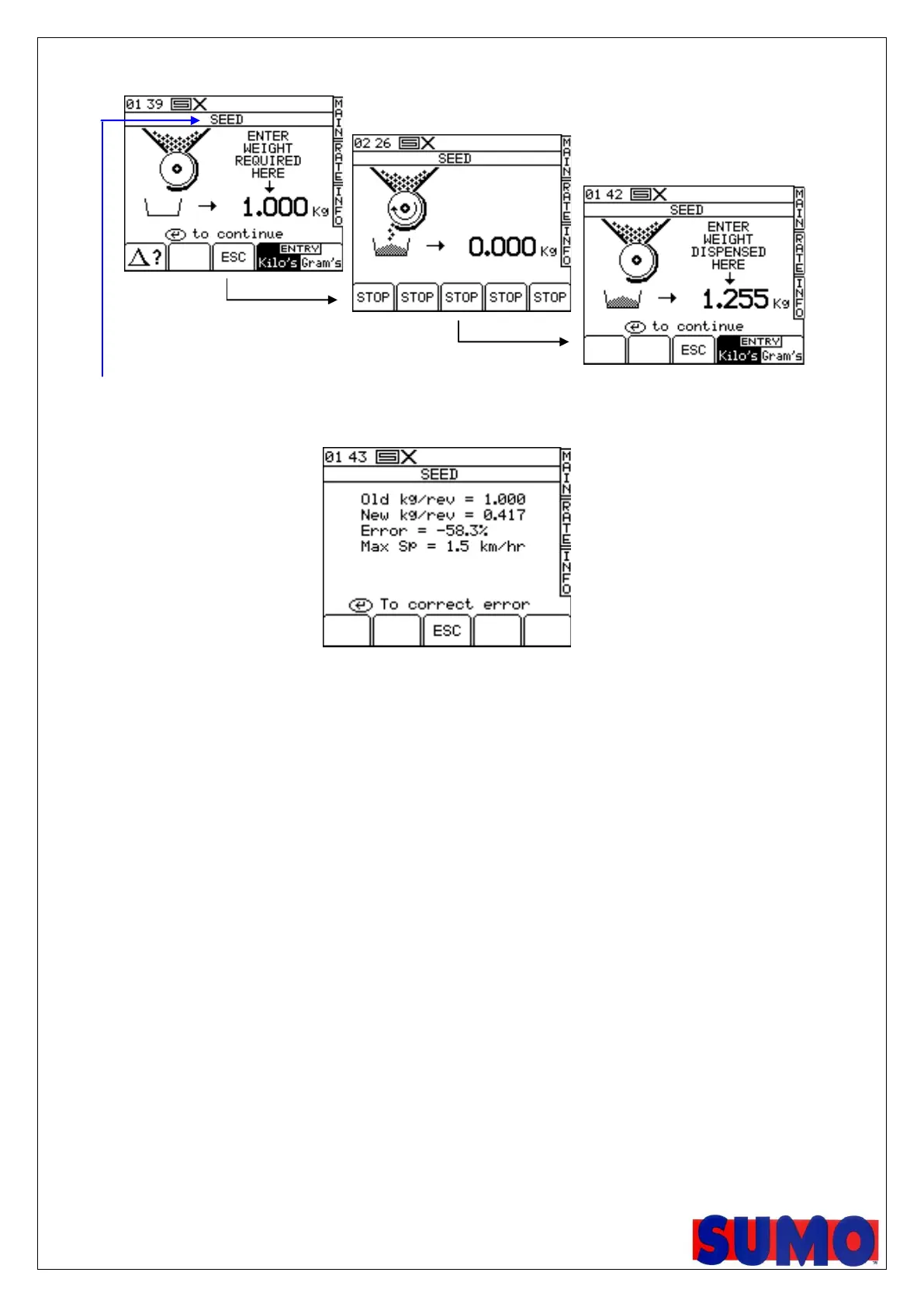
4. Weigh the contents of the container, and then enter the ACTUAL weight dispensed (fig. 14) and press ENTER to confirm.
Figure 12
NOTE: The heading will be either SEED / FERT / LEFT / RIGHT according to steps 2a , 2b.
5. Press ENTER again for the instrument to re-calculate and display the new calibration factor in kg/rev, the error %, and the
maximum forward speed that is permissible based on the application rate set for the product (fig.15).
Figure 15
6. Press ENTER again to confirm and store the new calibration factor, or press ESC to return to the SETUP menu screen.
It is recommended to reset the PART TOTAL to zero before commencing drilling. This will enable you after drilling an
area, to quantify any error in the calibration factor by logging the theoretical amount of product used against a known amount
used (a whole bag for example).
You can then adjust the calibration factor precisely, if necessary (section 2.5.2).



 To Next Page