Steering Link Installation
Check that the handlebars and front wheel are aligned perpendicular to each other for proper steering control. If adjustments are needed, they can be made
using the threaded joints on either end of the #10 Steering Link. These joints may be turned accordingly to either shorten or lengthen the #10 Steering Link
to help straighten the front wheel position.
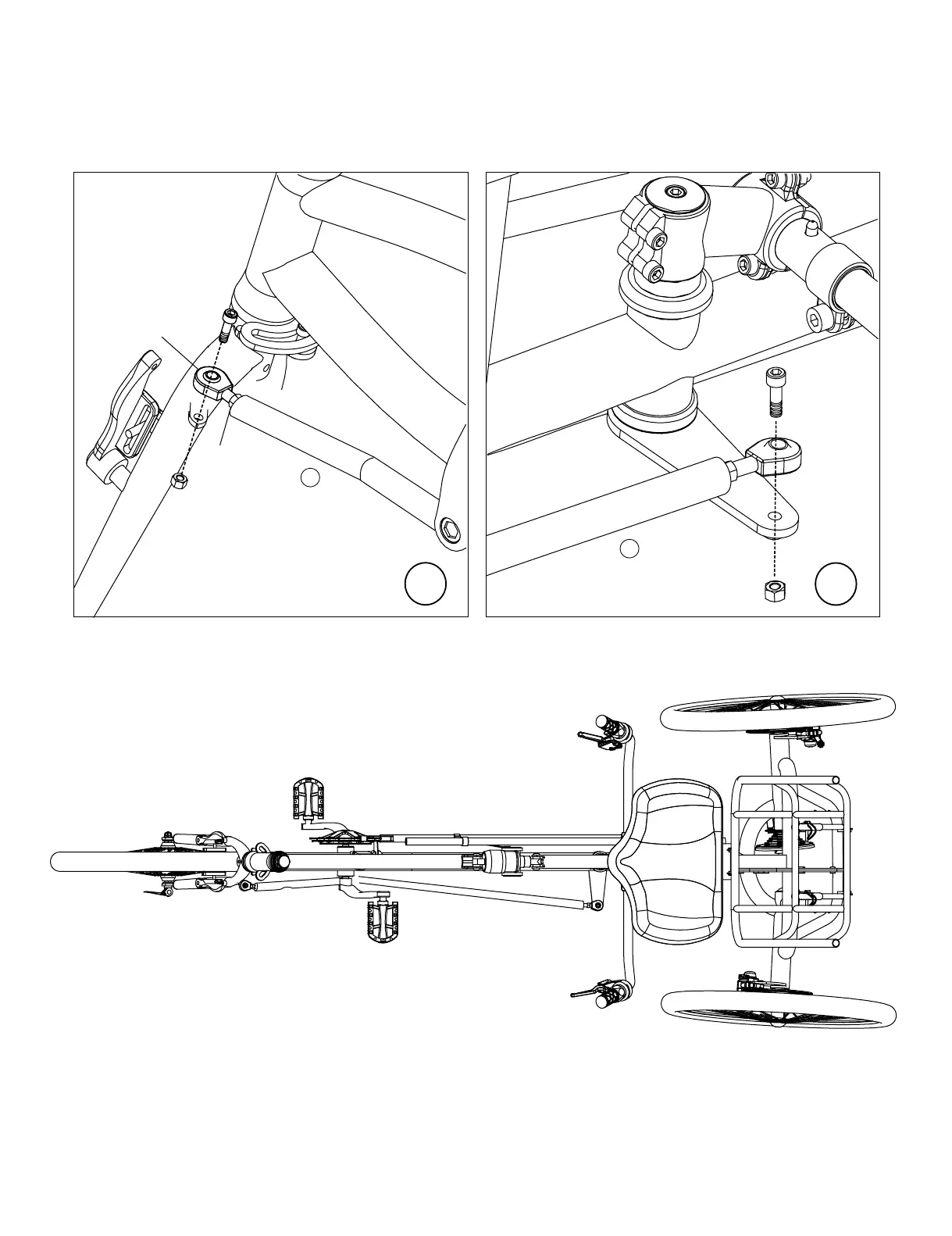
Adjust #10 Steering Link by removing the steering link joint at the front fork steering tab. Turn steering link joint in or out to shorten or lengthen the #10
Steering Link. This adjustment will help straighten the front wheel position.
Use locknuts to secure steering link joints. Secure steering link to front fork steering tab after adjustments. See Figure H, I.
WARNING: Make sure once you have made all your steering link adjustments that you do not have any crank or frame interference with the steer-
ing link. Failure to do so may result in loss of control resulting in a serious or fatal accident.
Install front joint of #10 Steering Link onto front fork steeering tab. Position the #10 Steering Link with bent portion below bottom bracket to avoid interfer-
ence with chainrings or pedals. See Figure H.
Install rear joint of #10 Steering Link onto handlebar stem steering tab. See Figure I.
Steering link joint
Locknut
H
I
10
10


 To Next Page