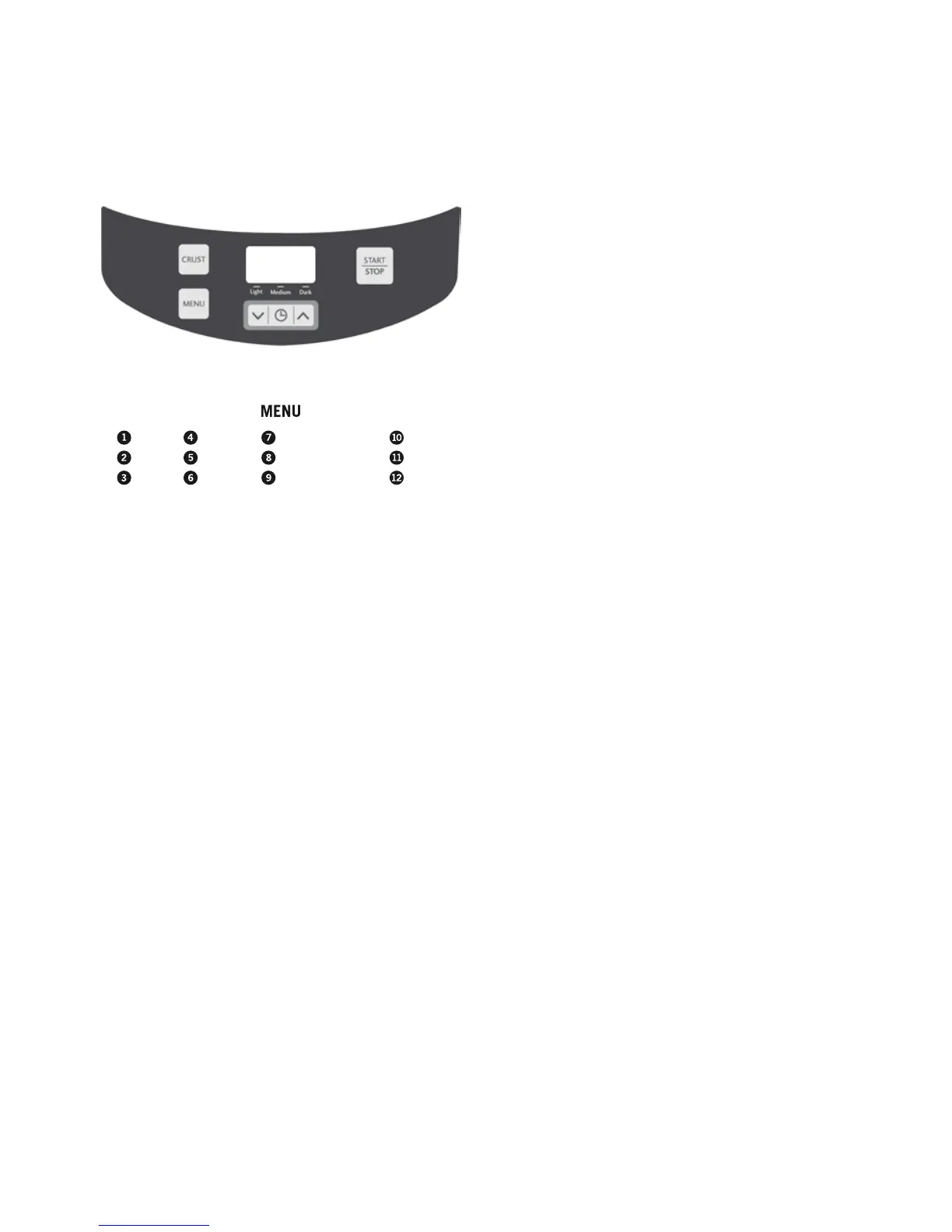
The Control Panel
Display window
Indicates the program setting selected from
(1) to (12) and the Crust Colour. The display
will show the number of hours and minutes
until the cycle is complete - “0.00”.
Menu button
Press this button to select the setting of your
choice from (1) to (12). A beep will sound
each time you press the button.
Timer buttons
Allows you to adjust the time. It also allows
you to delay the beginning of your desired
program setting. See page 13 for instructions
on how to use the Delay Bake function.
Crust colour button
On certain settings press to select the desired
crust colour – Light, Medium or Dark.
Start/Stop button
Press to commence selected setting or begin
timer countdown for delay timer.
To stop the operation or cancel a timer
setting, press and hold for 2-3 seconds until
you hear a beep.
Basic
French
Wheat
Sweet
Turbo
Buttermilk
Gluten Free/Yeast Free
Cake
Dough
Pasta Dough
Jam
Bake
5




 To Next Page