EasyManua.ls Logo

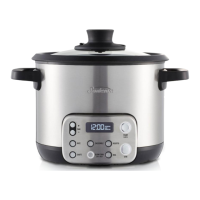
Sunbeam MU3000 - User Manual

Sunbeam MU3000
32 pages
Print Icon
To Next Page IconTo Next Page
Loading...
SOUS CHEF™ STIR
MULTICOOKER
User Guide
MU3000

Questions and Answers

  • C
    Christina RamirezAug 2, 2025
    How to fix a blank screen on my Sunbeam Kitchen Appliances?
    • B
      baileymatthewAug 2, 2025
      If the Sunbeam Kitchen Appliance screen is blank, first ensure the appliance is properly plugged into a power supply. If it's plugged in, try pressing any button to activate the appliance, as it may be in sleep mode.
  • D
    Darius HayesAug 6, 2025
    Why is the stir arm not working on my Sunbeam Kitchen Appliances?
    • S
      Susan ClarkAug 6, 2025
      If the stir arm on your Sunbeam Kitchen Appliance isn't working, consider the following: 1. Check if you're using the RICE mode, as the stir arm is disabled in this mode. Use another cooking function. 2. Ensure you've pressed the STIR button to activate the stir arm. 3. Make sure the stir arm is correctly fitted into the pot and twisted until it locks into place. 4. Verify that the pot is properly placed into the unit, sitting evenly.
  • K
    Kimberly GrahamAug 12, 2025
    Why did my Sunbeam MU3000 turn off?
    • S
      Sheila GreenAug 12, 2025
      Your Sunbeam Kitchen Appliance may have turned off because either the Auto Keep Warm period has ended, after which 'READY' will appear on the screen, or the maximum cooking time for the selected mode has been reached, also resulting in 'READY' being displayed.
  • M
    Mary MorganAug 17, 2025
    What to do if my Sunbeam MU3000 shows 'Dry Error'?
    • A
      Amanda SanchezAug 17, 2025
      If your Sunbeam Kitchen Appliance screen displays 'Dry Error', it could be due to not enough liquid in the pot. Adding liquid may solve the problem. Also, make sure the base of the pot is sitting flat against the heating element.
  • R
    Rebecca ThomasAug 21, 2025
    Why isn't my food cooking in Sauté on my Sunbeam MU3000 Kitchen Appliances?
    • M
      Megan DavisAug 21, 2025
      If your food isn't cooking while using the Sauté function on your Sunbeam Kitchen Appliance, ensure that you wait until the screen changes from 'PREHEAT' to 'COOKING' before adding ingredients.
  • K
    Kathy DavisAug 27, 2025
    Why does the stir arm operate when not selected on my Sunbeam MU3000?
    • D
      Dalton WoodAug 27, 2025
      If the stir arm on your Sunbeam Kitchen Appliance rotates even when not selected, it's normal. The stir arm automatically rotates for up to 10 seconds after you press the START button to ensure the pot is securely placed in the multi cooker.

Summary

Safety Precautions

Product Features Overview

Control Panel Operation

Menu Selection Buttons

Selects one of six cooking functions: Rice, Sauté, Risotto, Boil, Casserole, Slow Cook.

Indicator Screen Display

Shows cooking time, status (Preheating, Cooking, Keep Warm), and stir arm status.

Timer Adjustment Buttons

Adjusts the cooking time up or down.

Stir Arm Control Button

Activates or deactivates the automatic stirring arm function.

Start;Cancel Button

Initiates cooking or cancels the current program and resets settings.

Slow Cook Menu Instructions

Casserole Menu Instructions

Sauté Menu Instructions

Boil Menu Instructions

Rice Menu Instructions

Risotto Menu Instructions

Care and Cleaning Guide

Troubleshooting Guide

Warranty and Guarantee Information

Warranty Coverage Details

Outlines the 12-month warranty and consumer law rights for replacement or repair.

How to Make a Warranty Claim

Instructions for product registration and submitting a warranty claim with proof of purchase.

Customer Support and Contact Information

Sunbeam MU3000 Specifications

General IconGeneral
BrandSunbeam
ModelMU3000
CategoryKitchen Appliances
LanguageEnglish

Related product manuals