6
Using the chopper attachment
1. Place the chopper bowl on the non-slip
mat, ensuring the surface is clean and
level.
2. Fit the stainless steel chopping blade into
the chopper bowl.
Note: Care shall be taken when handling
sharp cutting blades.
3. Place food into the chopper bowl.
4. Attach the lid onto the chopper bowl and
rotate the lid in a clockwise direction until
it locks into position.
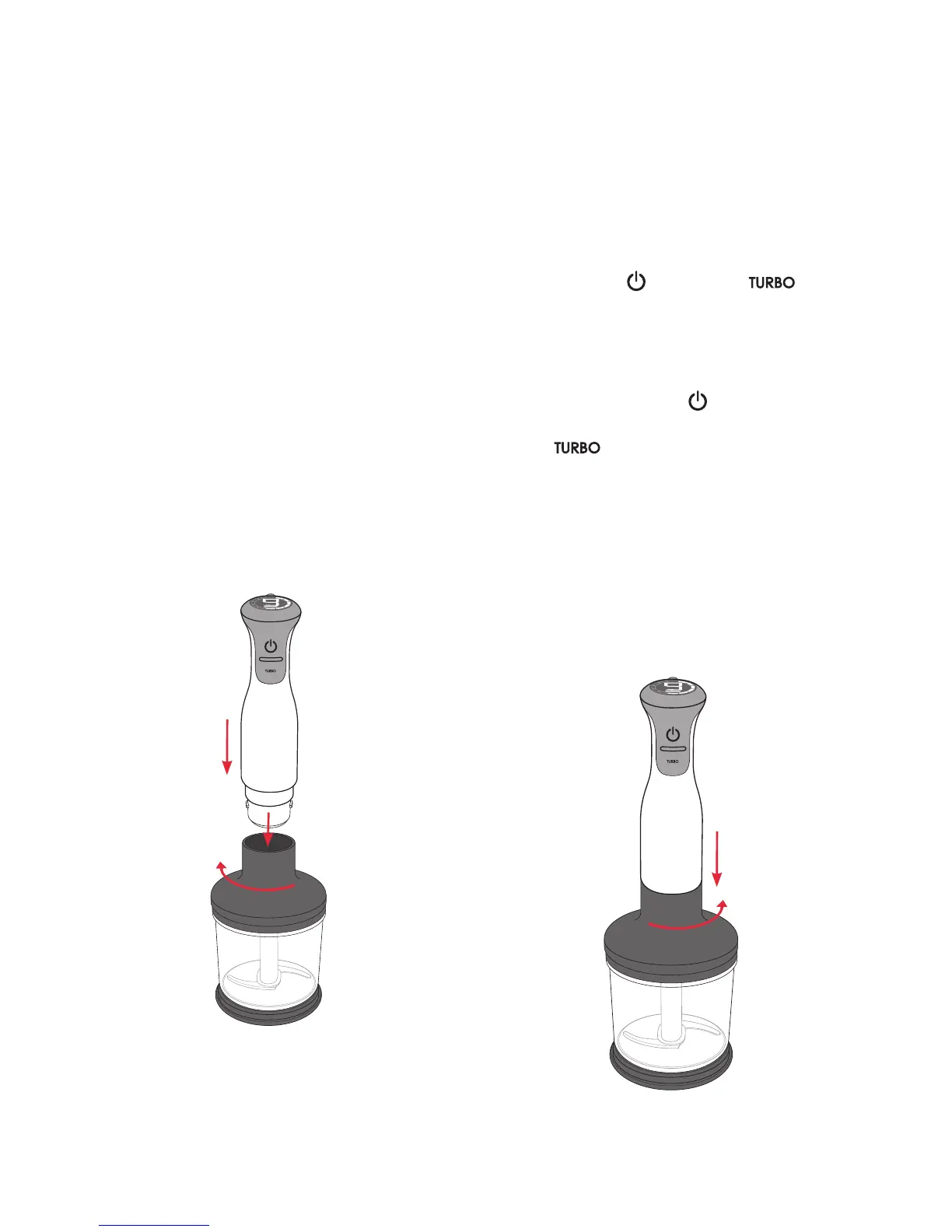
5. Insert the motor housing into the hole on
the top of the chopper attachment and turn
in a clockwise direction until you hear a
click. See Figure 3.
6. Plug the power cord into a 230-240 volt
power outlet and turn the power on.
7. Hold the bowl with one hand while
operating the stick mixer. Select from
speed 1 through to 9 and depress the
power button (
) or setting ( ) at
the top of the motor housing
Note: All stick mixers are designed to
operate only whilst the power buttons remain
depressed.
Note: The power button (
) should be
released when selecting the turbo speed
button (
).
8. To stop the StickMaster
®
, take your finger
off the power button or turbo speed button.
9. To detach the chopper attachment, twist
the motor housing in an anti-clockwise
direction until the two pieces separate.
See Figure 4.
Note: Care shall be taken when handling
sharp cutting blades, emptying the bowl and
during cleaning.
Using your StickMaster
®
continued
SOFT START
Figure 3
SOFT START
Figure 4




 To Next Page