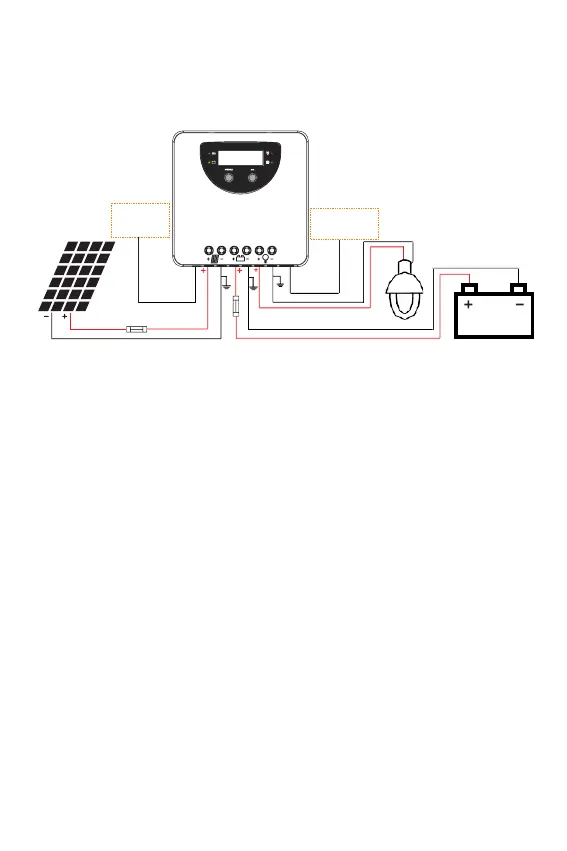
We strongly recommend connecting a fuse directly to the battery terminal to protect from any short
circuit in the battery circuit. PV-modules generate current whenever light shines on them. The generated
current is directly proportional to the light intensity. Even low levels of light will deliver the PV-Modules
no load, full voltage. It is advised to protect PV-modules from any incident light during installation;
Never touch uninsulated cables (ends), only use electric insulated tools, and make sure that the wire
cross section is adequate for the PV module operating currents. Connections must always be conducted
in the sequence as described below.
1st step: Connect accessories
Connect the remote temperature sensor cable
Connect the remote temperature sensor cable to the interface and place the other end close to the
battery.
2nd step: Connect loads
Connect the load cable with the correct polarity of the right-hand side pair of terminals on the solar
charge controller (with the lamp symbol). To avoid the presence of any tension on the cable/wires, please
connect these first to the load before connecting them to the charge controller.
3rd step: Connect the battery
Connect the battery cables observing the correct polarity to the center pair of terminals (make sure you
identify the battery marking/symbol on the controller casing). Pay attention to polarity. (Do not invert
the plus+ and minus- poles)
1) IF your system has a nominal 12 Vdc, make sure the battery voltage is between the 5 and 15.5 Vdc
voltage range;
2) for 24 Vdc nominal voltage, the battery voltage should be within the 20 to 31 Vdc range.
3) for 36 Vdc nominal voltage, the battery voltage should be within the 31 to 42 Vdc range.
4) for 48 Vdc nominal voltage, the battery voltage should be within the 42 to 62 Vdc range.
5) Voltages are identifiable when the controller is set to a lithium battery.
If the polarity is correct, the LCD on the controller will begin to display those.
4th step: Connect the solar module
When connecting the PV-Module make sure to cover it from incident sun light. Double check the PV-
Module will not exceed the maximum permissible input current of the Charge Controller (please refer to
the section Technical Data). Connect the solar module to the correct polarity of the left pair of terminals
on the solar charge controller (with the solar module symbol).
5th step: Final work
Tighten all cables connected to the controller and remove all the remains around the controller (leaving a
void of minimum 15 cm/6 inches). Re tighten all connections 2 weeks after installation. Failure to do so
could lead to potential fire.


 To Next Page