6.4 Settings
When the icon appears in the display interface, it means that the parameters can be set. Press the
MENU key for 1s, then icon flashes, press OK to change the parameter; when the setting is finished,
you can wait 30 seconds to exit the setting mode automatically, or you can press the MENU to exit the
setting mode.
6.4.1 Low voltage protection
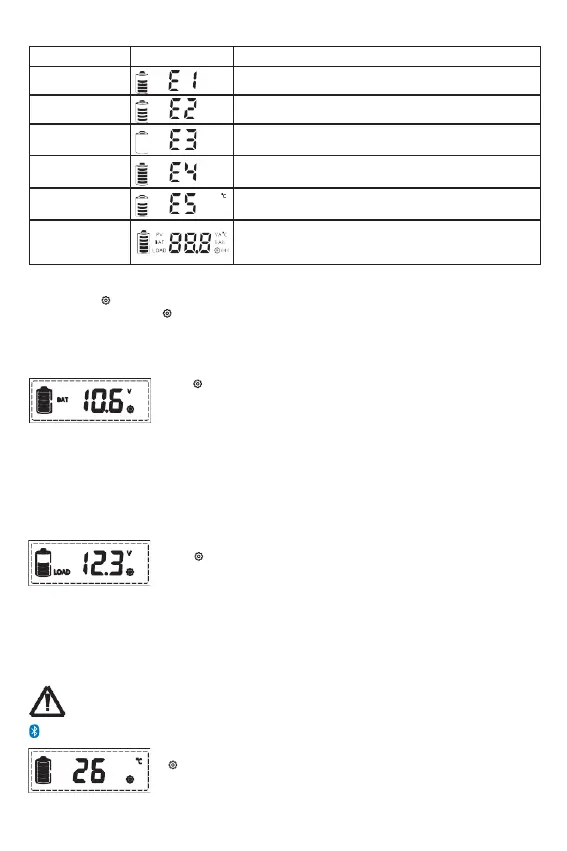
When the LCD shows as displayed at left, press the MENU key for 1s, the
icon flashes, now you can set the controller's low voltage protection.
1. Lithium Battery
Low voltage protection setting range:
12/24V: 9.0-30.0V (default: 10.6V)
12/24/36/48V: 9.0-60.0V (default: 21.0V).
2. Liquid, Gel and AGM Battery
Low voltage protection setting range:
10.8~11.8V/21.6~23.6/32.4~35.4/43.2~47.2V (default:
11.2/22.4/33.6/44.8V).
6.4.2 Low voltage reconnect
When the LCD shows as displayed at left, press the MENU key for 1s, the
icon flashes, you can set the controller's low voltage reconnect.
1. Lithium Battery
Low voltage reconnect setting range is:
12/24V: 9.6-31.0V (default: 12.0V)
12/24/36/48V: 9.6-62.0V (default: 22.4V).
2. Liquid, Gel and AGM Battery
Low voltage reconnect setting range:
11.4~12.8/22.8~25.6/34.2~38.4/45.6~51.2V (default: 12/24/36/48V).
The low voltage recovery voltage (LVR) should be higher than the low voltage protection
voltage (LVD) at least 0.6/1.2/1.8/2.4V. If it is desired to improve LVD, then LVR must improve
first.
6.4.3 Clear Bluetooth Device Password
When the LCD shows as displayed at left, press the MENU key for 1s, the icon
flashes, you can press OK to clear the Bluetooth device password set by
the mobile app.


 To Next Page