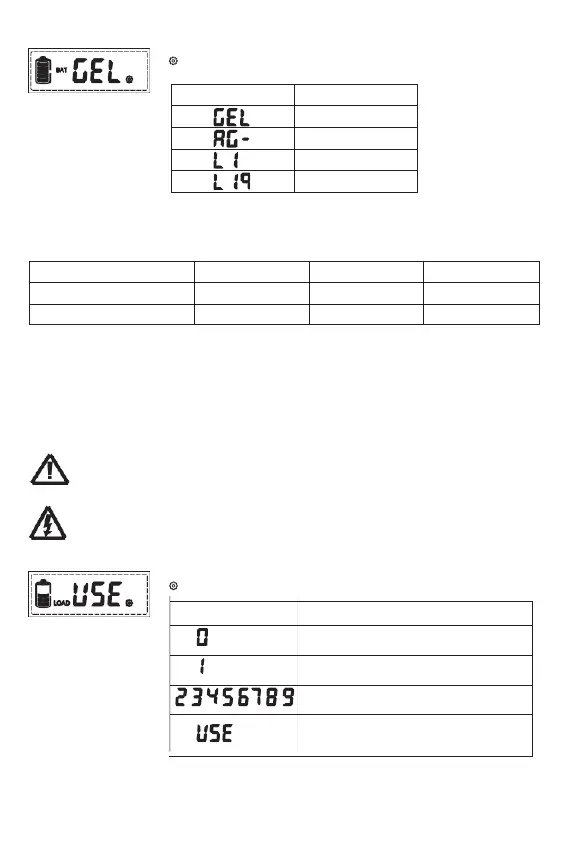
6.4.4 Battery type
When the LCD shows as displayed at left, press the MENU key for 1s, the icon
flashes , now you can set the battery type.
1. Charging Voltage Parameters(Liquid, GEL, AGM)
When choosing Liquid, GEL or AGM for battery type, the parameters of boost, equalization and float
charge voltage can be set by IoT, RS485 or bluetooth APP. The range of parameters is as follows.
The following voltage parameters are 25℃/12V system parameters, in a 24/36/48V system displayed
values are multiplied by a factor of 2/3/4.
2. Charging Voltage Parameters (Lithium)
The controllers are suitable for all kinds of lithium batteries. When choosing lithium battery type, the
overcharge protection and overcharge recovery voltage of lithium battery can be set using the
Bluetooth APP.
Charge target voltage range: 12/24V: 10.0-32.0V (default:14.4V)
12/24/36/48V: 10.0-64.0V (default:29.4V)
Charge recovery voltage setting range:
12/24V: 9.2-31.8V (default:14.0V)
12/24/36/48V: 9.2-63.8V (default:28.7V)
Note:
(Overcharge Recovery Voltage+1.5V) ≥ Lithium Overcharge Protection Voltage≥
(Overcharge Recovery Voltage+0.2V)
Parameter setting out of range is not supported.
Warning: The required accuracy of BMS shall be at least 0.2V. If tolerance is larger than 0.2V,
manufacturer will not assume any liability for any consequent system malfunction.
6.4.5 Load mode
When the LCD shows as displayed at left, press the MENU key for 1s, the icon
flashes, now you can set the load mode.
Always on Mode:
The load output is always switched on.
Dusk to Dawn Mode: The load output is
switched on between sunset and sunrise.
Evening Mode: The load output will be
switched on for 2~9hours after sunset.
Manual Mode: The load output can be
switched on and off manually by short
pressing MENU.
1. Always on Mode
When the controller is set to always On mode, no matter the charging or discharging state, the load is
always powered on (except in when in protection state).


 To Next Page