16 17
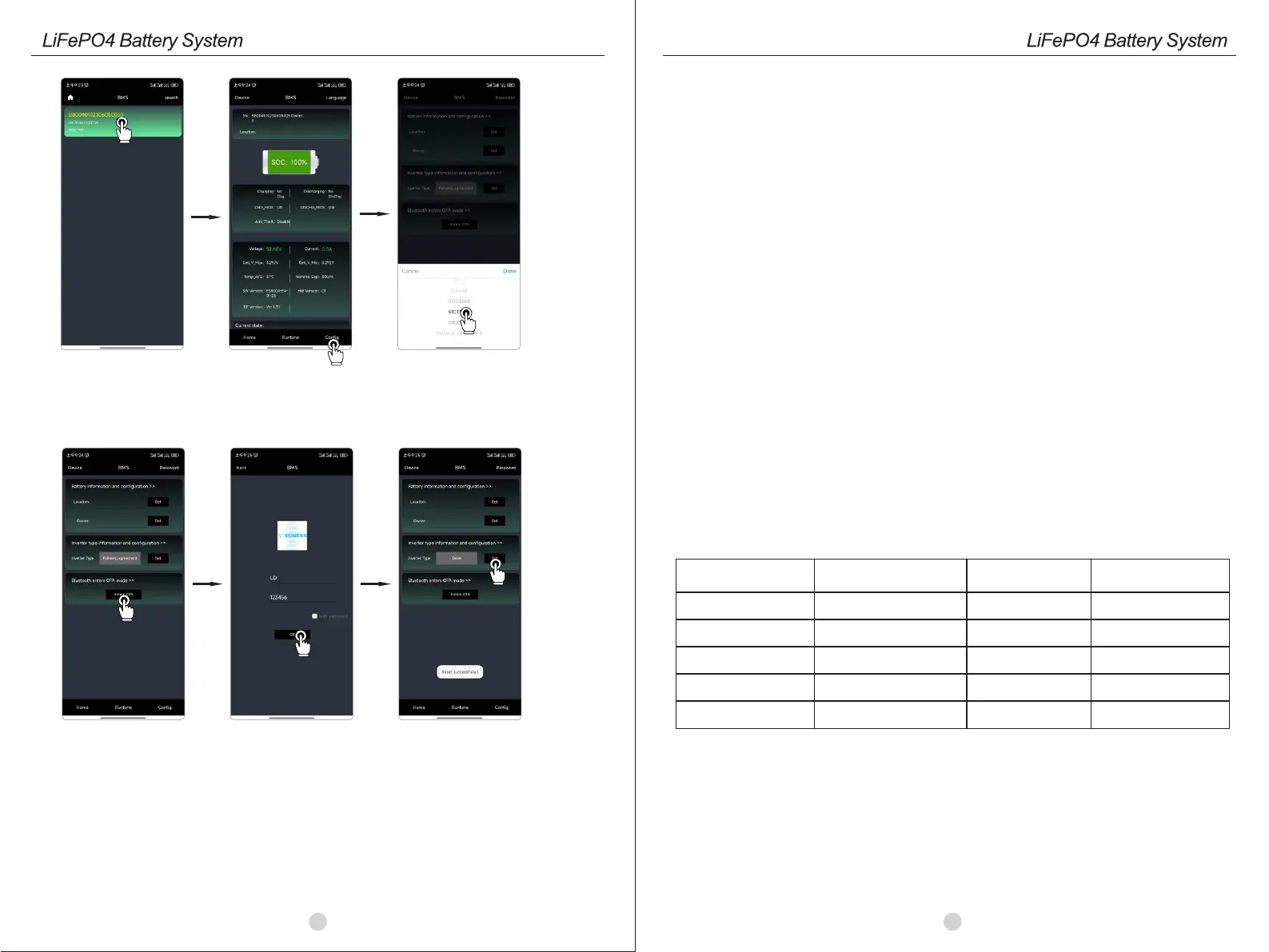
Step 2: Open the SUNESS app, search the device serial number and tap to choose it.
Step3: Tap the Configure and select the inverter type
Step 4: Tap "Enter OTA", type the user name, user password, hit OK, and wait until "Reset successfully !" appear.
Note: User Name: LD; User Password: 123456
user ID:
Password:
Storage environment
temperature
Relative humidity of
the storage environment
Storage time
SOC
Below -10℃
-10~25℃
25~35℃
35~55℃
Above 55℃
/
5%~70%
5%~70%
5%~70%
/
Not allowed
≤ 12 months
≤ 6 months
≤ 3 months
Not allowed
/
25%≤SOC≤60%
25%≤SOC≤60%
25%≤SOC≤60%
/
9.WARRANTY
10.TROUBLESHOOTING AND MAINTENANCE
10.1 Maintenance
The warranty does not cover defects caused by normal wear and tear, improper maintenance, transportation,
storage, incorrect repair, modifications to the battery pack by third parties other than SUNESS, failure to comply
with provided product specifications, or improper use or installation, including but not limited to the following:
• Damage during transportation or storage.
• Incorrect battery installation or maintenance.
• Use of the battery pack in inappropriate environments.
• Improper charging, discharging, insufficient charging, or deviation from the production circuitry specified in this
manual.
• Incorrect or misuse of the product.
• Inadequate ventilation.
• Neglect of applicable safety warnings and instructions.
• Unauthorized personnel attempting to modify or repair.
• Acts of nature or force majeure (such as lightning, heavy rain, floods, fires, earthquakes, etc.).
• Apart from the warranties specified in this agreement, there are no other express or implied warranties.
SUNESS is not liable for any subsequent or indirect damages caused by product specifications, batteries,
or battery packs.
1.Regularly check whether the service environment of the battery meets the requirements, and the installation
position should be far away from the heat source.
2.Regularly check whether the battery and its supporting terminals, connecting cables and indicator lights are
normal.
3. The battery should be stored in an environment with a temperature range of -10°C to +55°C and should be
periodically charged according to the table below. Charging temperature should not exceed 0.5°C (C-rate
measures the discharge rate relative to the battery's maximum capacity). After long-term storage, the State of
Charge (SOC) should decrease to 30%.
- To determine the issue based on the following points:
• Check if the red light on the LED display is illuminated.
• Verify if the battery can output voltage.
- Preliminarytroubleshootingsteps:
If the battery system is not functioning and the LCD does not light up when the DC switch is turned on and power
is connected, please contact your local dealer.



 To Previous Page
 Loading...