LiFePO4 Battery System LiFePO4 Battery System
Communication
harness side
Battery side
Communication
harness side
Battery side
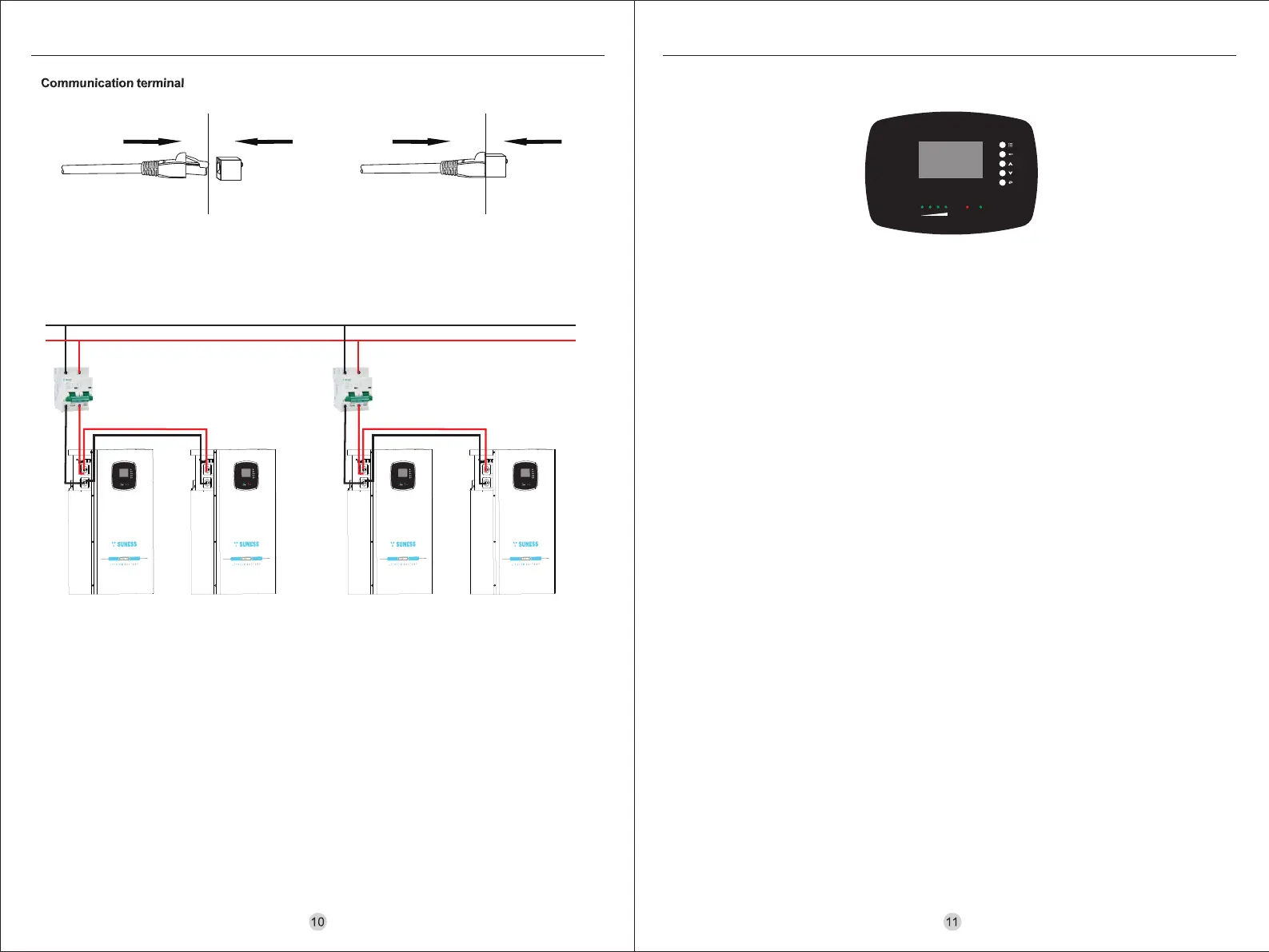
8.5 Connection for parallel mode
The EV-5.12M battery support to be connected in parallel for expansion. lf you need one more battery bank work in
parallel mode, connect the battery as shown in Figure 1.
Step 1: The parallel connection of four battery packs is presented in Figure 1.
Note: After completing the outlined steps, proceed by connecting one of the battery packs' positive and negative
terminals to the inverter. Once the correct connection of battery, inverter and controller being confirmed, you can
start the whole system and enjoy using it without issues.
Main Circuit
RUNALM
SOC
8.6 LCD display indicators
Buttons (from top to bottom)
• Menu: Menu button, press to go into setting.
• Enter: Enter submenu, press to confirm or go into submenu.
• UP: Cursor up/page up, press to choose the previous selection.
• Down: Cursor down/page down, press to choose the next selection.
• Esc: Cancellation, press to cancel or escape the setting.
Version information
- BMS version information
• BMS software versions: xxxxxxxx (BMS reads the last 8 bits of the software version)
• BMS hardware version: xxxxxxxx (i.e. PCB version number)
- LCD version information
• LCD software version: xxxxxxxx
• LCD hardware version: xxxxxxxx
- Language setting
• Chinese
• English
Battery parameter acquisition
- Total voltage: xxxxV
- Current: xxxxA (Charge as '+', discharge as '-')
- Temperature acquisition(Full screen page turn)
• Cell temperature 01~04: xx°C
• PCB temperature 02: xx°C(Communication failure is displayed as temperature 05:00 °C)
• Environment temperature: xx °C(Communication failure is displayed as temperature 06:00 °C)
- Cell voltage (Full screen page turn)
• Voltage 01~16: xxxxmV
- SOC: xxxx%
- Number of cycles: xxxx
Battery working state (Full screen page turn)
- Status: Idle / Charging / Discharging
- Alarm Status (Full screen page turn)
• Overvoltage alarm / Undervoltage alarm / Overtemperature alarm / Undertemperature alarm / Capacity
alarms / Differential pressure alarm / Overcurrent alarm / Anti-connection alarm: Yes / No
- Protection Status (Full screen page turn)
• Overvoltage protection / Undervoltage protection / Over-temperature protection / Undertemperature protection
/ Overcurrent protection / Short-circuit protection: Yes / No
- Failure alarm (Full screen page turn)
• Sample line / Charging tube / Discharge tube / Sampling chip: Ok / Fail
- Number of short circuit protection: xxxx
- Temperature protection times: xxxx
- Overcurrent protection times: xxxx
- Overcharge protection times: xxxx
- Overdischarge protection times: xxxx
BMS hibernation: Press menu to light up the LCD.
The LCD display will go into sleep mode within 1 minute without any operation: press any button to light up the LCD.
LCD light-up method



 To Next Page
 Loading...