28
Helpful Tips on the "Sungale Cloud" App
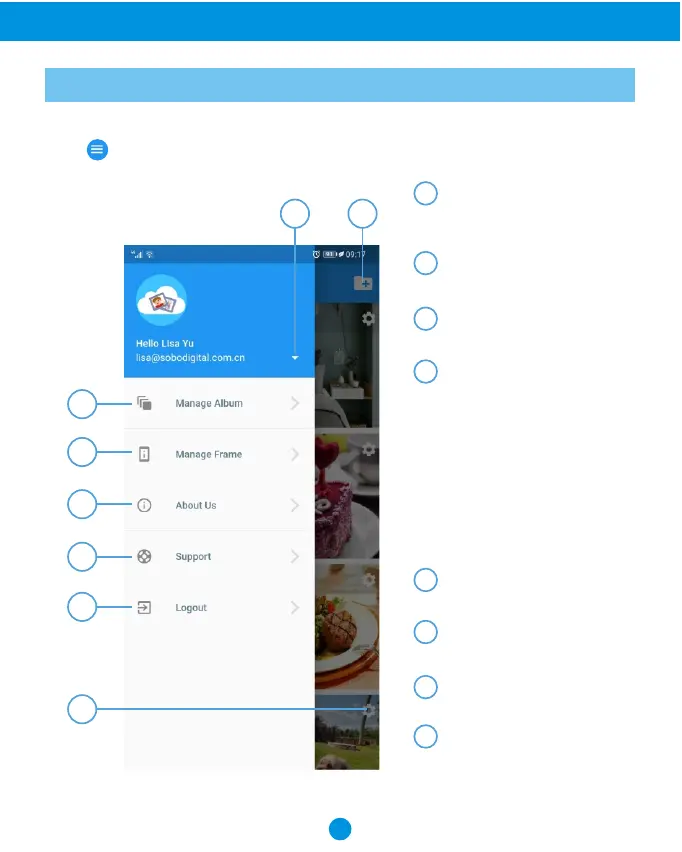
Know the App main menu
Once you have logged in on your "Sungale Cloud" App, it will go to the My Album menu,
Tap icon from the upper left hand corner, it will go to the main menu.
1
2
3
4
5
6
Account Setting:
To change password and
view the usage statistics.
1
2
3
4
5
6
7
8
8
7
Create New Album:
To add your new cloud album.
Manage Album:
To go to the My Album menu.
Manage Frame:
1. My Frame:
You can set up the Frame Alias,
Slide Show settings, Weather
Panel setting, Random play,
Zoom effect.
2. Linked Frame:
To add other Sungale Cloud
Frames from your family
member or friends.
About Us:
About Sungale Cloud
Support:
Sungale cloud support
Logout:
Log out your account
Cloud Album setting:
Push the album to cloud frame
Rename album, Delete album



 To Next Page