14
6.0 Using the Control Panel
6.1 Using the Physical Control Panel
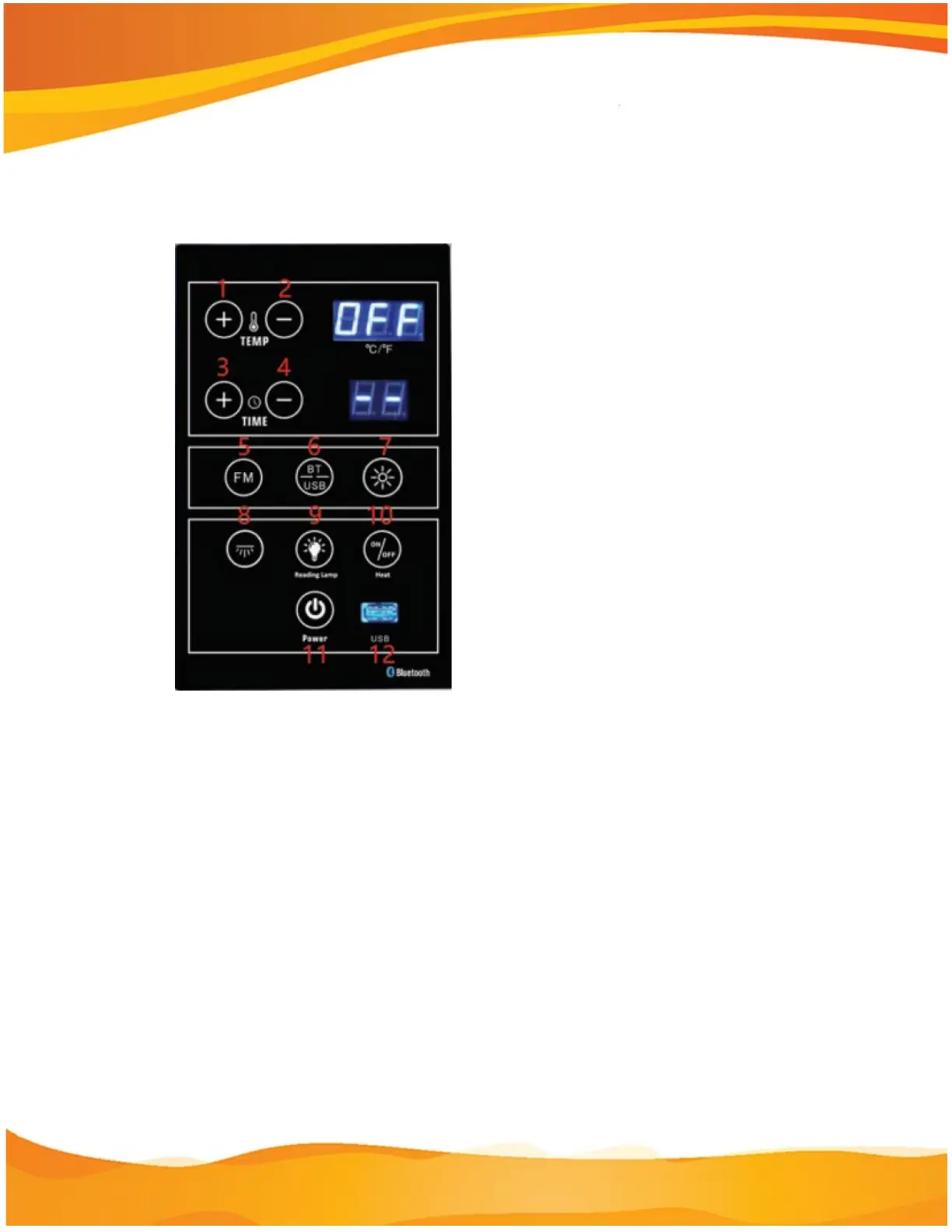
1. Temperature, Previous song, Change channel – Press the 10 key to turn on
the infrared heaters. Press the 1 key to raise the temperature setting. Press the 2
key to lower the temperature setting. Press the 5 or 6 key to enter music mode.
In music mode, press the 1 key to play the previous song. In radio mode, press
the 1 or 2 key to change the channel.
2. Convert Celsius into Fahrenheit – Press and hold the 10 key.
3. Time, Volume – In infrared mode, press the 3 key to increase the time setting.
In music mode, pressing the 3 key increases the volume for music and radio
mode. Pressing the Bluetooth 6 key then the 3 key increases the volume.
In infrared mode, press the 4 key to decrease the time setting. In music mode,
pressing the 4 key decreases the volume for music and radio mode. Pressing the
Bluetooth 6 key then the 4 key decreases the volume.
5. FM Radio – Press the 5 key to enter the radio mode. Press the 1 key or the 2
key to search the station. Five seconds later, the control will automatically jump


 To Next Page