EasyManua.ls Logo

Sunny SF-T7603 - User Manual

Sunny SF-T7603
24 pages
Print Icon
To Next Page IconTo Next Page
Loading...
MOTORIZED TREADMILL
SF-T7603
USER MANUAL
IMPORTANT! Please retain owner’s manual for maintenance and adjustment instructions. Your
satisfaction is very important to us, PLEASE DO NOT RETURN UNTIL YOU HAVE CONTACTED US:
support@sunnyhealthfitness.com or 1- 877 - 90SUNNY (877-907-8669).
Question and Answer IconNeed help?

Do you have a question about the Sunny SF-T7603 and is the answer not in the manual?

Overview

The provided document is a user manual for the Sunny Health & Fitness Motorized Treadmill SF-T7603.

Function Description

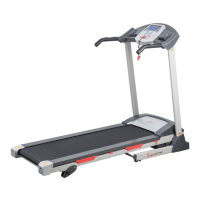
The SF-T7603 is a motorized treadmill designed for indoor and home use, providing a platform for cardiovascular exercise. It allows users to walk or run at various speeds and offers adjustable incline levels to simulate different terrains and increase workout intensity. The treadmill features a console for controlling speed, monitoring workout data, and accessing pre-programmed exercise routines. A safety key mechanism ensures immediate stopping in case of emergency. The unit is foldable for storage and equipped with wheels for easy transport.
Important Technical Specifications

  • Maximum Weight Capacity: 220 pounds (100 KG)
  • Speed Range: 0.5 - 9 MPH
  • Power Source: 10 amps (100-120V)
  • Display Console: Shows time, speed, distance, calories burned, and pulse (BPM).
  • Programs: P1-P9 interval programs.
  • Modes: H1 (Time countdown), H2 (Distance countdown), H3 (Calories countdown).
  • Safety Features: Safety Key for emergency stop, Overload Protector (No. 64) for electrical system reset.
  • Dimensions (approximate, inferred from diagrams):
    • Running Belt (No. 20)
    • Running Board (No. 70)
    • Main Frame (No. 2)
    • Left & Right Upright Tubes (No. 4 & No. 5)
    • Console (No. 22)
    • Air Pressure Cylinder (No. 13) for folding mechanism
    • Adjustable Foot Pad (No. 29) for incline adjustment
    • Moving Wheels (No. 26) for transport

Usage Features

  • Quick Start: Begin a workout with a 3-second countdown, starting at a default speed of 0.5 MPH.
  • Speed Adjustment: Control speed using +/- buttons in 0.1 MPH increments or quick speed buttons (2, 4, 6 MPH).
  • Workout Termination: Press the STOP button once to pause, or again to completely end the workout session and reset data. Removing the Safety Key also stops the treadmill immediately.
  • Pulse Measurement: Hold pulse sensors on the handles for 5 seconds to display heartbeat per minute (BPM).
  • Pre-programmed Workouts (P1-P9): Select interval programs with varying speed settings across 10 sections. Exercise time can be adjusted.
  • Countdown Modes (H1-H3): Set countdowns for time (10:00 MINS), distance (1 MILE), or calories (50 KCAL).
  • Body Mass Index (BMI) Calculation: Input F-1 (Sex), F-2 (Age), F-3 (Height), F-4 (Weight) to calculate and display BMI (F-5) by holding pulse sensors. This is for reference only.
  • Folding Mechanism: The treadmill can be folded vertically using an Air Pressure Cylinder (No. 13) for compact storage. A "click" sound indicates successful locking.
  • Transport Wheels: Equipped with wheels (J) for easy relocation once folded.
  • Incline Adjustment: Manual incline adjustment using 2 Fixing Pins (No. 7) and Adjustable Foot Pads (No. 29) on the Main Frame (No. 2). Three holes allow for different incline levels.
  • Power Saving Mode: Automatically enters power saving mode after 10 minutes of inactivity, turning off the display. Press any button to reactivate.
  • Safety Key: Essential for operation; must be inserted into the console for the treadmill to start. The clip end should be attached to clothing during workouts.

Maintenance Features

  • General Cleaning: Regular dusting of components, cleaning both sides of the Running Belt (No. 20) to prevent dust accumulation, and keeping running shoes clean. The Running Belt surface should be cleaned with a clean, damp cloth.
  • Power Management: Suggested to power off the treadmill for 10 minutes every 2 hours of use and fully power off when not in use to prolong its life.
  • Running Belt Centering: Adjusting bolts on the left and right sides of the rear roller (No. 10) to center the Running Belt (No. 20) if it drifts.
  • Running Belt Tensioning: Tighten the Running Belt (No. 20) by turning Left & Right-side adjustment bolts one full turn clockwise. Both sides should be adjusted equally to ensure correct belt alignment. The ideal tightness allows the belt to be pulled out 50-75mm from the Running Board (No. 70).
  • Lubrication: The Running Board (No. 70) and Running Belt (No. 20) require lubrication. Lubricant should be applied by raising the belt and wiping it over the running board.
    • Lubrication Schedule:
      • Light user (less than 3 hours/week): every six months
      • Medium user (3-5 hours/week): every three months
      • Heavy user (more than 5 hours/week): every two months
    • Lubrication Reminder: An "OIL" icon and beeping sound will appear on the LCD display every 188 miles to remind the user to lubricate. Press and hold the STOP button for 3 seconds to clear the reminder after lubrication.
  • Regular Inspection: Ensure all nuts and bolts are securely tightened. Regularly examine for damage and/or wear and tear. Discontinue use if defective components are found or unusual noises occur.
  • Troubleshooting Guide: Provides solutions for common issues such as the treadmill not starting, inaccurate speed, off-center belt, computer not working, message failures (E01), burst clash protection (E02), and overload protection (E05). Contact customer service for unresolved issues.

Sunny SF-T7603 Specifications

General IconGeneral
BrandSunny
ModelSF-T7603
CategoryTreadmill
LanguageEnglish

Related product manuals