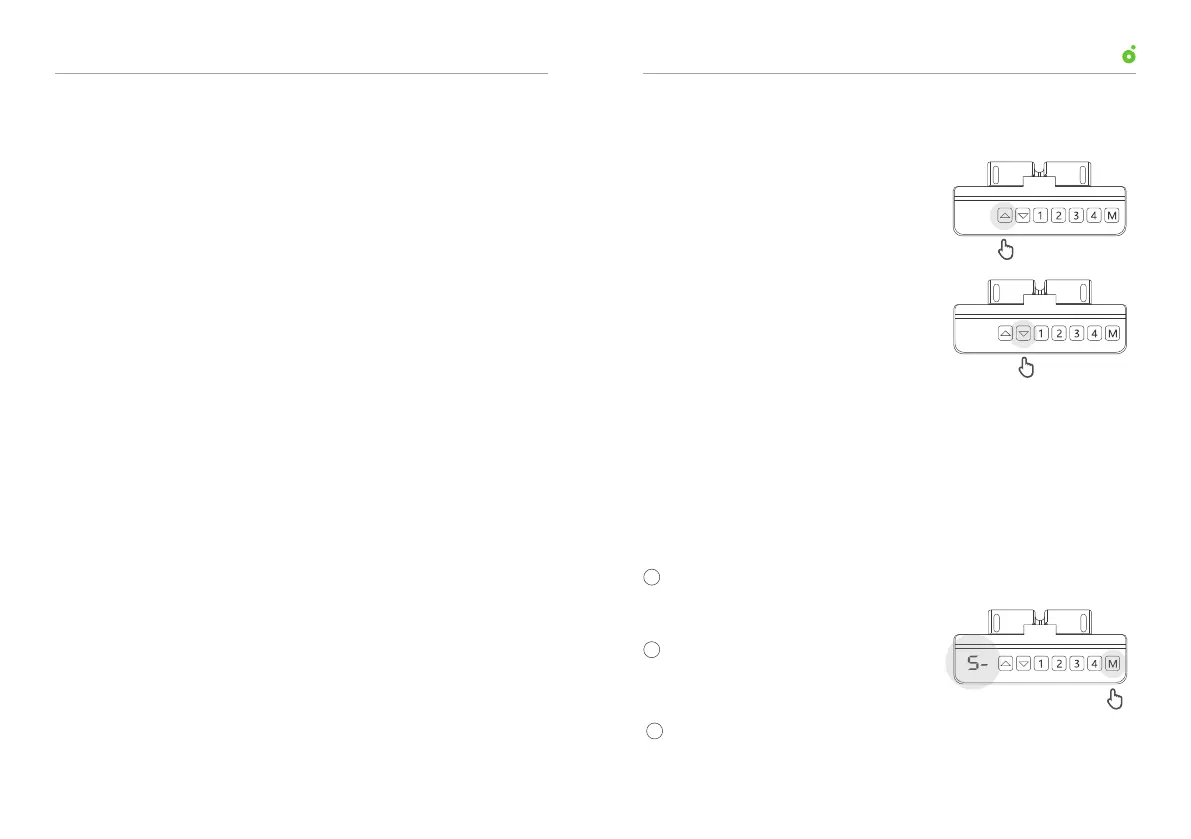
Press and hold the down arrow to
lower the desk.
Press and hold the up arrow to
raise the desk.
Table of Contents
01. Adjust Desk Height
02
01
03
Save a Height Position
Adjust Desk Height
Overwrite a Save Height Position
04 Set Upper Stop
05 Set Lower Stop
06 Clear Lower and Upper Stops
07 Lock Control Buttons
08 Unlock Control Buttons
09
Hard Reset the Programmable Control
10
12
13
Enter into Reset Mode
Switch Between Inches and Centimeters
11
Switch Modes in Which Desk Travels
to a Saved Height
Adjust Sensitivity to an Obstruction
14
Troubleshooting
Adjust the desk to a desired height (refer to “01. Adjust desk
height”).
Press “M” button and release
it when the display reads “S-”.
Suggestion:For your convenience,it is recommended to assign
“1” button to the height at which you feel most comfortable when
sitting . “2” button to the height at which you feel most comfortable
when standing.“3”“4” buttons could be assigned to any height you
desire.
02. Save a Height Position
2
1
s-
Press one of the four height storage buttons to assign and save
the current height position to it.
3
User ManualUP1 Height-Adjustable Desk
0403



 To Next Page