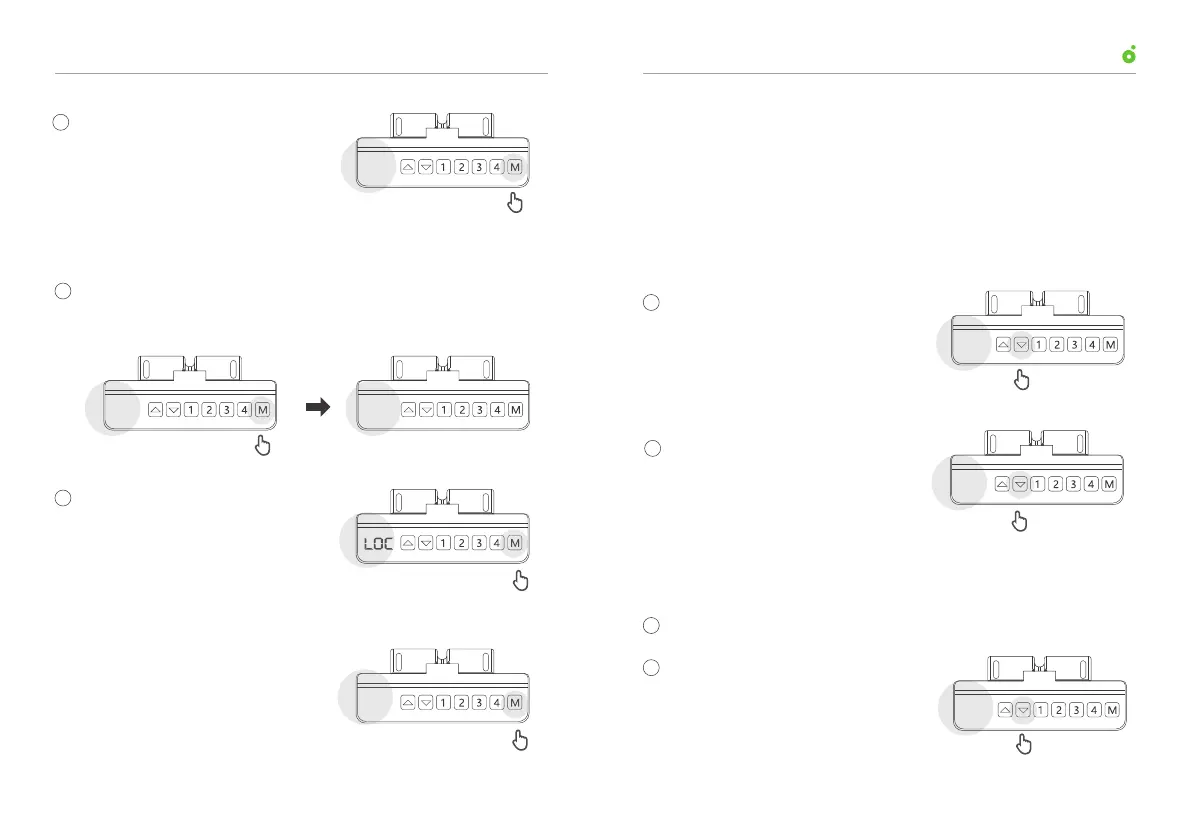
Press and hold “M” button for 8 s
when the control buttons are locked,
until the screen reads current desk
height, which indicates control
buttons are unlocked successfully.
If the desk doesn’t respond to any button operation even when the
control buttons are unlocked, the desk perhaps needs to be hard
reset.
Follow the steps below to perform hard resetting:
Press and hold down arrow
for 5 s until the display reads
“RST”.
Note: Hard resetting will not wipe the stored height position.
07. Lock Control Buttons
08. Unlock Control Buttons
09. Hard Reset the Programmable Control
Hold down “M” button for 2 s until
the display reads “555”, which
indicates the upper and lower
stops are cleared successfully.
Press and hold “M” button for 5 s until “S-” shown on the display
turns into display of current desk height.
Hold down “M” button for
another 3 s until the screen reads
“LOC”, which indicates control
buttons are locked successfully.
Press and hold for 2 s
555
Press and hold for 3 s
Press and hold for 8 s
Current height
95
Press and hold for 5 s
RST
Press and hold for 5 s
5- 95
Current height
1
1
2
2
Lower the desk to the lower stop.
Press and hold the down arrow for
5 s until the screen reads “RST”,
which indicates that the reset
mode is turned on successfully.
Hold down the down arrow
until the display reads the
current desk height.
10. Enter into Reset Mode
Press and hold for 5 s
RST
Current height
78
2
2
1
User ManualUP1 Height-Adjustable Desk
0807



 To Next Page