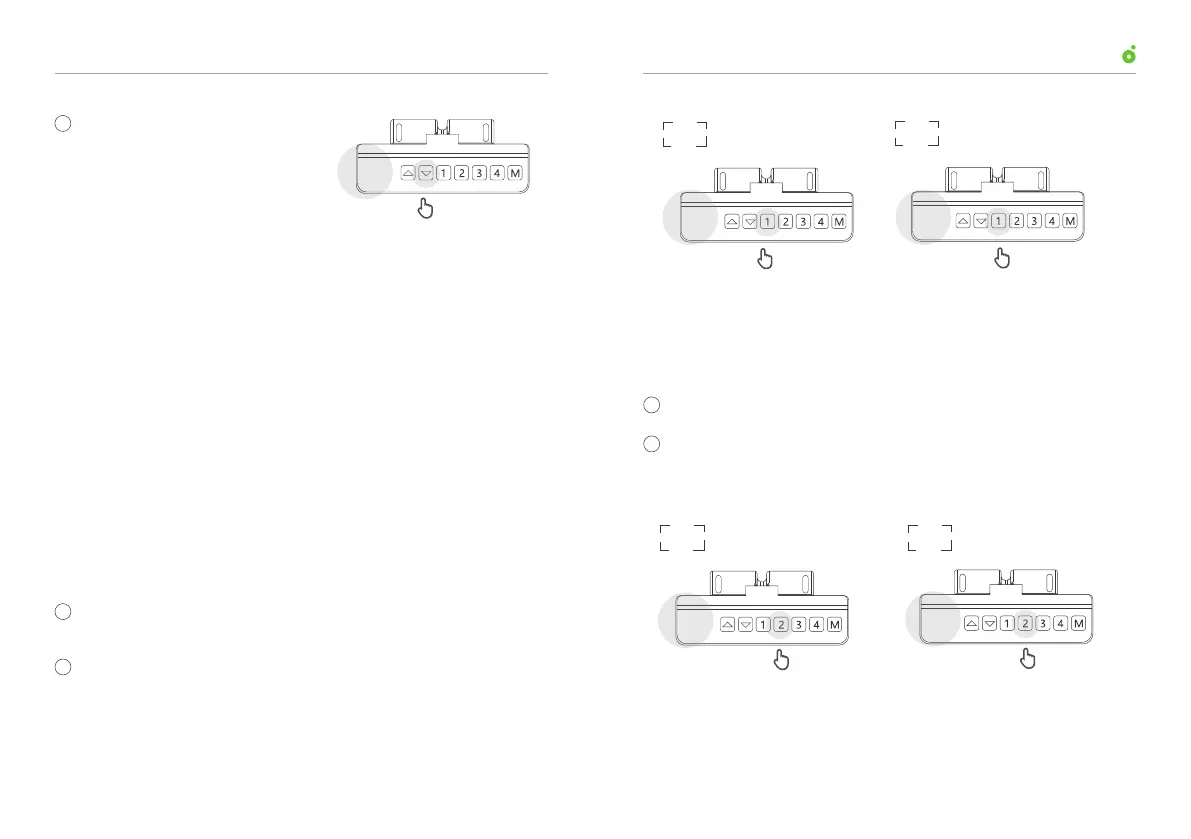
To exit the reset mode, press
and hold the down arrow
until the display reads the
current desk height.
There are two modes in which the desk can travel to a saved
height: the intermittent movement mode and the continuous
movement mode.
In the intermittent movement mode, to adjust the desk to a saved
height, you need to press and hold a height storage button until
the desk stops adjusting itself. In the continuous movement mode,
just press a height storage button and the desk will adjust to the
saved height automatically.
Mode switch:
By default, the desk is the continuous movement
mode ; However, you can switch between the two modes
following the steps below:
Enter into the reset mode (refer to “10. Enter into the reset
mode”).
Hold down the “1” button for 5 s to switch between intermit-
tent and continuous movement modes:
The readout of “10.1” denotes continuous movement mode,
and “10.2” denotes intermittent movement mode.
By default, the display reads in centimeters.
Hold and press the “2” button for 5 s to switch between inches
and centimeters: the readout of “10.3” denotes reading in
inches
, and “10.4” denotes reading in centimeters.
11. Switch the Mode in Which the Desk Travels to
a Saved Height
12. Switch Between Inches and Centimeters
Current height
Press and hold
78
2
2
3
1
Enter into the reset mode (refer to “10. Enter into the reset mode”).
1
Press and hold for 5 s
10.1
Press and hold for 5 s
10.2
10.1
10.2
User ManualUP1 Height-Adjustable Desk
Press and hold for 5 s
10.3
Press and hold for 5 s
10.4
10.3 10.4
1009



 To Next Page