If you want to adjust the saved height that has been assigned to a
specific height storage button, just follow instructions specified in “02.
Save a height position” and the previous saved height will be
overwritten by the current desk height.
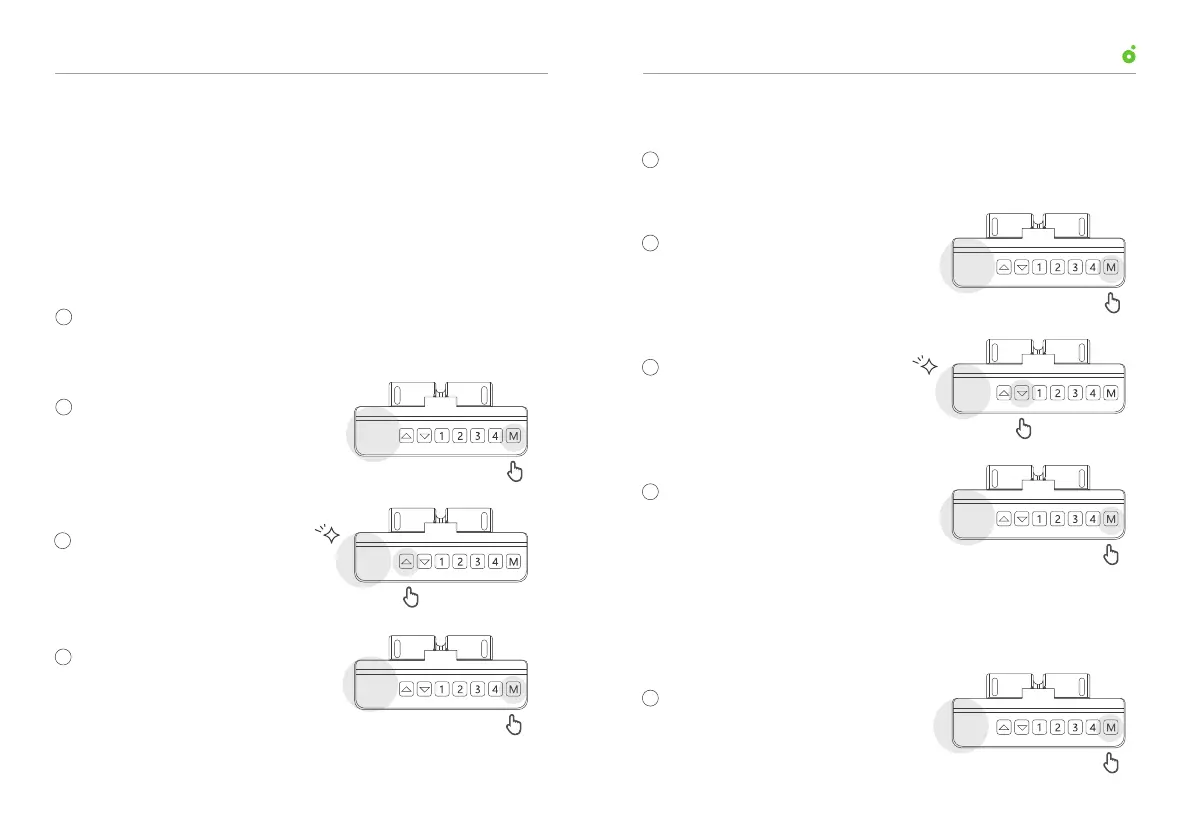
Press and hold the up arrow to raise the desk to a desired height
(refer to “01. Adjust the desk height”).
Press “M” button and release it
when the display reads “S-”.
Hold down the “M” button for 2
s until the display reads “999”,
which indicates the upper stop
is set successfully.
Hold down up arrow until the
display starts to blink.
Lower the desk to a desired height(refer to “01. Adjust desk
height”).
Press “M” button and release it
when the display reads “S-”.
Hold the down arrow until the
display starts to blink.
Hold down “M” button for 2 s
until the display reads “000”,
which indicates lower stop is set
successfully.
03. Overwrite a Save Height Position
04. Set Upper Stop
05. Set Lower Stop
s-
s-
Press and hold for 2 s
000
Press and hold for 2 s
999
1
1
2
3
4
2
3
4
s-
s-
06. Clear Lower and Upper Stops
Press “M” button and release it
when the display reads “S-”.
s-
1
User ManualUP1 Height-Adjustable Desk
06
05



 To Next Page