The SunPower Solar Monitor is a device designed to display the status of a SunPower Solar Inverter system. It serves as an owner's guide to the features and functions of the monitor, including installation procedures, descriptions of indicator lights and buttons, and operating instructions.
Function Description:
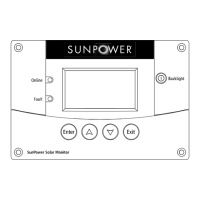
The SunPower Solar Monitor provides real-time information about the performance of a solar power system. It features a screen that displays system information and menus, allowing users to monitor various aspects of their power generation. Key indicators include an "Online" light, which illuminates when there is sufficient energy from the PV array and the inverter is producing power, and a "Fault" light, which indicates a condition requiring attention or periods when the inverter is not producing power. The monitor is equipped with an "Enter" button to display the Setup Menu or select adjustable settings, "Up" and "Down" arrow buttons to navigate screens or change settings, and an "Exit" button to return to the previous screen. A "Backlight" button illuminates the screen for better visibility.
Important Technical Specifications:
- Product Part Numbers: SPR-3300x, SPR-3300x-208, SPR-4000x.
- Network Compatibility: Connects to the inverter with a network cable (CAT 5 cable with RJ-45 connectors wired to T568A standard).
- Network Termination: Requires a male network terminator at one of the monitor's network ports.
- Network Length: The total length of the network, including all connected inverters and monitors, cannot exceed 130 feet (40 meters).
- Mounting Plate Thickness: The mounting plate for flush mounting fastens to walls up to ½ inch (19 mm) thick.
- Clearance for Cables: Requires at least 2 ½ inches (57 mm) of space behind the wall for the unit's depth and network cable bending.
- Environmental Conditions: Must be installed indoors, in a dry location, free from corrosive or explosive fumes. Not ignition protected.
- Electrical Specifications: (Details not provided in the excerpt, but mentioned as a section in the table of contents).
- Mechanical Specifications: (Details not provided in the excerpt, but mentioned as a section in the table of contents).
- Environmental Specifications: (Details not provided in the excerpt, but mentioned as a section in the table of contents).
Usage Features:
- Monitoring: Displays system output, system totals, system harvest, device list, inverter status, and fault messages.
- Navigation: Intuitive button layout for easy menu navigation and setting adjustments.
- Backlight: Screen backlight for visibility in various lighting conditions.
- Setup Menu: Accessible via the "Enter" button for initial configuration and adjustments.
- Fault Indication: The "Fault" light and corresponding "Fault Screen" provide detailed information on issues, including fault messages and descriptions.
- System Information: The screen shows comprehensive system data, allowing users to track their solar energy production.
Maintenance Features:
- No User-Serviceable Parts: The monitor should not be dismantled as it contains no user-serviceable parts.
- Protection: Must be protected from rain, snow, spray, and water; not designed for outdoor installation.
- Installation Guidelines: Detailed instructions for routing network cables to ensure maximum performance and prevent damage. This includes avoiding sharp edges, allowing sufficient space for cables, maintaining slack, keeping wire pairs straight, separating data and power cables, and using appropriate fasteners.
- Troubleshooting: The "Fault Messages and Descriptions" section (page 22) provides guidance for understanding and potentially resolving issues indicated by the fault light.
- Professional Installation: Installation should be performed by qualified installers or electricians due to potential shock hazards.
- Network Integrity: Emphasizes proper network cable routing and termination to prevent unpredictable device behavior or equipment damage. It specifically warns against connecting the network in a ring or loop and clarifies that it is not an Ethernet system, despite similar cabling.
The manual includes important safety instructions, emphasizing the need to read and save the guide. It contains warnings about shock hazards, restrictions on use (not for life support or medical devices), and explosion hazards (not ignition protected, avoid flammable materials). General precautions include reading all instructions, not dismantling the monitor, protecting it from water, and reviewing inverter instructions before making connections. It also provides FCC information for users regarding Class B digital device compliance and measures to correct harmful interference.

 Need help?


 To Next Page
 General