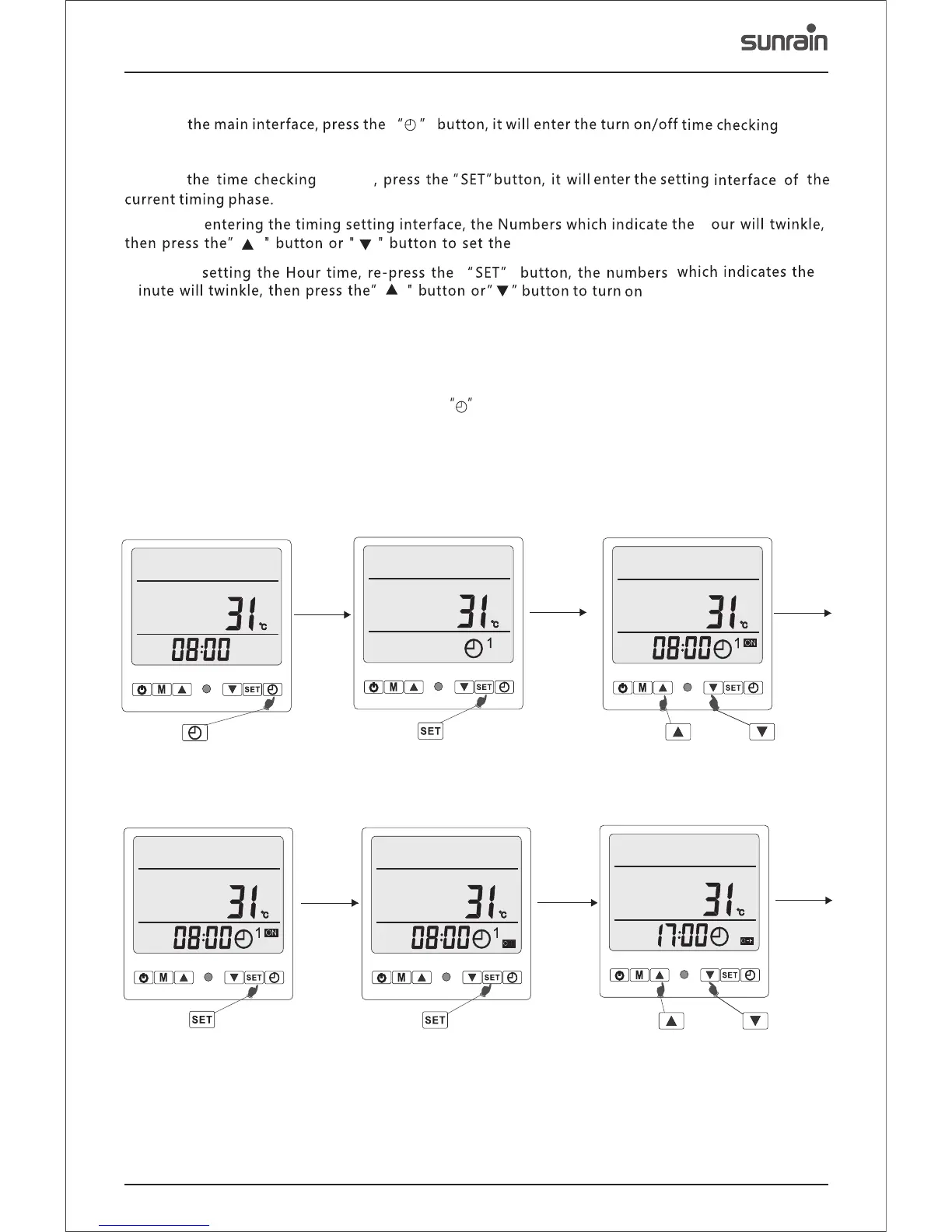
Press the button or
button to set the Hour of the
timing time of turn on.
Press the button, it will
enter the setting interface
of the current timing phase.
Step1
Press the button, it will
enter the turn on/off timing
time checking interface.
Press the button, the
numbers which indicates
the Minute will twinkle.
Step2 Step3
Step4 Step5 Step6
Press the button or
button to set the Hour of the
timing time of turn off.
Press the button, it will
enter the setting interface
of the current timing phase.
7.5 ON/OFF Time Setting
7.5.1
7.5.2
7.5.3
7.5.4
7.5.5
7.5.6
7.5.7
7.5.8
18
On
screen
The time checking screen will display the status of the timing phase1 and 2.
On
screen
After
After
h
m
the minutes of the time.
After setting the minutes, re-press the ‘SET’ button, it will show the screen to turn off the timer.
After setting the turn off timer, re-press the “SET” button to confirm the current timing phase and
return back to checking the turn off and on timer.
In the turn on/off timer screen, press the button to confirm the current set times and return
back to the on/off timer.
turn on time.



 To Next Page