Introduction
Remote Control
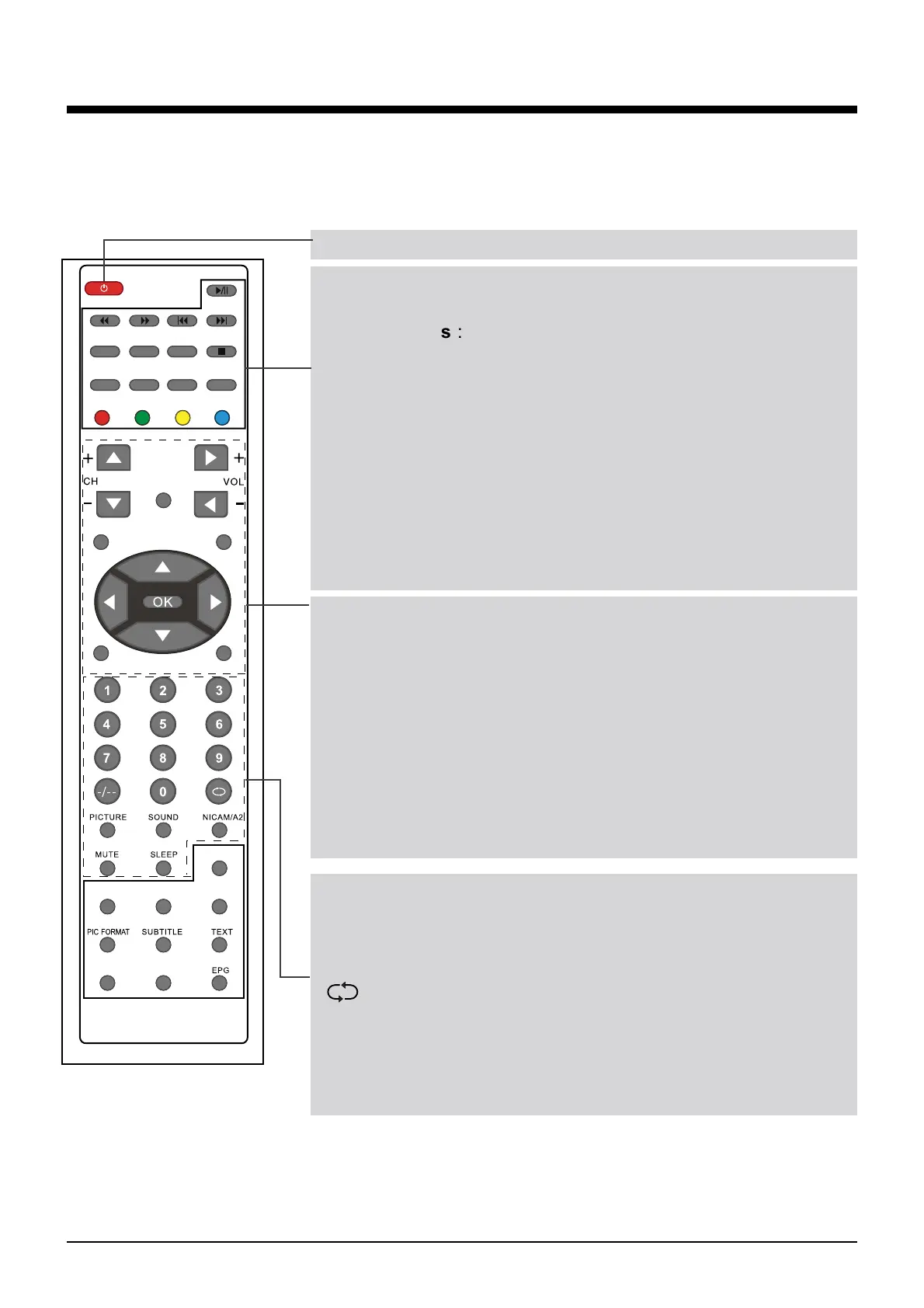
The remote control is using Infra-Red(IR). Point it towards the front of the LCD TV. The remote
control may not work correctly if it is operated out of range or out of angle.
POWER(red button): Turn the TV on/standby.
Buttons for TELETEXT operating
You could use the buttons only in TELETEXT .
TV/TXT: Turn off/on the Teletext display.
CANCEL: Cancel the Teletext displa
y
.
REVEAL: Reveal any hidden text.
HOLD
: Disabled function due to Analogical broadcasting
discontinued.
SIZE
: Disabled function due to Analogical broadcasting
discontinued.
SUBPAGE:
INDEX
:
Colour buttons : Short cuts-follow the coloured links in the
text.
Buttons for Basic operating
MENU: Press to display the OSD menu.
SOURCE: Display the input source menu.
CH+/-: Channel/Program +/-.
VOL+/-: Volume +/-.
REC: Press to start record the program in DTV mode.
DVB: Switch to DVB source.
EXIT: Press to exit the OSD menu.
THUMBSTICK(
=!0!?!0Ĥ0ĥ
OK): Allows you to navigate
the on-screen menus and adjust the system settings to your
preference.
Buttons for Basic function
NUMBER BUTTONS: Choose channel directly. Press number
buttons and press OK button to play the channel.
: Return to the previous channel viewed.
PICTURE: Select the picture mode.
SOUND: Select the sound mode.
NICAM/A2: Selects Nicam or Mono sound.
MUTE: Mutes the Audio.
SLEEP: StandbyTimer
SOURCE
MENU
EXIT
DVB
TV/RADIO
FAV FAV+ FAV-
DISPLAY LANGUAGE
REC
TV/TXT
CANCEL
REVEAL
HOLD SIZE
SUBPAGE INDEX
7
Pressing “-/--”button to display “SELECT 10+”, and press
a number button to play the program.
Disabled function due to Analogical broadcasting
discontinued.
Disabled function due to Analogical broadcasting
discontinued.
IN DTV MODE,THE FOLLOWING KEY BUTTONS ARE NON-
FUNCTION.


 To Next Page