6
Using the App
Pairing
1. First, you need to check your camera’s ID. Press the “menu” button,
then select “network” and press OK. Then choose “Device ID”, press
OK. Here you will find camera’s QR code.
2. Start the app, press “+” button, scan camera’s QR code. Alternatively,
you can enter camera’s ID manually.
3. Name your device, add password (default password is 123456) and
press “Submit”.
Taking photos and videos
In the “video” sub-menu:
• Press “capture” to take a photo with the camera
• Press “record” to start video recording
Captured photos and videos can be downloaded to your mobile phone.
Press the icon in top-right corner, choose the photos and videos you’d like
to download, and then press the “Download” button. In sub-menu “More”
choose “Album” to see all the downloaded pictures and videos.
Operating Instructions
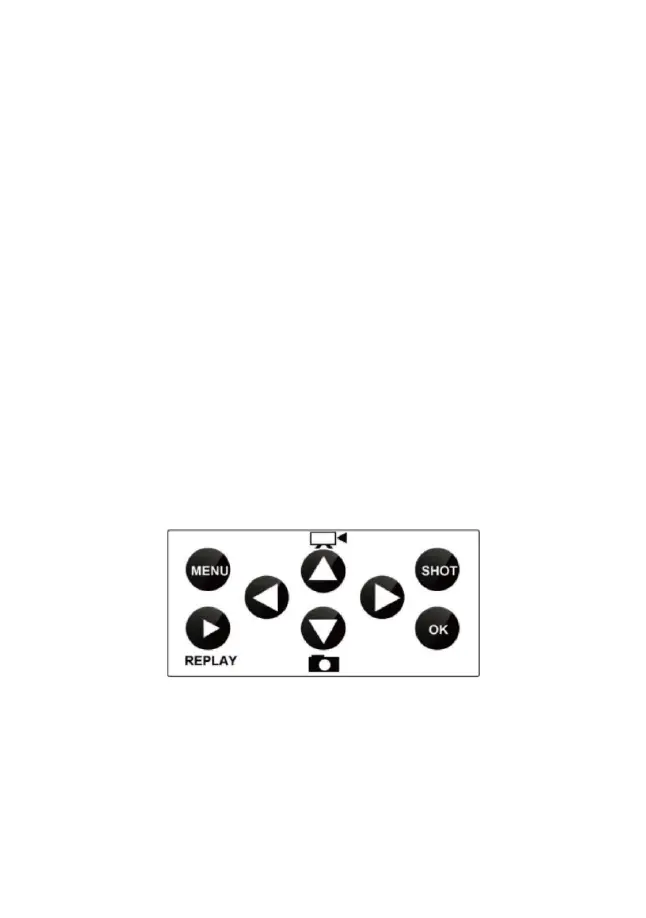
• Menu button – Takes you to the settings of the device.
• Shot button – Start/end the video recording or photo taking.
• Arrow up – Video recording mode.
• Arrow down – Photo taking mode.
• Replay button – replay mode.


 To Next Page