10
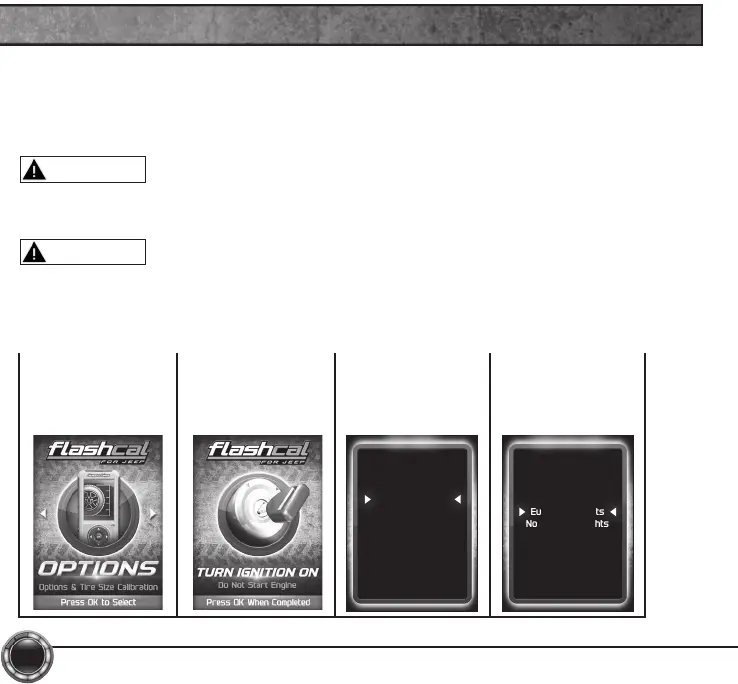
STEP 1 - Enter
the Options Menu
by pressing ok.
STEP 2 - Follow
the on-screen
instructions.
STEP 3 - Select
an option from
the list provided.
OPTIONS
Quick Options
Axle Lock
Engine Idle
Lamp Delay
Run Lights
Acc Delay
Lane Change
Lamp Flash
Horn Chirp
Fog Lights
Exit
CAUTION
WARNING
Do not make adjustments to your vehicle while parked in unsafe locations
including heavy trafc or places without cell phone service.
STEP 4 - Modify
each setting
according to your
specic needs.
These options allow to you quickly adjust the settings for the available
features.
NOTE: Not all features are available on every make, model, and engine.
Do not remove or bump the OBD-II connector while changing Quick option
settings. If you do, the vehicle may not start.
Daytime Run Lamps
High Beams
Low Beams
Turn Signals
Fog Lights
European Lights
No Running Lights


 To Next Page