EasyManua.ls Logo

Superchips Flashcal - READ DTC

Superchips Flashcal
24 pages
Print Icon
To Next Page IconTo Next Page
To Previous Page IconTo Previous Page
Loading...
12
READ DTC
This feature allows you to troubleshoot issues that your vehicle may be experiencing. Most
vehicles will illuminate the in-dash check engine light. A Diagnostic Trouble Code (DTC) arises
when a vehicle’s computer detects a sensor failure or a parameter outside of specic range.
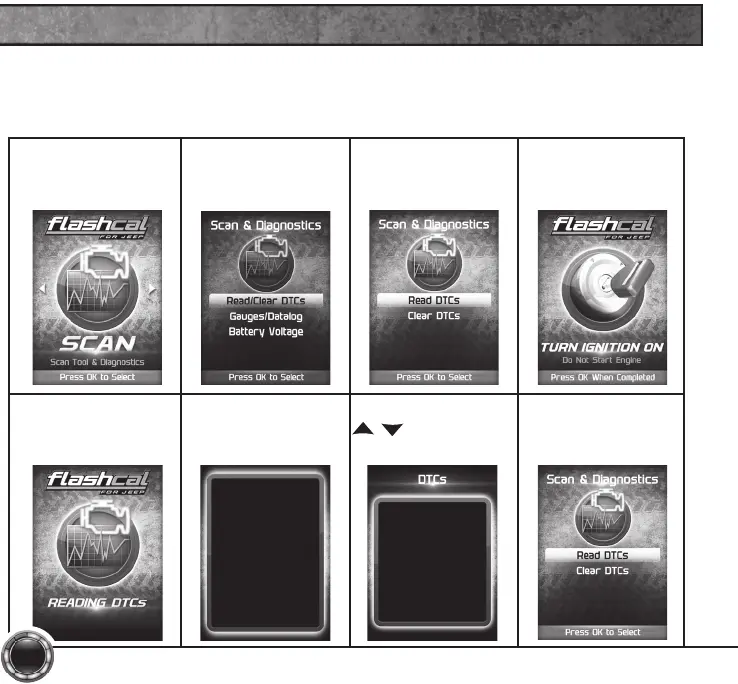
STEP 1 - Enter the
Scan Menu.
STEP 2 - Select
Read/Clear DTCs.
STEP 3 - Select
Read DTCs.
STEP 4 - If asked,
turn ignition on,
but do not start.
STEP 5 - Allow the
device to search for
DTCs.
STEP 6 - Read and
follow the on-screen
instructions.
Pressing UP or DOWN
will cycle through the
DTCs
Pressing OK or LEFT
will exit
Press OK to Continue
STEP 7 - Push the
/ arrows to
view each DTC.
DTC - 1of2
P0090
Fuel Pres Reg Ctrl Circ
STEP 8 - Press OK
to return to the
DTC menu.

Related product manuals