3-1
Chapter 3: Troubleshooting
Chapter 3
Troubleshooting
3-1 Troubleshooting Procedures
Use the following procedures and chart to troubleshoot your system. If you
have followed all of the procedures below and still need assistance, refer to
the ‘Technical Support Procedures’ and/or ‘Returning Merchandise for Ser-
vice’ section(s) in this chapter.
Before Power On
1. Make sure there is no short circuit between motherboard and chassis.
2. Disconnect all ribbon/wire cables from the motherboard.
3. Remove all the add-in cards except the video graphics card. (Be sure
the video/graphic card is inserted properly.)
4. Install a CPU, a chassis speaker and power LED to this motherboard.
(Check all the jumper settings as well)
5. Install one bank of memory module.
6. Check power supply voltage monitor 115V/230V switch.
Power On
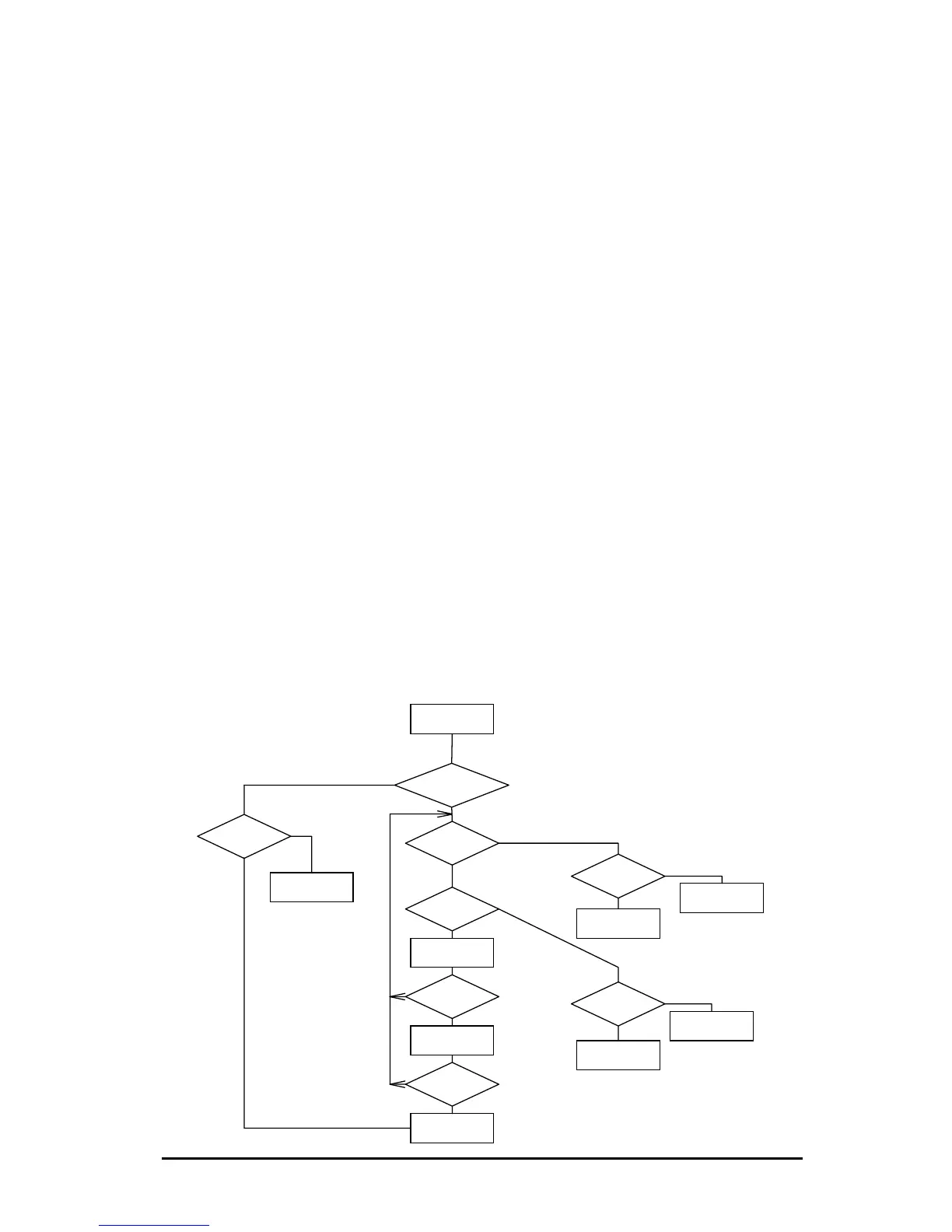
Sytem Power
LED on?
System Hold?
Speaker
Beeps?
Speaker
Beeps?
Number of
Beeps
Video
Display?
Power
Supply OK?
Speaker
Beeps?
Remove
Memory
Check CPU &
BIOS
Replace
Motherboard
Replace Power
Supply
Check BIOS
Setting & Add-
on Card
Motherboard
Good
Memory
Problem:
Check Memory
Video Card
Problem
N
N
N
N
N
N
N
Y
Y
Y
Y
Y
6
8
Y
Y
*
See "Before Power On,"
above, before proceding with
these steps.
Figure 3-1. Troubleshooting Flowchart



 To Next Page