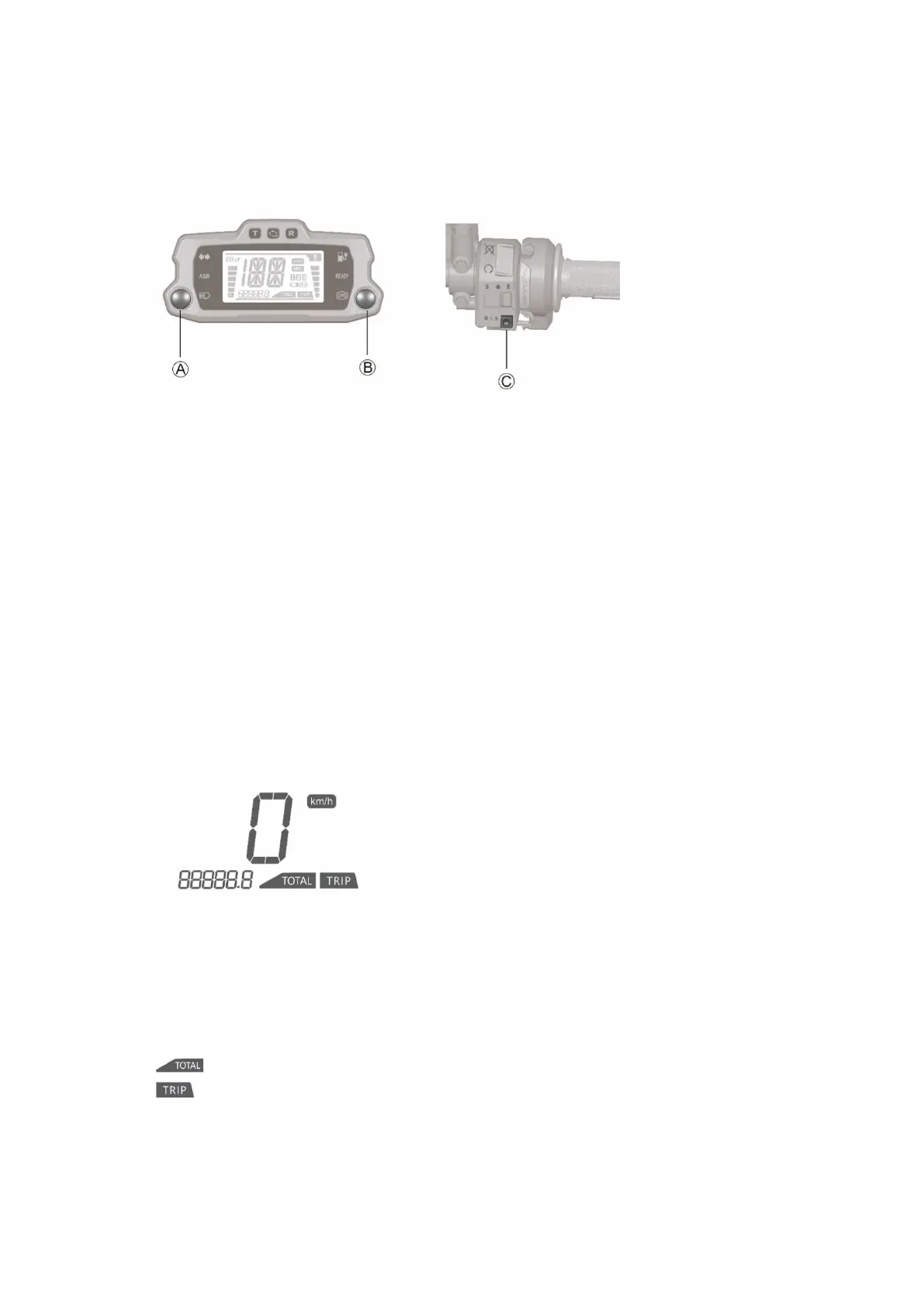
The features and displays on the dashboard can be customized to your personal preferences by
using the MODE and SEL buttons combined with the R\S button on the Handlebar Control
A. Mode Buttom( MODE)
By momentarily pressing or holding the MODE button you can reset fields and toggle through
the trip menus and display options.
B. Select Button(SEL)
To select the corresponding feature by pressing SEL button when entering the feature menu.
C. Reverse mode\Switch setting button R\S
To set different feature by R\S button when entering the system feature mode. The R\S button
can switch the ASR level during normal riding.
Display - Odometer
Select total or trip mileage:
1. To select the display of total or trip distances, momentarily press the MODE button when the
dashboard in its normal operating mode and the speed is 0km/h.
2. Trip mileage and maximum speed are displayed synchronously. The speedometer displays the
current speed during riding.
3. is displayed in dashboard when selecting the total mileage.
4. is displayed in dashboard when selecting the trip mileage.
Reset trip mileage and maximum speed:
To reset the trip mileage and maximum speed simultaneously by pressing and holding the SEL
button for more than 2secs in the trip mileage mode, when the the dashboard in its normal



 To Next Page