Actived in C1)
⑥Reserved feature (F0 F1 F2) Factory default at F0 (feature is disabled in F0, and strengthens
in turn from F1 to F2)
⑦Exit System Feature Mode Setting (X)
Warning: it is recommended to turn off the tilt protrction in off road environment, to avoid
the loss of power due to the triggering of tilt protection when performancing some jump tricks.
功能介绍 Feature Introduction
3.16
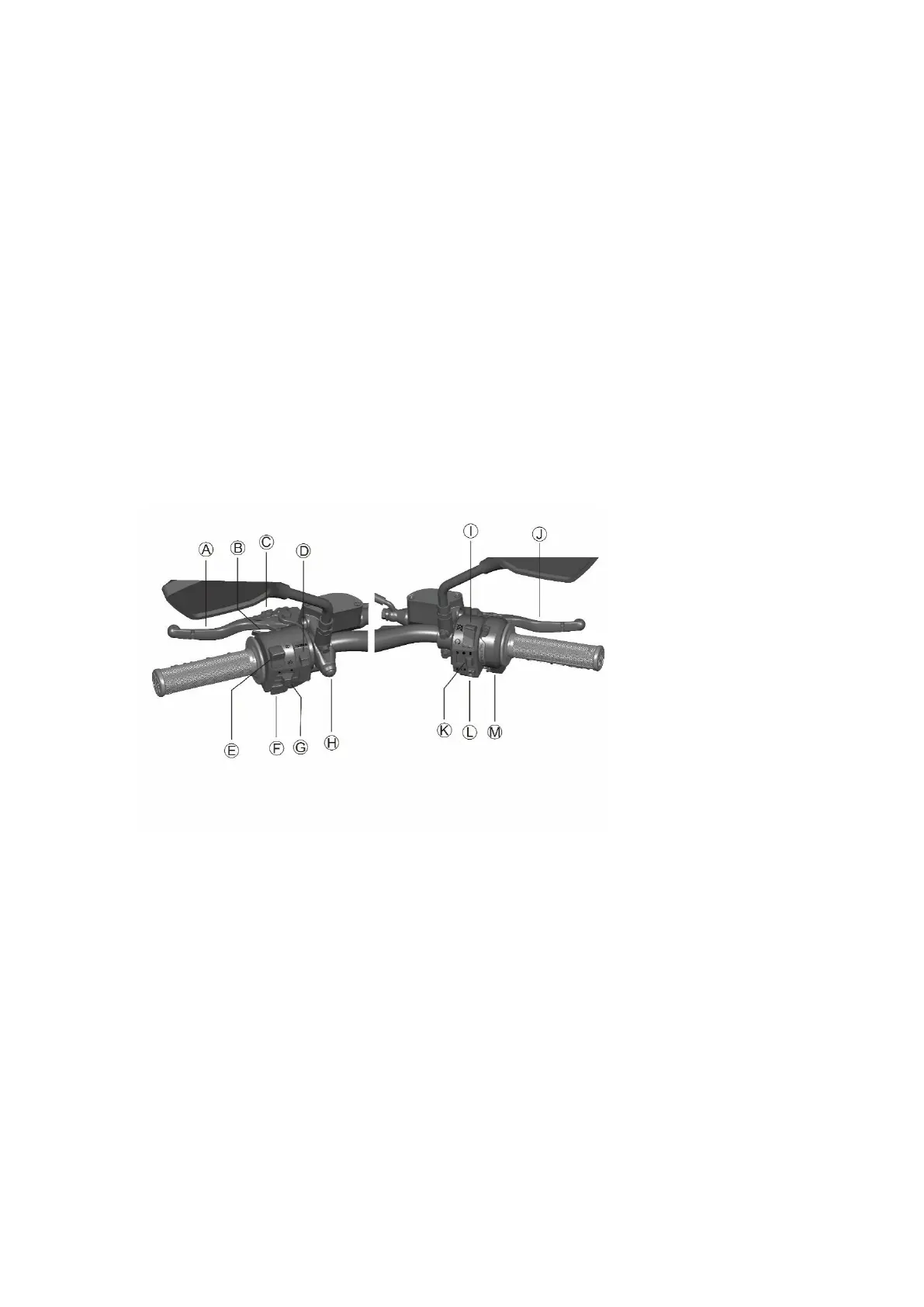
车把控件 Handlebar controls
3.17
A. Rear brake handle
When you pull the handle backwards, it will control the rear brake system. When braking, the
throttle should be in the idle position. The brake lights are also lit.
B. Acceleration Slip Regulation switch(ASR switch)
The Acceleration Slip Regulation (or called traction control) is set by the ASR switch in the left-
hand handle switch and the R/S button of the right-hand handle switch, as the current
motorcycle ASR setting.
① ASR switch: located behind the left-hand handle control, trigger switch.
② Regular no pressing: ASR off
③ Regular long pressing: ASR is turned on and in the setted ASR value



 To Next Page