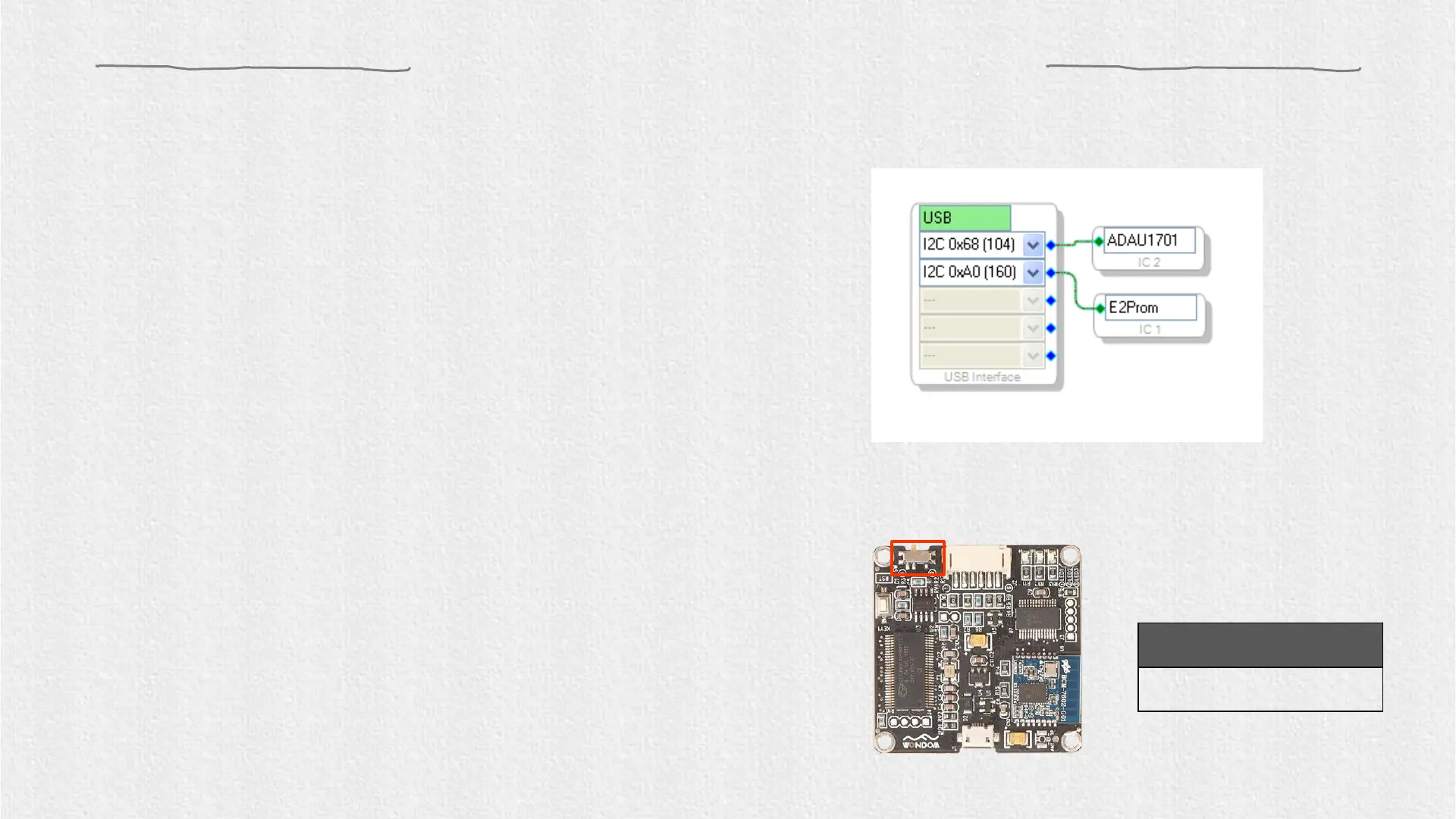
2. Set the SW of ICP3 at (PROGRAM)* and connect
the ICP3 to the computer with a USB cable.
1. Compile the needed program in advance.
Setting up the hardware
Figure 1
Setting of SW
SW
4. Please note whether the ICP3 can be recognized by the
computer, if the underpainting of the “USB” turn green, it
represents the ICP3 is recognized, otherwise it will ture
orrange and you should reconnect the ICP3 until it turn
green. See figure 1.
3. Select “USBi” from the list on the left and drag it to
the blank area on the right. Repeat the action to
move “ADAU1701” and “E2Prom” to the right.
*Note:
Customers can realize program with SigmaStudio or APP control of
audio system with ICP3 because of the integrated Bluetooth. We
provide a switch on ICP3 for customers to switch between program
and remote control mode.
Do not connect ICP3 with target products (APM2/JAB3) now.


 To Next Page