19
The Compass mode utilizes the Suunto 9-series 3D compass, which allows reading the
compass reliably even if the unit is held tilted up to 30 degrees from horizontal to any
direction.
Since the compass feature consumes a lot of power, the compass is automatically turned
off after 45 seconds, after which it can be restarted with START/DATA.
The compass shortcuts are:
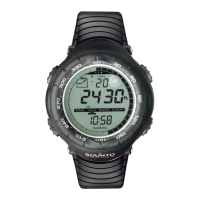
• Standard compass mode (with time in the lowest field)
The first row displays the cardinal and half-cardinal point abbreviations
The second row displays the bearing in degrees
• Locked bearing
In this mode you can lock the compass to any bearing by pointing the unit to the
desired direction and pressing START/DATA. The locked bearing is displayed in
the lowest field. By turning the unit so that the small circle is between the lines, the
unit points to the locked bearing. If the circle is not visible, a small arrow shows
where the unit has to be turned.
• Bearing to a waypoint (shortcut displays: bea)
If you are navigating a route from the Navigation menu, the third shortcut displays
the bearing to the next waypoint. If you have not activated a route and the GPS is
on, the shortcut displays the bearing to the initial position of the GPS fix. If the GPS
is not on, the shortcut displays the latest value when the GPS was on.
Long press ENTER to access the Compass settings menu. Here you can:
• Set the declination (DECLINATION)
• Calibrate the compass (CALIBRATE)
DECLINATION
You can set the declination to:
Off The compass points to the magnetic north.
On You can set the declination manually.
Auto Declination is set from the declination grid based on your current position.
The globe is covered by a 4-degree grid (45 x 90 declination values).
CALIBRATE (see page 36)



 To Next Page