7
ENTER
Change the value
with UP/DOWN
ENTER (stores sensor data to temporary memory)
Press ENTER
for over 2 sec
Function menu
GPS On/Off
See pages 12-13
Time menu
ALARM
TIME/DATE
UNITS
GENERAL
TIME 24h
DATE dd.mm
TEMP °C
TIME 24h
DATE dd.mm
TEMP °C
ENTER
ENTER: accept and return
STOP/CANCEL: discard and return
ENTER for over 2 sec: accept and return to the main display
STOP/
CANCEL
STOP/
CANCEL
Scroll the menu
with UP/DOWN
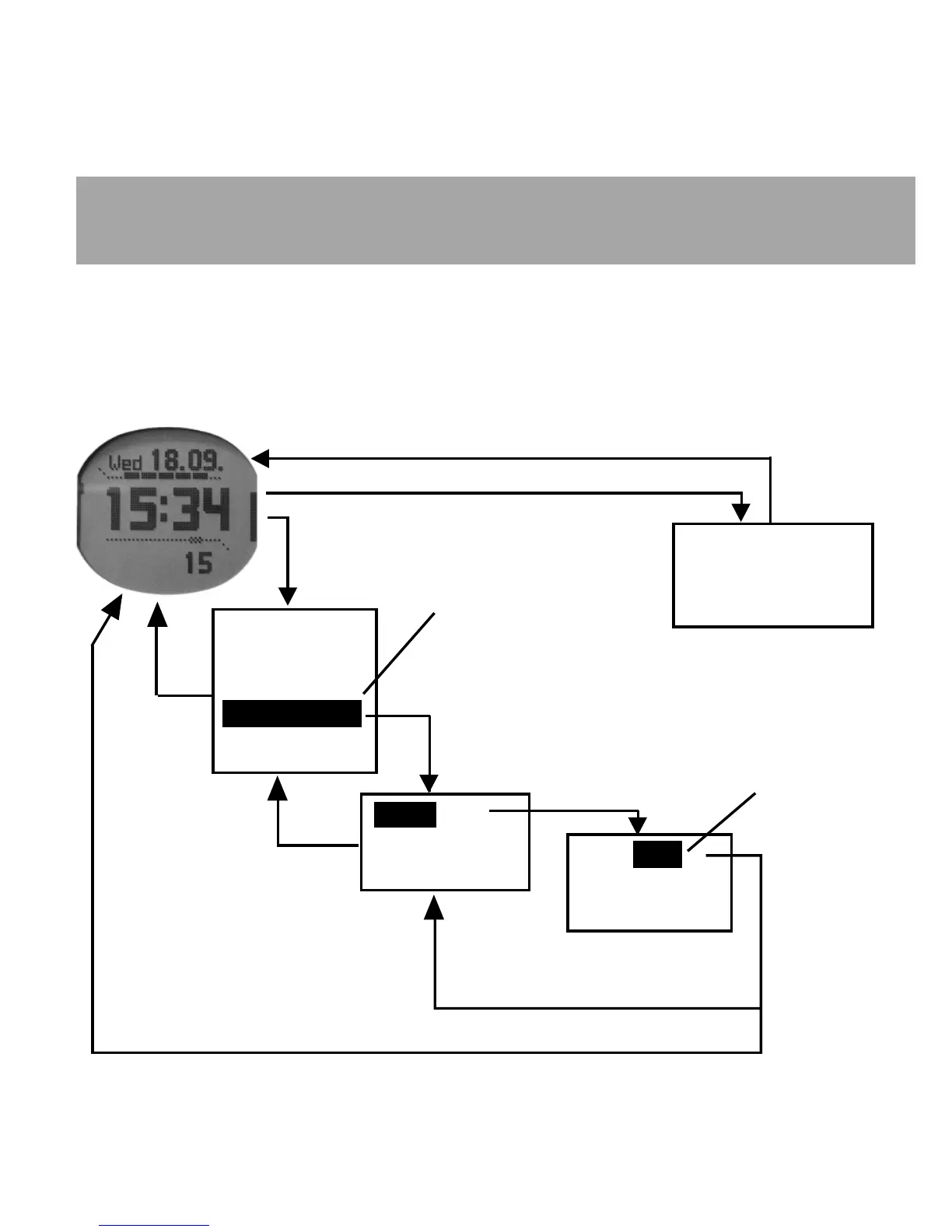
NAVIGATING IN THE MENUS
STOP/CANCEL
Each main mode in Suunto M9 has a submenu, which can have one or more submenus.
You navigate in the menus with the ENTER, UP/DOWN and STOP/CANCEL buttons.
By pressing ENTER the Suunto M9 records data in the temporary memory, from all the
sensors. This data is utilized in the Function menu features. For an example, see pages 26-
29, sections Before and After the Race Start, for more information on using the ENTER button.













 To Next Page