8
BEFORE YOU START
Before you start using your new Suunto M9, you should do the following:
• Charge the unit
• Read through this manual
To get the most out of your Suunto M9, you should also install the included Suunto Sail
Manager software. The Suunto Sail Manager CD includes a more detailed manual that
contains all the features.
CHARGING THE BATTERY
Suunto M9 is equipped with a Li-Ion rechargeable battery. You can charge it from the
mains outlet with the included charger, from a 9V battery or from your car’s cigarette
lighter (optional accessory).
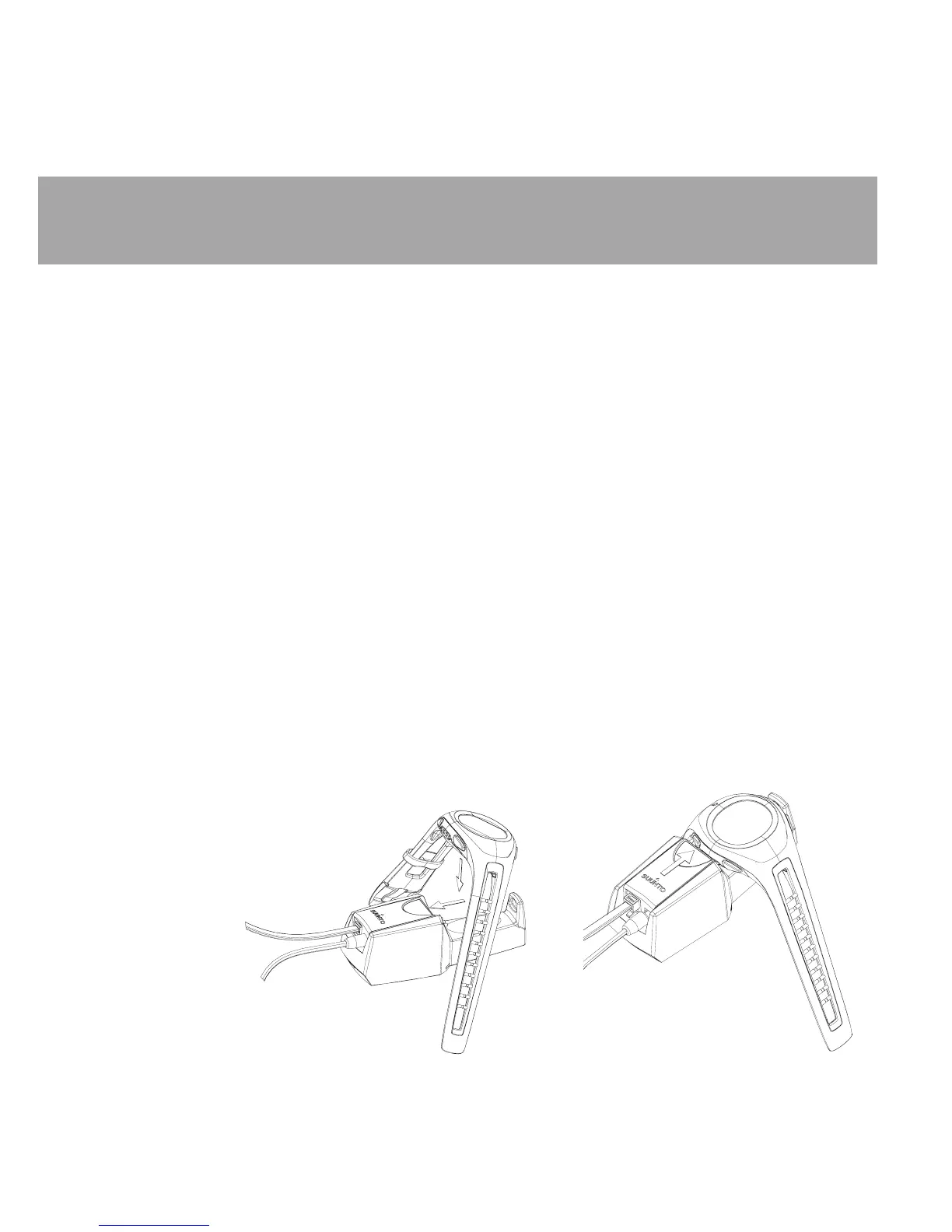
To charge the unit, place the Suunto M9 on the docking station as shown in the picture
and connect the charger to the docking station. During charging, the battery level indicator
will continuously climb from bottom to top. When the battery is full, the battery level
indicator is fully displayed.
To connect the docking station to your PC, connect the telephone modular jack of the
interface cable to the docking station and the 9-pin D-connector to a free serial port in
your PC. (If your PC does not have a serial port, you have to purchase a USB to serial port
adapter separately.)
Note: Make sure the unit is placed correctly in the docking station to allow proper charging.
Ensure the battery level indicator is climbing.













 To Next Page