51
6. Turn the emergency key to the “ON & OFF”
(“ ”) position and hold it until the buzzer
sounds.
Turn the emergency key back to the “PUSH
START/STOP” position. The system turns to
stand-by state for passcode input.
7. Take the following steps to enter the pass-
code.
(1)Turn the main switch to the “ON & OFF”
(“ ”) position and then release it. The main
switch automatically returns to the “PUSH
START/STOP” position.
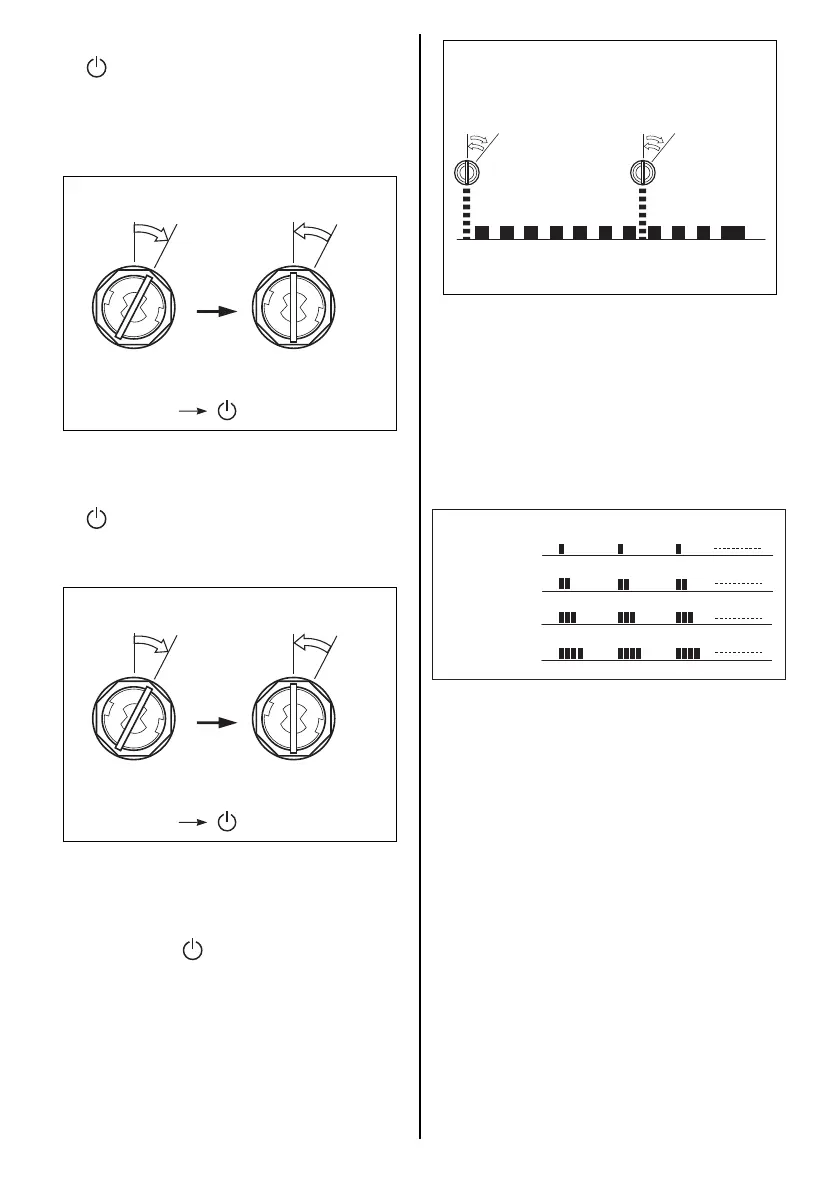
(2)The buzzer starts emitting short sounds.
When the buzzer sounds for the same num-
ber of times as the 1st digit of the passcode,
immediately turn the emergency key to the
“ON & OFF” (“ ”) position, and release it to
the “PUSH START/STOP” position.
To enter “0” in the passcode, turn the switch
after the buzzer sounds 10 times.
ON & OFF ON & OFF
PUSH
START
STOP
PUSH
START
STOP
* If equipped with top mount type
remote control box: (Main switch panel)
“ON & OFF” “ ”
ON & OFF ON & OFF
PUSH
START
STOP
PUSH
START
STOP
* If equipped with top mount type
remote control box: (Main switch panel)
“ON & OFF” “ ”
(3)After an 11th long sound, repeat steps 1 and
2 to enter the second, third and fourth pass-
code digits.
NOTE:
The buzzer emits one (1) short sound for the
1st digit, two (2) short sounds for the 2nd digit,
three (3) short sounds for the 3rd digit, and four
(4) short sounds for the 4th digit.
NOTE:
If a wrong passcode is entered or the input
operation fails, the buzzer emits a long sound
after entering the 4th digit followed by three
additional beeps, and the operation is can-
celled.
1234567891011
Example: When entering 7
ON & OFF ON & OFF
PUSH
START
STOP
PUSH
START
STOP
Buzzer sound
When entering
the 1st digit
When entering
the 2nd digit
When entering
the 3rd digit
When entering
the 4th digit



 To Next Page