36
5. Initial Setting
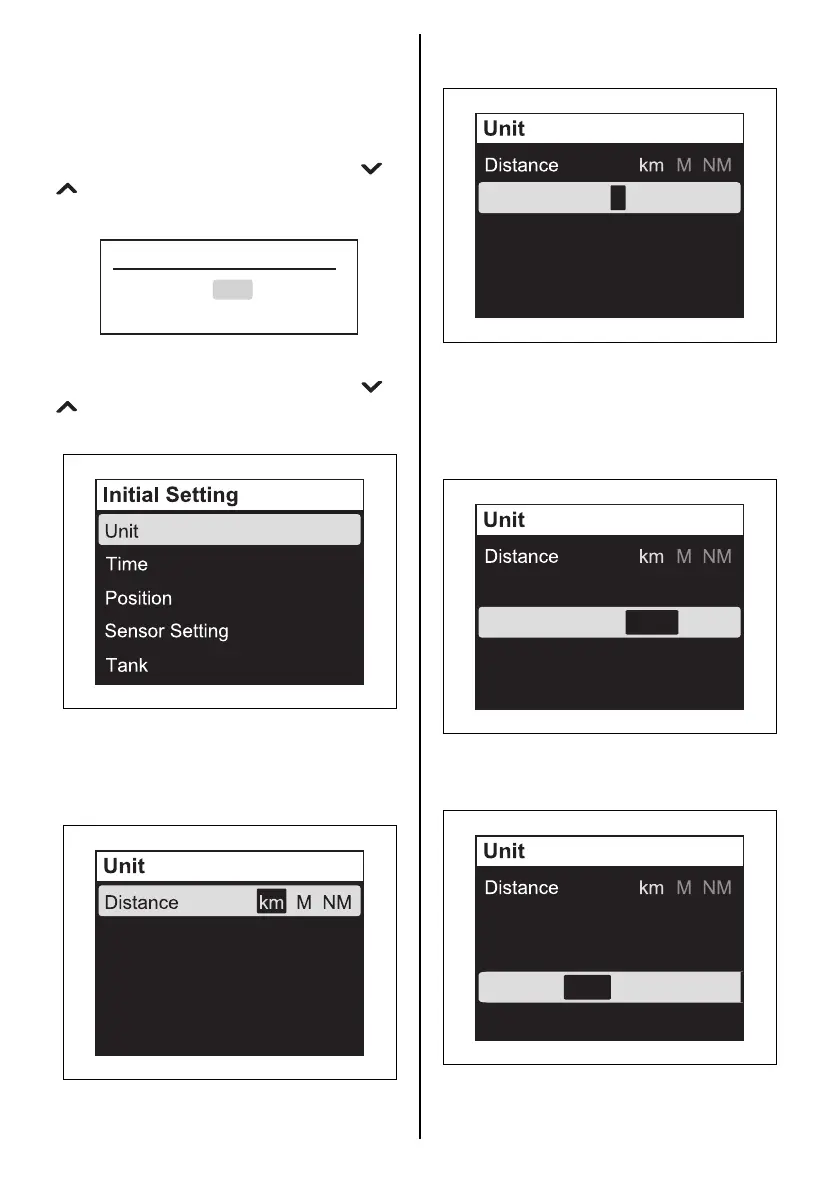
Items in the Initial Setting include important
items for initial setting. Therefore, the confirma-
tion screen “Revise initial setting?” is displayed
when you select “Initial Setting” in the menu
screen and press the [SET] button. To change
the Initial Setting, select “Yes” using the [ ] or
[ ] button and press the [SET] button to dis-
play the Initial Setting menu screen.
“Initial Setting” contains five (5) menus.
Select the Initial Setting menu using the [ ] or
[ ] button, and then press the [SET] button to
display the setting screen.
Unit
Setting for the following units.
Distance: set the unit for distance.
Press the [SET] button to select the unit.
Revise initial setting?
Yes
No
Speed Scale
LOW HIGH
L
G
(
US
)
G
(
IMP
)
Quantity
Econ D/Q Q/D I/100km
Quantity: set the unit for fuel quantity.
Press the [SET] button to select the unit.
Speed Scale: setting for the speed scale.
The setting of Speed Scale is reflected only on
the analog screen display.
Press the [SET] button to select the scale to be
indicated.
Econ: set the unit for fuel economy.
Press the [SET] button to select the unit.
Speed Scale
LOW HIGH
L
G
(
US
)
G
(
IMP
)
Quantity
Econ D/Q Q/D I/100km
Speed Scale
LOW HIGH
L
G
(
US
)
G
(
IMP
)
Quantity
Econ D/Q Q/D I/100km
Speed Scale
LOW HIGH
L
G
(
US
)
G
(
IMP
)
Quantity
Econ D/Q Q/D I/100km



 To Next Page