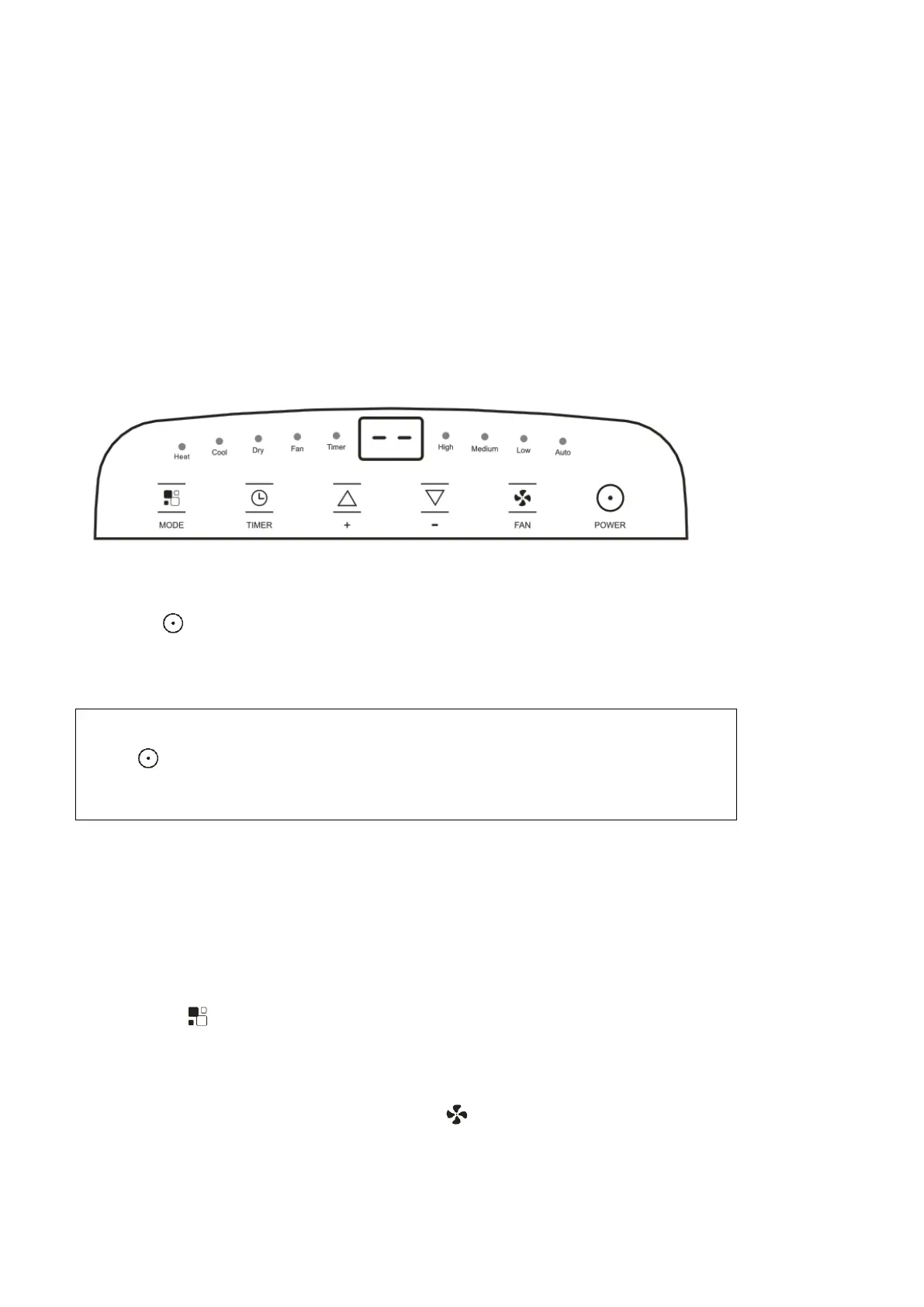
OPERATING FROM THE CONCTROL PANEL
The control panel is on the top of the appliance, enables you to manage part functions
without remote controller, but to fully exploit its potential, you must use the remote controller.
TURNING THE APPLIANCE ON
Plug into the mains socket, then the appliance is standby.
Press the button to make the appliance turn on. The last function active when it was turned off will
appear.
√ Never turn the appliance off by unplugging from the mains. Always press the
button , then wait for a few minutes before unplugging. This allows the appliance to
perform a cycle of checks to verify operation.
COOL mode
Ideal for hot muggy weather when you need to cooling and
dehumidify the room.
To set this mode correctly:
● Press the button a number of times until the Cool symbol appears.
● Select the target temperature18
℃
-32
℃
(64
℉
-90
℉
) by pressing the
▲
or
▼
button until the
corresponding value is displayed.
● Select the required fan speed by pressing the button.
Four speeds are available: High / Medium / Low / Auto.


 To Next Page