ENG
6
2.1 Multimedia Speaker System
• To connect the MSS to a PC, МР3/CD player, use 2RCA to mini-jack signal cable (included). Con-
nect the RCA jacks of the signal cable to the L and R jacks of the PC AUDIO INPUT m, and the
mini-jack (Ø 3.5 mm) of the signal cable – to the LINE OUT port of your PC sound card or to the
audio output (OUTPUT) of your МР3/CD player, as shown in Fig. 4.
• To connect the MSS to a TV set or DVD/CD players, use 2RCA to 2RCA signal cable (not included).
Connect at first the RCA jacks of the signal cable to the L and R jacks of AUX AUDIO INPUT n and
then connect RCA jacks to your TV set or DVD/CD player audio output jacks, as shown in Fig. 4.
• Connect the subwoofer to the mains outlet with the power cord k.
• Turn on the MSS power supply using ON/OFF switch (j, ON) on the subwoofer rear panel.
• Turn on the MSS using VOLUME knob d on the front panel or button q on the remote control,
LED backlight e will light.
• Select a desired signal source pressing short INPUT button d on the control panel or pressing
INPUT button a on the remote control.
• Adjust the master volume as desired with VOLUME knob d on the control panel or with the VOL+/-
buttons k on the remote control.
• Adjust the bass and timbre level using BASS+/- e and TREBLE+/- b buttons on the re mote
control. The timbre level of the system can be also adjusted using knob d on the control panel
preselecting this option with MODE button b.
• Use SW+/- buttons f on the remote control to adjust the subwoofer volume level. The volume
level of the subwoofer can be also adjusted using knob d on the control panel preselecting this
option with MODE button b.
• In order to have the high-fidelity reception direct the antenna to a required direction when listening
to the radio, first connecting the antenna to RADIO ANT jack l (see Fig. 4).
• When the MSS operation is over, mind to switch it off using ON/OFF switch (j, OFF position) and
unplug the power cord k from the socket.
FM
ANT
A UX
PC
R
R
L
L
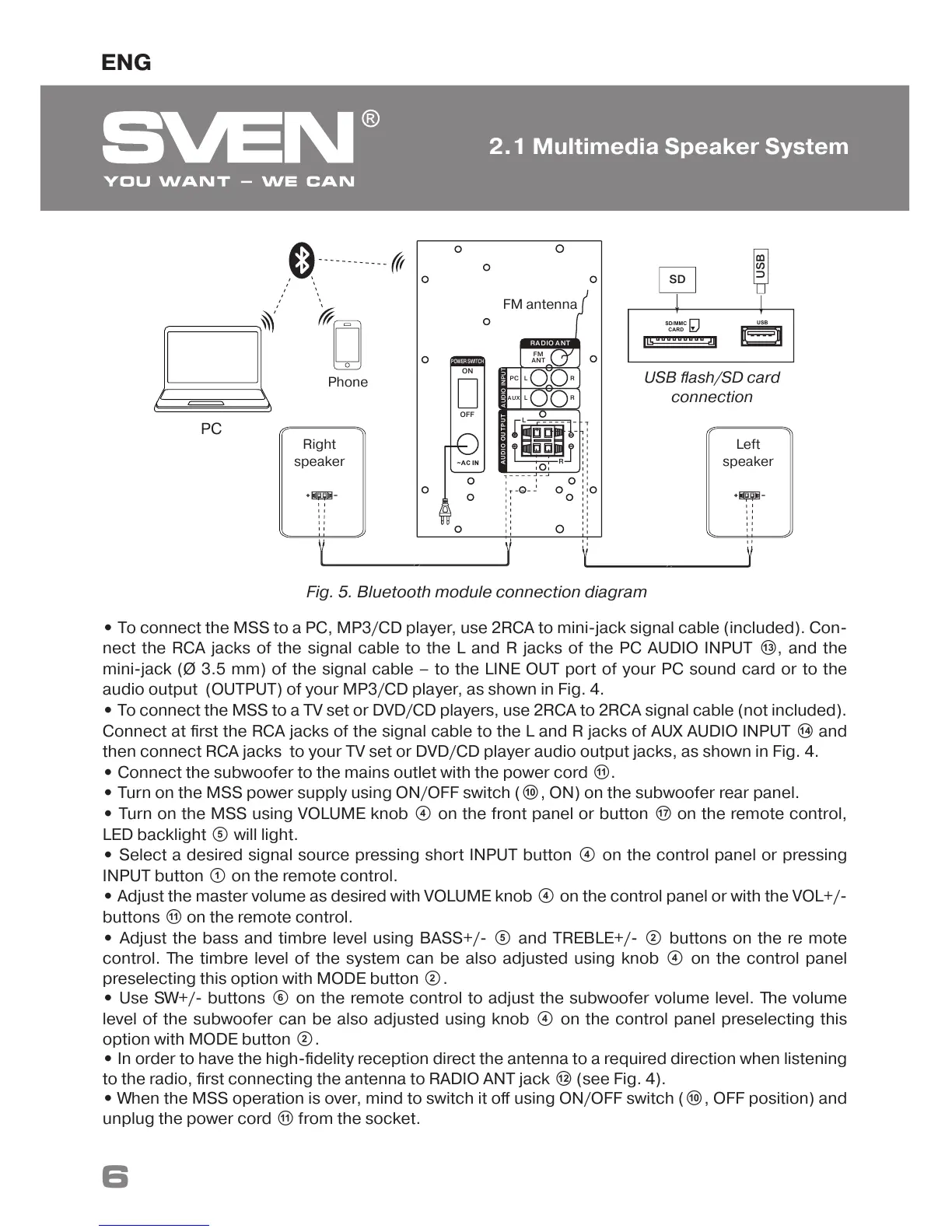
FM antenna
OFF
ON
Right
speaker
Left
speaker
USB flash/SD card
connection
AU D IO O U T P U T
RA DIO A NT
AUDIO INPUT
R
L
POWER SWITCH
SD/MMC
CARD
USB
USB
SD
Fig. 5. Bluetooth module connection diagram
Phone
PC


 To Next Page