ENG
7
MS-302
User Manual
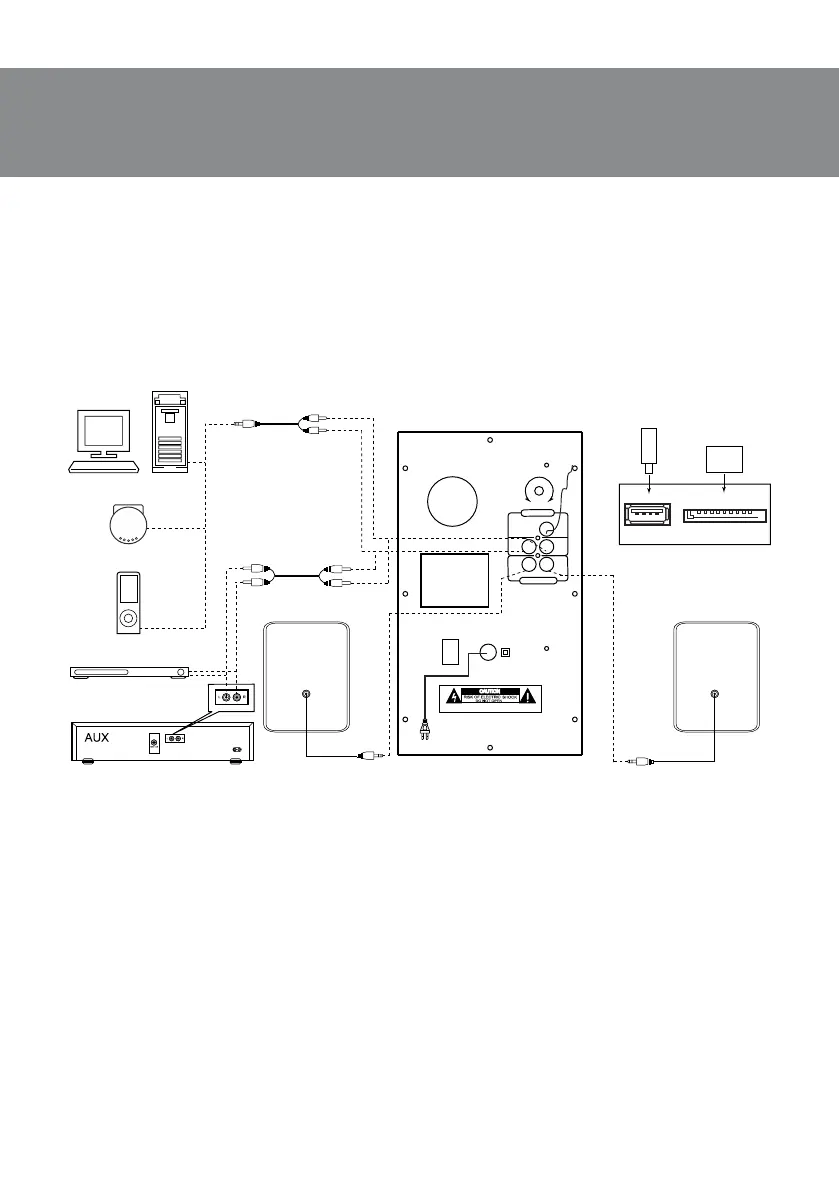
• Before making any connections, make sure the MSS is o and unplugged. Then connect speak-
ers to the subwoofer AUDIO OUTPUT L/R l jacks using built-in audio cables. Connect theright
speaker to the subwoofer AUDIO OUTPUT R and the left speaker — to the AUDIO OUTPUT L (see
connection diagram in Fig. 4).
Note. Check the xation connectors.
• To connect the MSS to a PC, МР3/CD player, use 2RCA to mini-jack signal cable (included). Con-
nect the RCA jacks of the signal cable to the L and R jacks of the AUDIO INPUT k, andthemi-
ni-jack (Ø 3.5 mm) of the signal cable — to the LINE OUT port of your PC sound card or totheau-
dio output (OUTPUT) of your МР3/CD player, as shown in Fig. 4.
• To connect the MSS to a TV set or DVD/CD player, use 2RCA to 2RCA signal cable (not included).
First connect the RCA jacks of the signal cable to the L and R jacks of AUDIO INPUT k and then
connect RCA jacks to your TV set or DVD/CD player audio output jacks, as shown in Fig. 4.
• Connect the subwoofer to the mains outlet with the power cord n.
• Turn on the MSS power supply using switch m (ON position) on the subwoofer rear panel.
• Turn on the MSS by pressing MODE button b on the front panel or a button on the remote
control.
• Select a desired signal source by pressing short MODE button b on the control panel orpress-
ing corresponding button on the remote control.
• Adjust the master volume as desired with knob f on the control panel or with the VOL+/-
buttons i on the remote control.
• Use BASS+/- knob i on the rear panel to adjust the subwoofer volume level.
F M
ANT
L
R
L
R
AU DI O INP UT
AU DI O OU T P UT
ON
OF F
~23 0V/50H z
BA SS
WA RN ING :S HOC K HA Z A RD-D O N OT O P E N
Made in china
PC
USB flash/SD card
connection
CD
DVD
USB
SD
SD/MMC
USB
PC
Player
Right
speaker
FM antenna
2RCA to 2RCA
signal cable
2RCA to mini-jack
signal cable
Left
speaker
Fig. 4. Connection diagram


 To Next Page