ENG
6
2.1 Multimedia
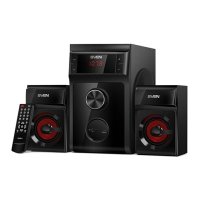
Speaker System
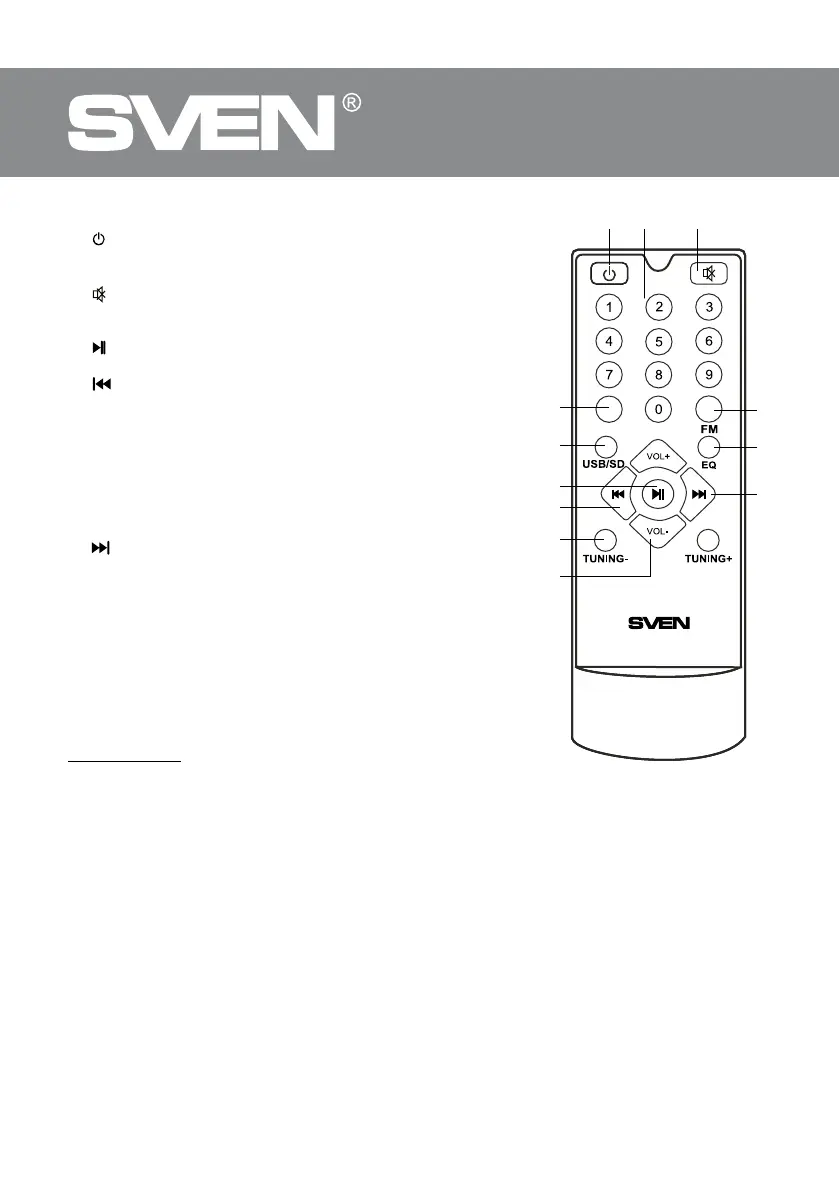
Remote control
a
: On/O button ; level control and EQ reset button
(pressed short).
b 0-9: numeric pad.
c
: sound on/o button.
d PC: PC line input.
e USB/SD: playback audio les mode selection.
f
: Play/Pause (pressed short in the Player mode); auto
scan start/stop (pressed long in the Radio mode).
g
: previous track (pressed short in the Player mode);
previous station** (pressed short in the Radio mode).
h TUNING-/+: buttons for manual radio frequency scanning
Increase/decrease the frequency up to 100 kHz bypressing
short. By pressing long the search mode is activated the rst
station (up/ down the frequency range).
i VOL+/-: volume level control buttons.
j FM: Radio mode switch button.
k EQ: equalizer mode switch button (in the Player mode).
l
: next track (pressed short in the Player mode); next
station** (pressed short in the Radio mode).
Battery Installation
• Open the battery compartment on the back of the RC.
• Insert the included AAA batteries.
• Close the battery compartment.
Notes. Use the RC at an angle no more than 30° at a distance
ofno more than 7 meters. If the remote control does not op-
erate, check the batteries or replace the discharged batter-
ies with new ones. Remove the batteries from the RC if you
don’t intend touse it for a long time (more than one week).
* The storage device must be formatted as FAT, FAT32.
Memory cards SDHC class 10 or less can be used. Connec-
tion of external hard disks other than USB ash drive is not
recommended, otherwise it can cause the MSS damage.
** The frequencies are switched if stations have been preset in the memory.
5. PREPARATION AND OPERATION
Speaker placement
• Place the speakers symmetrically to the listener at least one meter away. The subwoofer emits
non-directional sound, therefore it can be located in any place of the room where it sounds
thebest.
• Place MSS as far away as possible from monitors and TV sets, to avoid insignicant image
distortion.
Installation and operation
MS-302 speaker system can be connected to virtually any audio devices: DVD/CD players, PCs,
laptops, etc. (see connection diagram in Fig. 4).
Fig. 3. Remote control
PC


 To Next Page