ENG
4
Portable Multimedia
Speaker System
Micro SD
5. PREPARATION AND OPERATION
Speaker placement
• Place the device in an easy-to-use place for a user.
• Place the MSS far away from monitors and TV sets, as insignificant image distortion in these
supersensitive devices is possible.
MSS connecting
PS-50
Portable
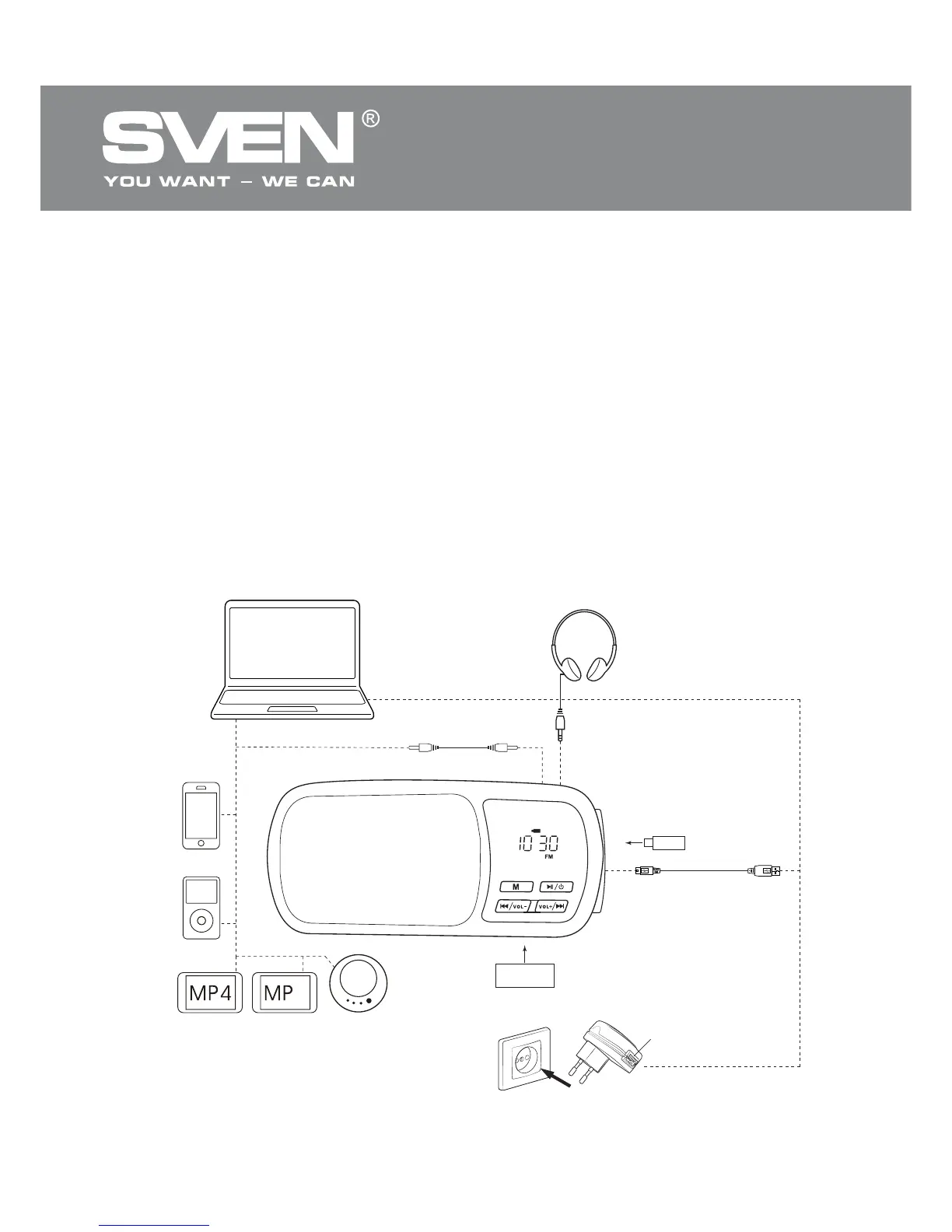
Multimedia Speaker System can be connected to virtually any audio devices: PC,
notebook, МР3/МР4 players, etc. (see сonnection diagram in Fig. 6).
• Before making any connections, make sure the MSS is unplugged.
• Connect signal cable with 3.5 mm mini-jack (included) to AUX jack h, and then to a sound source
audio output (PC, notebook, CD/МР3/МР4 players, iPhone, iPod, etc.), as shown in the connection
diagram (see Fig. 6).
• Connect the power cable connector (included) to DC IN jack k, and then to a USB port of a PC or
5V DC power unit.
• Connect a USB flash carrier with musical files to USB jack l. Connect a Мicro SD card with mu-
sical files to Мicro SD slot j.
Fig. 6. Connection diagram
USB jack
Socket
USB flash
Mini-jack to mini-jack
signal cable
Headphones
PC
CD player
iPhone
iPod
MP4 player MP3 player
Mini USB to USB
power cable
3
USB



 To Next Page