ENG
4
Party Speaker System
withBluetooth and FM-radio
p : Play/Pause button (short pressing in Player and Bluetooth mode); Start/Stop auto scan
(long pressing in Radio mode); Mute (short pressing in Radio and LINE IN mode); Disconnect
from device (long pressing in Bluetooth mode).
q
: next track (short pressing in Player and Bluetooth mode); Navigation on the track (long
pressing in Player and Bluetooth mode); Next station (short pressing in Radio mode); Search
forastation with a higher frequency (long pressing in Radio mode).
Remote control
a
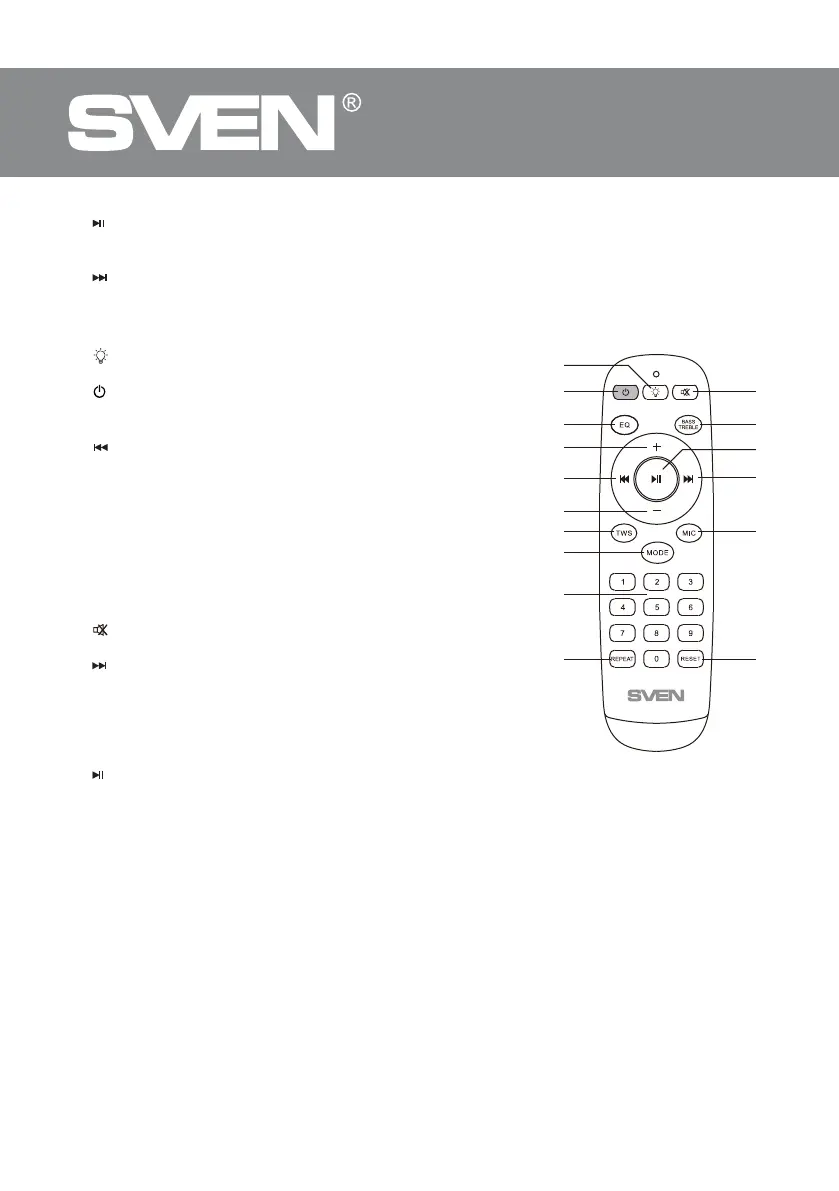
: switch backlight mode (short pressing); turning on/o
the backlight (long pressing).
b
: On/O button.
c EQ: EQ mode switch button.
d +/- : volume up/down.
e
: previous track (short pressing in Player and Bluetooth
mode); track navigation (long pressing in Player and Blue-
tooth modes); previous station (in Radio mode).
f TWS: Connecting an additional speaker.
g MODE: switching modes button: Bluetooth/Radio/Player/
LINE IN (short pressing); ON/OFF the service signals (long
pressing).
h 0-9: numeric pad for entering track number (in Player mode)
or number track/station (in Radio mode).
i REPEAT: Repeat mode selection button (in Player mode).
j
: Mute (short pressing).
k BASS/TREBLE: Bass/treble level adjustment.
l
: next track (short pressing in Player and Bluetooth mode);
track navigation (long pressing in Player andBluetooth modes);
next station (in Radio mode).
m MIC: Microphone volume/Echo level adjustment (short
pressing); Enable microphone priority mode (long pressing).
n RESET: reset settings (long pressing).
o
: Play/Pause button (short pressing in Player andBlue-
tooth mode); Start/Stop auto scan (long pressing in Radio
mode); Mute (short pressing in Radio andLINE IN mode); Disconnect from device (long pressing
in Bluetooth mode).
CONNECTION AND OPERATION
Attention! The built-in battery must be charged completely prior to the application.
Speaker system battery charging
• Connect speaker system to a charger. During battery charging the indicator a is red. Indicator
a will be light green when the battery is charged.
• The battery is used in the speaker system as an integral part of the device, therefore do nottry
toextract or replace it, because this can result in the warranty cancellation or the device damage.
OPERATION MODES
Bluetooth mode
• Wireless data transfer via the Bluetooth protocol enables to connect speaker system to com-
patible devises. Maximum radius of action of data transfer is 10 m. Such obstacles as walls oroth-
er electronic devices can interfere with the signal transfer.
Fig.2.


 To Next Page