EasyManua.ls Logo

Sven RX-G815 - User Manual

Sven RX-G815
10 pages
Print Icon
To Next Page IconTo Next Page
Loading...
www.sven.fi
USER MANUAL
Gaming Mouse
RX-G815
Question and Answer IconNeed help?

Do you have a question about the Sven RX-G815 and is the answer not in the manual?

Summary

Buyer Recommendations and Product Information

Appointment

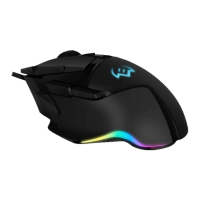
Describes the gaming mouse as an input device for computers, controlling operations.

Package Contents

Lists the items included in the package: gaming mouse, user manual, and warranty card.

Special Features

Highlights key attributes: non-slip coating, programmable buttons, braided cable, RGB backlight.

Preparation and Setup

Preparation to Work

Instructions for connecting the mouse to PC, driver installation, and software usage.

Key Assignments and Mouse Settings

Details on configuring basic mouse functions and profiles for convenience.

Advanced Mouse Configuration

Button Functions Assignment

Explains how to reassign mouse buttons to various functions, macros, or multimedia keys.

Profile and Button Settings

Covers profile switching, button function changes, and standard button settings.

Special Key Functions and Media Control

Special Key Functions

Details functions of DPI, Hot button, AIM, LED mode, Profile switching, and button off.

Media and Internet Controls

Describes media playback controls and internet navigation shortcuts.

Additional Functions

Lists additional functions like My Computer, Calculator, and Desktop.

Macro and Advanced Settings

Keyboard Shortcuts

Explains assigning mouse shortcuts to keyboard key combinations.

Macro Creation and Settings

Details assigning macros, advanced fire button settings, and DPI configurations.

Mouse Behavior and Backlight

Cursor and Scrolling Speed

Adjusting cursor speed, double-click speed, and scroll wheel speed.

DPI Settings and Color Customization

Adjusting DPI from 500-8000 and customizing DPI mode backlight color.

Backlight Menu

Adjusting blink speed and selecting various mouse backlight modes.

Troubleshooting and Specifications

Troubleshooting

Provides solutions for issues like the mouse not working, advising professional help.

Technical Specifications

Lists technical parameters: OS compatibility, DPI, buttons, interface, cable length, dimensions, weight.

Summary

Buyer Recommendations and Product Information

Appointment

Describes the gaming mouse as an input device for computers, controlling operations.

Package Contents

Lists the items included in the package: gaming mouse, user manual, and warranty card.

Special Features

Highlights key attributes: non-slip coating, programmable buttons, braided cable, RGB backlight.

Preparation and Setup

Preparation to Work

Instructions for connecting the mouse to PC, driver installation, and software usage.

Key Assignments and Mouse Settings

Details on configuring basic mouse functions and profiles for convenience.

Advanced Mouse Configuration

Button Functions Assignment

Explains how to reassign mouse buttons to various functions, macros, or multimedia keys.

Profile and Button Settings

Covers profile switching, button function changes, and standard button settings.

Special Key Functions and Media Control

Special Key Functions

Details functions of DPI, Hot button, AIM, LED mode, Profile switching, and button off.

Media and Internet Controls

Describes media playback controls and internet navigation shortcuts.

Additional Functions

Lists additional functions like My Computer, Calculator, and Desktop.

Macro and Advanced Settings

Keyboard Shortcuts

Explains assigning mouse shortcuts to keyboard key combinations.

Macro Creation and Settings

Details assigning macros, advanced fire button settings, and DPI configurations.

Mouse Behavior and Backlight

Cursor and Scrolling Speed

Adjusting cursor speed, double-click speed, and scroll wheel speed.

DPI Settings and Color Customization

Adjusting DPI from 500-8000 and customizing DPI mode backlight color.

Backlight Menu

Adjusting blink speed and selecting various mouse backlight modes.

Troubleshooting and Specifications

Troubleshooting

Provides solutions for issues like the mouse not working, advising professional help.

Technical Specifications

Lists technical parameters: OS compatibility, DPI, buttons, interface, cable length, dimensions, weight.

Sven RX-G815 Specifications

General IconGeneral
TypeGaming
SensorOptical
ConnectionWired
PowerUSB
ColorBlack
Cable Length1.8 meters
Buttons6 + scroll wheel

Related product manuals