AS-EQ1 Operator Manual
© 2009 SV Sound, LLC
•
6420 Belmont Avenue, Girard, OHIO
•
703.845.1472
•
www.svsound.com
SV Sound, LLC
23
NOTE
:
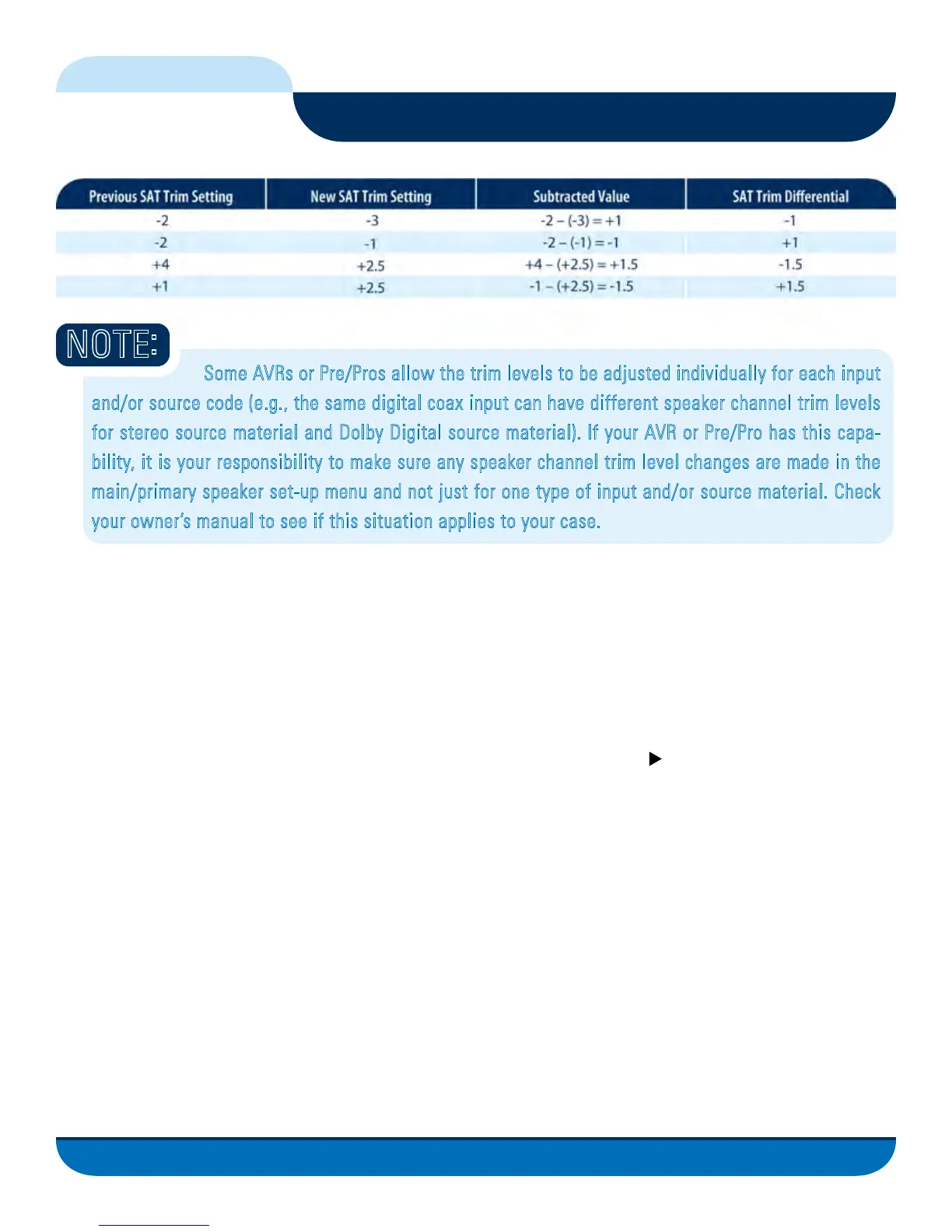
Some AVRs or Pre/Pros allow the trim levels to be adjusted individually for each input
and/or source code (e.g., the same digital coax input can have different speaker channel trim levels
for stereo source material and Dolby Digital source material). If your AVR or Pre/Pro has this capa-
bility, it is your responsibility to make sure any speaker channel trim level changes are made in the
main/primary speaker set-up menu and not just for one type of input and/or source material. Check
your owner’s manual to see if this situation applies to your case.
Calibrating the AS-EQ1 in Your Listening Environment
Click the Next button on the Level Matching screen. Using the gain control on the subwoofer amplifier,
adjust the level of SUB A (clicking the Reset button as needed) until the box turns green and you obtain
a steady reading at/near 0.0
Click the Next button if you have two subwoofers and repeat the above step for SUB B. It is critical that
dual subwoofers match each other as closely as possible before navigating away from the Level Matching screen.
Once level matching of the Satellite and Subwoofer(s) is complete, click the button to move on to the next
task, “Measuring your Subwoofer(s)”.



 To Next Page