AS-EQ1 Operator Manual
© 2009 SV Sound, LLC
•
6420 Belmont Avenue, Girard, OHIO
•
703.845.1472
•
www.svsound.com
SV Sound, LLC
31
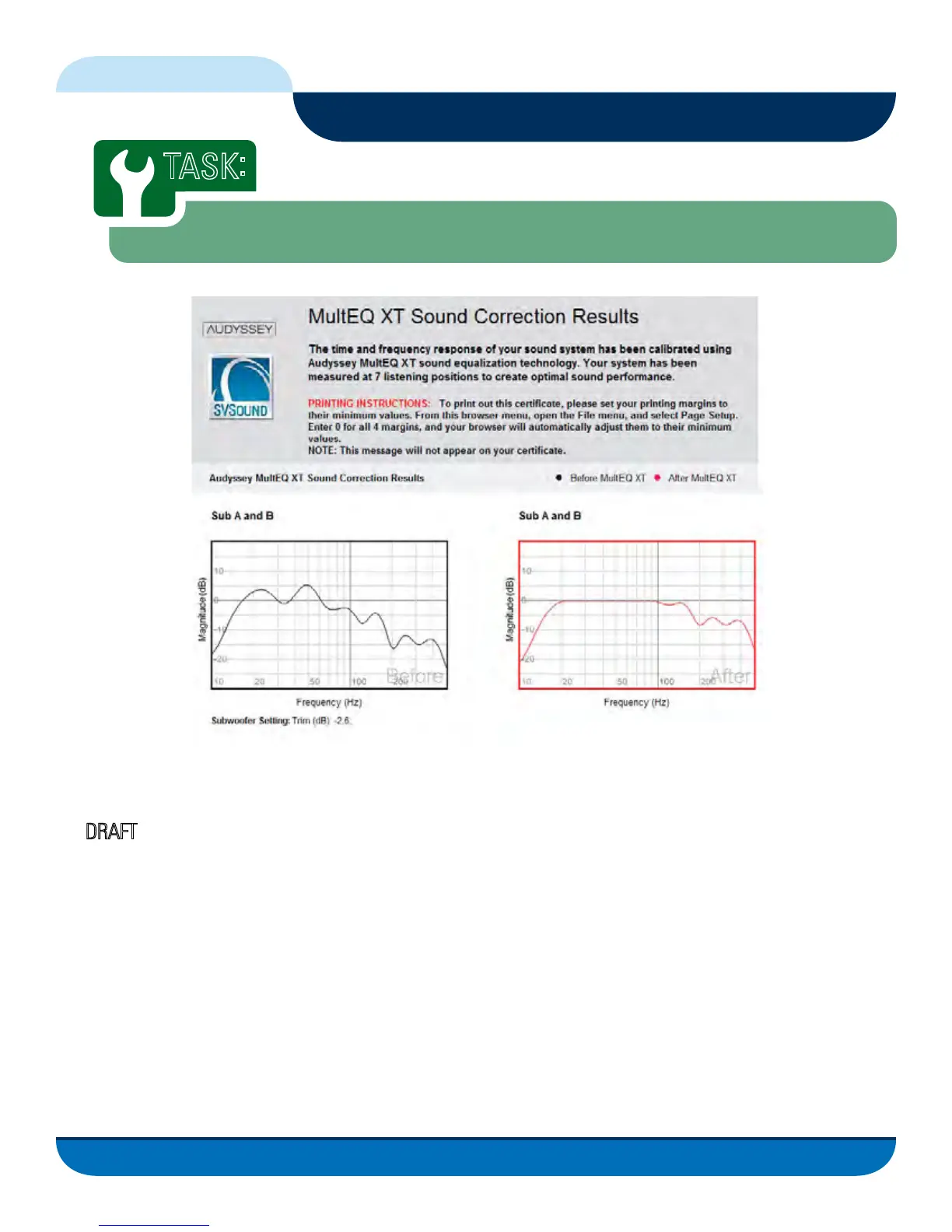
This HTML document will show the before and after performance of your subwoofer(s) frequency response us-
ing the AS-EQ1. Use your native HTML browser’s print functions to print this document. Your results will have
the
DRAFT watermark on it until it has been permanently saved to the AS-EQ1 in the previous task.
If you would like to capture your results to a file for storage or sharing, you can use one of many .pdf file creator
printer drivers available. One such driver (freeware) is CutePDF which can be found on the AS-EQ1 Installation
CD in the file CuteWriter.zip. Un-Zip this file and follow the instructions in the Readme file to install on your PC.
Alternatively you can visit the CutePDF web site at http://www.cutepdf.com/Products/CutePDF/writer.asp
Remove the USB cable from the AS-EQ1 and replace the front panel.
Calibrating the AS-EQ1 in Your Listening Environment
TASK
:
Create HTML Certicate Document
FIG. 19



 To Next Page