EasyManua.ls Logo

SVS PB-1000 - Power and Signal Connections; A;V Receiver (AVR);Processor (PRO) Connection

SVS PB-1000
16 pages
Print Icon
To Next Page IconTo Next Page
To Previous Page IconTo Previous Page
Loading...
POWER
&
SIGNAL
CONNECTIONS
Before
making
any
power
connections
or
signal
(line
level
or
speaker
level)
connections,
please
make
sure
the
subwoofer
power
switch
is
turned
OFF.
Connect
the
subwoofer
power
cord
to
the
subwoofer
amplifier
and
to
an
AC
outlet.
Using
convenience
outlets
located
on
some
AVR
receivers
or
pre/pros
is
NOT
recommended
for
your
subwoofer
as
these
outlets
are
not
meant
for
high
power
devices.
Signal
Connection
Options:
A/V
Receiver
(AVR)/Processor
(PRO)
Connection
This
is
the
most
common
form
of
connection.
The
AVR/PRO
will
perform
the
upstream
digital
bass
management
and
send
the
subwoofer
a
pre-filtered
mono
signal.
Using
a
high
quality
and
shielded
RCA
cable,
connect
the
AVR/PRO
subwoofer
output
jack
to
the
Line
Level
R/LFE
input
on
the
subwoofer
amplifier.
Set
the
low
pass
filter
to
LFE.
Set
the
phase
control
to
0
degrees.
Set
the
gain
to
between
10
o'clock
and
12
o'clock.
Turn-on
the
hard
power
switch.
Run
the
AVR/PRO
auto-set-up
routine.
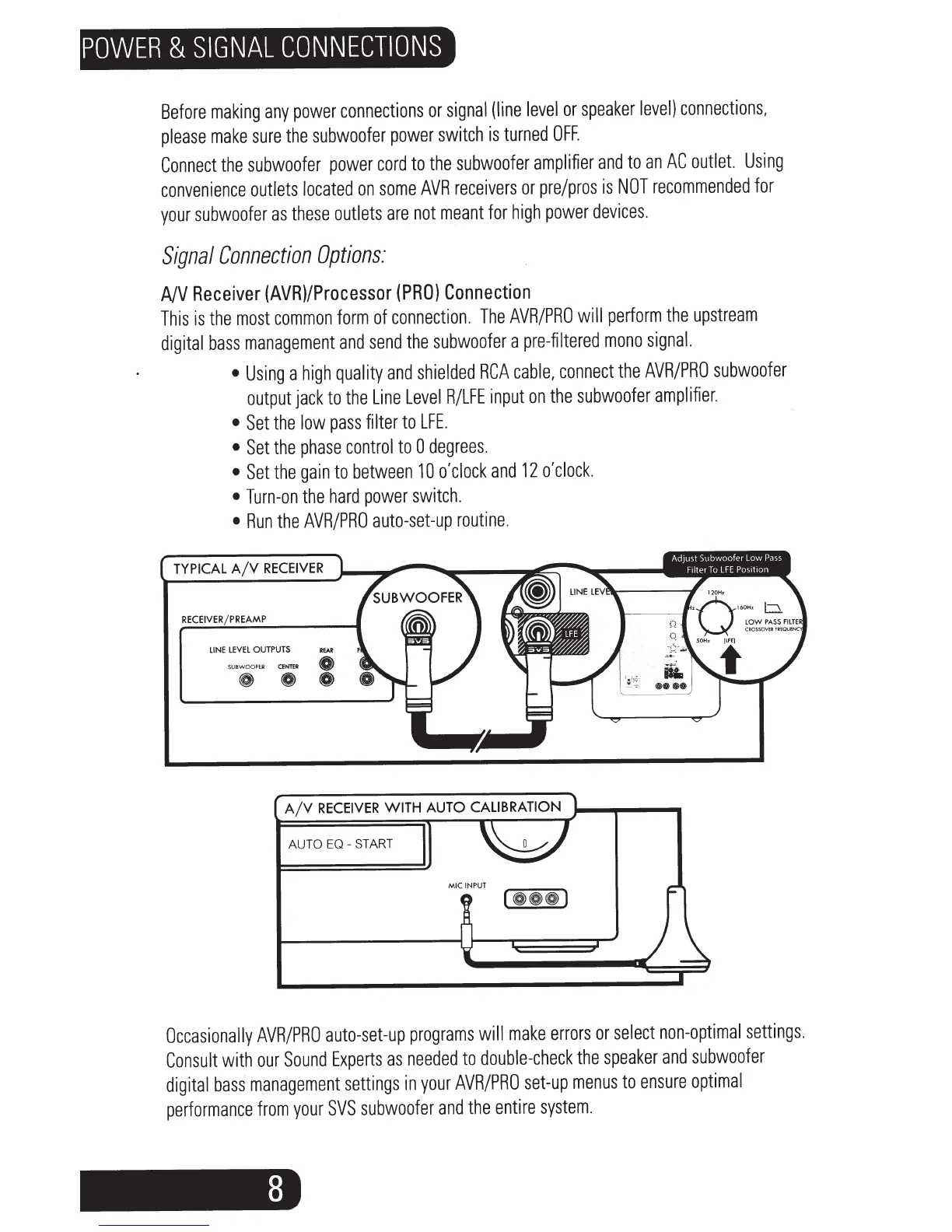
TYPICAL
A/V
RECEIVER
RECEIVE
REAMP
LINE
lEVEl
OUTPUTS
REAR
SUBWOOFER
CENTER
0
~
0 0
AUTO
EO
-
START
MIC
INPUT
Occasionally
AVR/PRO
auto-set-up
programs
will
make
errors
or
select
non-optimal
settings.
Consult
with
our
Sound
Experts
as
needed
to
double-check
the
speaker
and
subwoofer
digital
bass
management
settings
in
your
AVR/PRO
set-up
menus
to
ensure
optimal
performance
from
your
SVS
subwoofer
and
the
entire
system.

Related product manuals