EasyManua.ls Logo

Swegon Conductor W4 - User Manual

Swegon Conductor W4
2 pages
Print Icon
To Next Page IconTo Next Page
Loading...
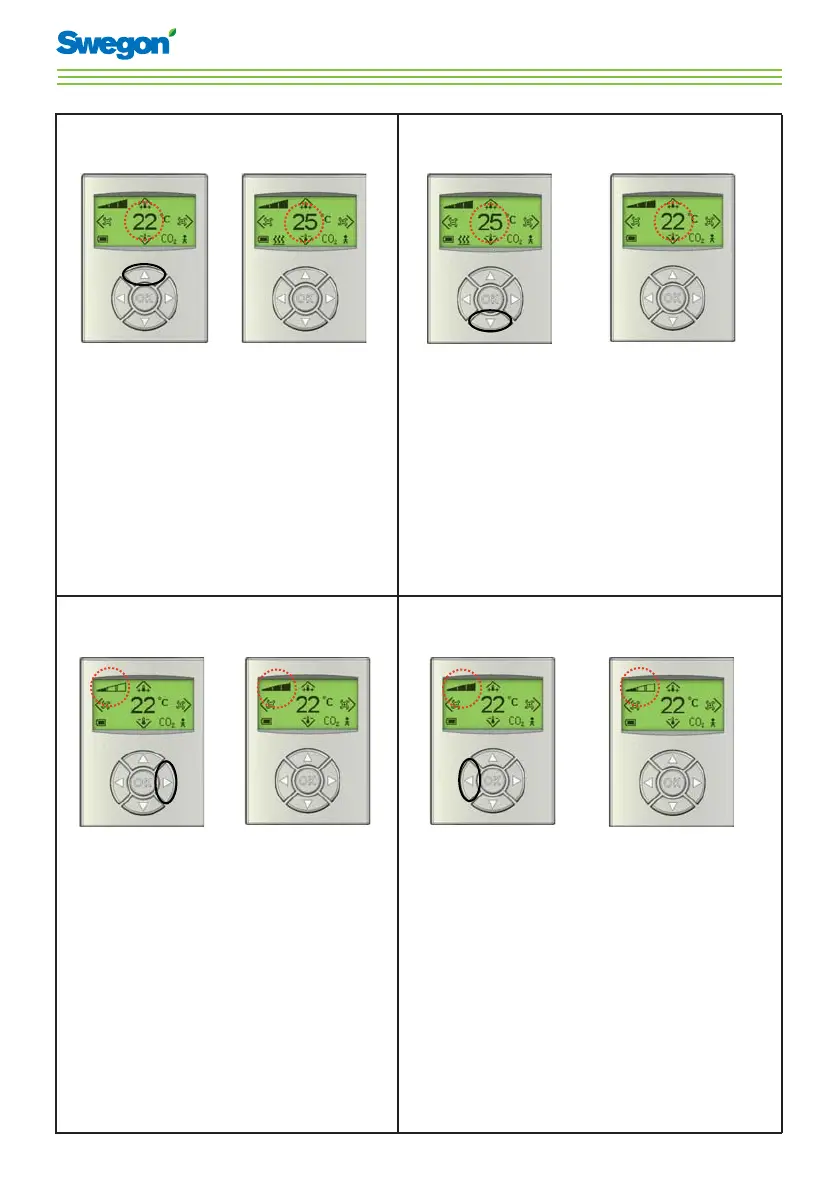
Instructions for Use - Conductor W4
To increase the temperature
Press 1. Up
until the desired
temperature is
shown.
Press OK or 2.
wait 3 seconds.
To decrease the temperature
Press 1. Down
until the desired
temperature is
shown.
Press OK or 2.
wait 3 seconds.
To increase the airfl ow
Press 1. Right
until the desired
air ow is shown.
Press OK or 2.
wait 3 seconds.
To decrease the airfl ow
Press 1. Left
until the desired
air ow is shown.
Press OK or 2.
wait 3 seconds.

Other manuals for Swegon Conductor W4

Questions and Answers

  • P
    patrick14Sep 16, 2025
    What to do if Swegon Controller indicates room unit low battery?
    • G
      gkaufmanSep 16, 2025
      If the Swegon Controller indicates a room unit low battery because the level on the battery in the room unit is low, replace the batteries in the room unit.
  • P
    Peggy LewisSep 17, 2025
    What to do if Swegon Conductor W4 shows no room unit 1?
    • D
      Daniel SpencerSep 17, 2025
      If the Swegon Controller shows no room unit 1 because the controller has not received any signal from the room unit 1 within the given time (P_110), make a new connection in Radio Frequency mode and check the cable.
  • J
    John HernandezSep 18, 2025
    What to do if Swegon Conductor W4 Controller shows no room unit 2?
    • U
      ualvarezSep 18, 2025
      If the Swegon Controller shows no room unit 2 because the controller has not received any signal from the room unit 2 within the given time (P_110), check the cable.
  • D
    Dr. Mark SilvaSep 18, 2025
    What to do if Swegon Conductor W4 has no temperature from room unit 1?
    • T
      Tara MedinaSep 19, 2025
      If the Swegon Controller is not getting a temperature reading from room unit 1 because there is no temperature from room unit 1, change the room unit.
  • S
    Susan PetersonSep 23, 2025
    What to do if Swegon Conductor W4 Controller has no temperature from room unit 2?
    • R
      Robin HillSep 23, 2025
      If the Swegon Controller is not getting a temperature reading from room unit 2 because there is no temperature from room unit 2, change the room unit.
  • B
    Brittany GriffithSep 23, 2025
    What to do if previous parameters are lost on Swegon Conductor W4 Controller?
    • P
      Paige GregorySep 23, 2025
      If previous parameters are lost on the Swegon Controller because changes in the parameter file have been lost, restart the controller.
  • W
    William GraySep 23, 2025
    What to do if factory parameters take up on Swegon Conductor W4 Controller?
    • C
      Christopher HerreraSep 23, 2025
      If factory parameters take up on the Swegon Controller because changes in the parameter file have not been approved, restart the controller.
  • F
    freedAug 23, 2025
    What to do if Swegon Controller has a system fault?
    • T
      Tara ThompsonAug 23, 2025
      If the Swegon Controller has a system fault due to a component error, the suggested solution is to replace the controller.
  • M
    Michelle Henson DVMSep 6, 2025
    What to do if Swegon Conductor W4 Controller indicates a wrong parameter file?
    • L
      Lauren GrahamSep 6, 2025
      If the Swegon Controller indicates a wrong parameter file because the parameter file is incorrect, update with a new parameter file.
  • A
    Andrew HallSep 5, 2025
    How to fix parameter file size on Swegon Conductor W4 Controller?
    • N
      Nicole SpearsSep 5, 2025
      If the Swegon Controller has a parameter file size issue because the parameter file is incorrect, update with a new parameter file.

Summary

Increase Temperature

Decrease Temperature

Increase Airflow

Decrease Airflow

Symbols and Indicators

Heating and Cooling Symbols

Explanation of symbols for heating, cooling, and battery status.

Operational Mode Symbols

Definitions for AUTO, ECON, STOP, and EMERGENCY operating modes.

Airflow and Status Symbols

Meaning of airflow indicators, occupancy, and CO2 limit alerts.

Energy Saving Features

Contact and Support

Swegon Conductor W4 Specifications

General IconGeneral
BrandSwegon
ModelConductor W4
CategoryController
LanguageEnglish

Related product manuals