EasyManua.ls Logo

Swegon Conductor W4 - User Manual

Swegon Conductor W4
2 pages
Print Icon
To Next Page IconTo Next Page
Loading...
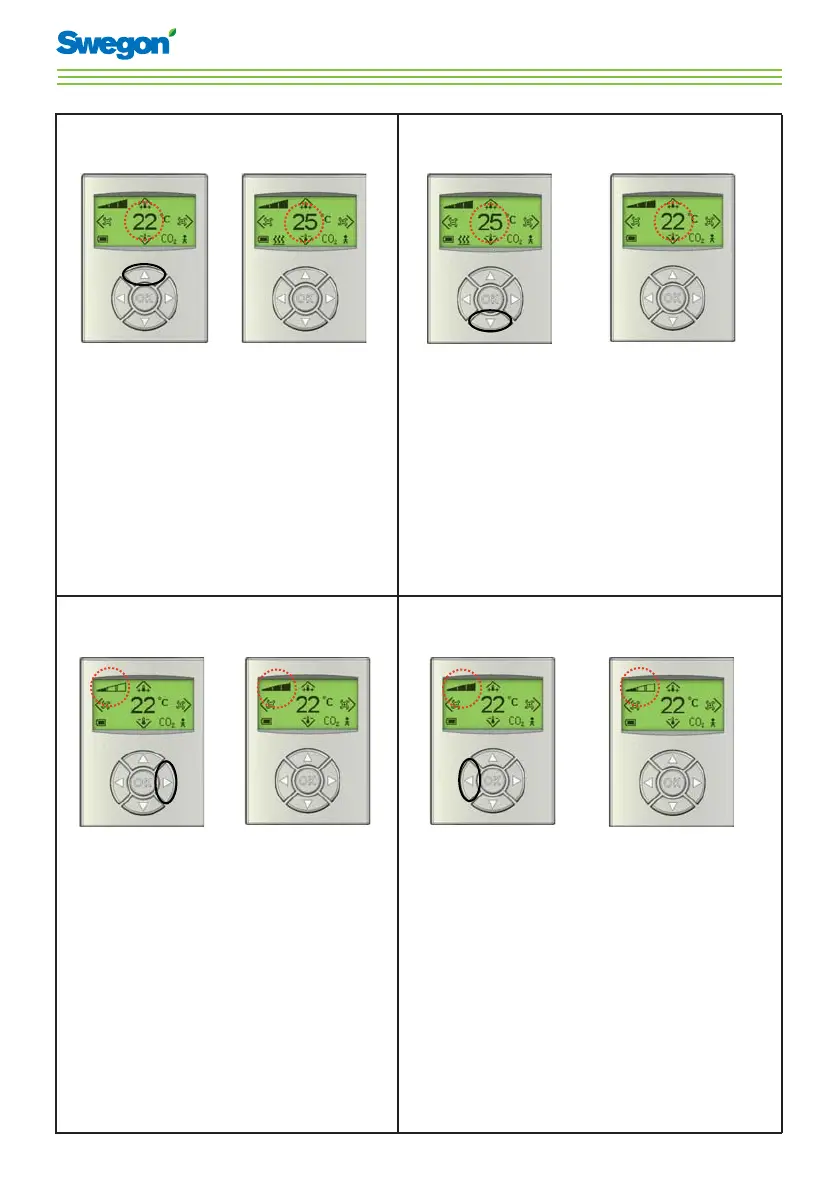
Instructions for Use - Conductor W4
To increase the temperature
Press 1. Up
until the desired
temperature is
shown.
Press OK or 2.
wait 3 seconds.
To decrease the temperature
Press 1. Down
until the desired
temperature is
shown.
Press OK or 2.
wait 3 seconds.
To increase the airfl ow
Press 1. Right
until the desired
air ow is shown.
Press OK or 2.
wait 3 seconds.
To decrease the airfl ow
Press 1. Left
until the desired
air ow is shown.
Press OK or 2.
wait 3 seconds.

Other manuals for Swegon Conductor W4

Questions and Answers

  • M
    Michael GordonAug 26, 2025
    What to do if Swegon Conductor W4 Controller has a short circuit X12?
    • C
      Chelsea AtkinsonAug 27, 2025
      If the Swegon Controller has a short circuit X12 because the connected component is defective, troubleshoot to find the faulty component and replace it.
  • C
    Christian GonzalezAug 25, 2025
    What to do if Swegon Controller has a short circuit X11?
    • O
      omartinAug 26, 2025
      If the Swegon Controller has a short circuit X11 because the connected component is defective, troubleshoot to find the faulty component and replace it.
  • S
    Sandra MartinezAug 25, 2025
    What to do if Swegon Controller shows no serial number?
    • J
      Jacqueline SmithAug 25, 2025
      If the Swegon Controller shows no serial number due to a program error, the suggested solution is to replace the controller.

Summary

Increase Temperature

Decrease Temperature

Increase Airflow

Decrease Airflow

Symbols and Indicators

Heating and Cooling Symbols

Explanation of symbols for heating, cooling, and battery status.

Operational Mode Symbols

Definitions for AUTO, ECON, STOP, and EMERGENCY operating modes.

Airflow and Status Symbols

Meaning of airflow indicators, occupancy, and CO2 limit alerts.

Energy Saving Features

Contact and Support

Swegon Conductor W4 Specifications

General IconGeneral
BrandSwegon
ModelConductor W4
CategoryController
LanguageEnglish

Related product manuals