ELECTRONIC START SYSTEM / E-GUN & StartTime V
Version 1.2 3481.560.02 Page 3
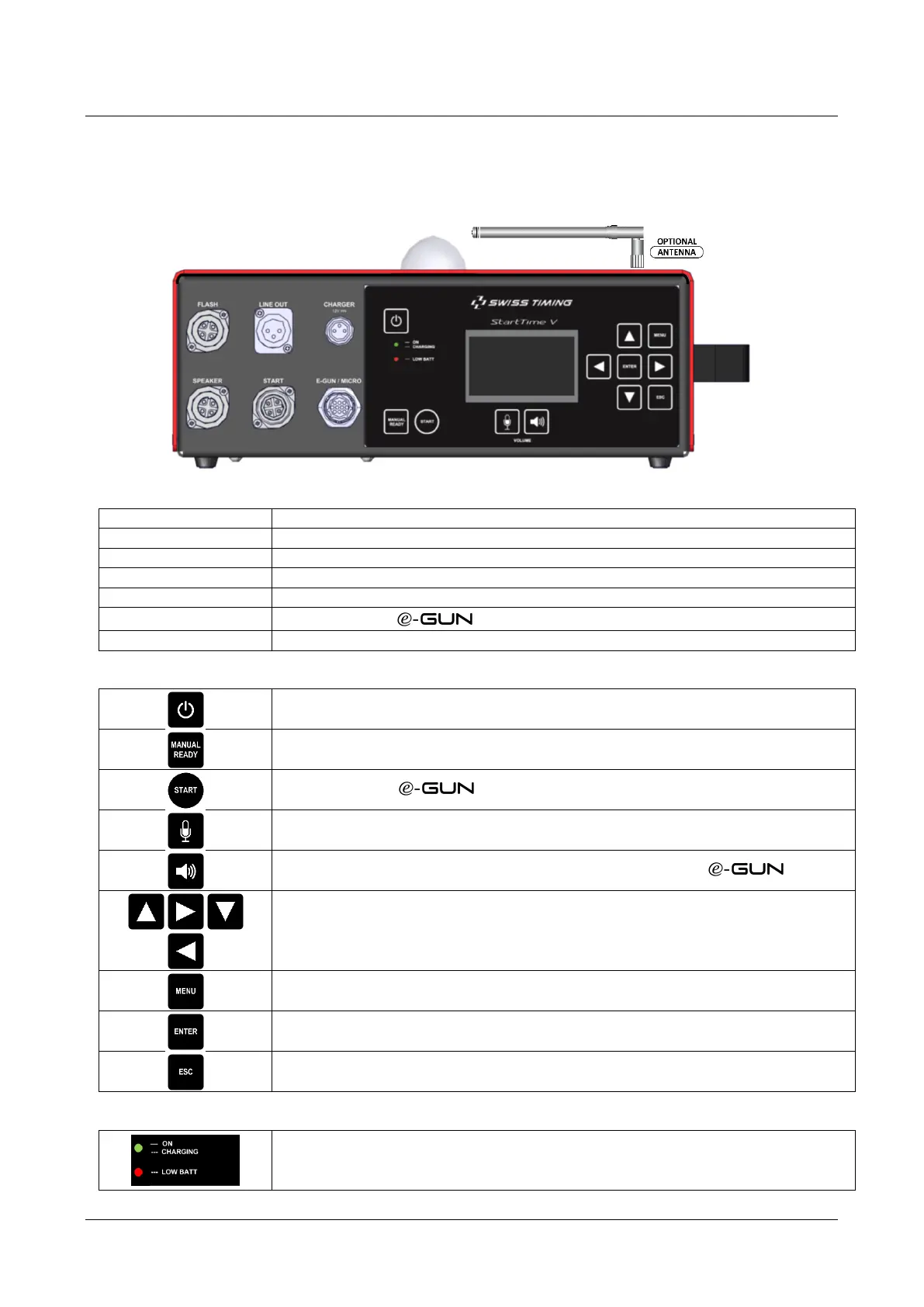
1.6 Front panel
The front panel of the StartTime V is divided in two parts: on the left is the connection area and on the right the
command keypad with display.
Connection to external flash(es)
Connection to external amplifier with dedicated speaker
Charger input for internal battery
Connection to external loudspeaker(s).
Connection to the main timing device (MAIN / PRIMARY)
Connection to the or SMU (Start & Microphone Unit)
Antenna for Wireless Recaller (optional)
Power ON (>5 sec.) and Power OFF (>3 sec.)
Allows field starter to force READY from control room
Key to start race if or SMU are not used (Independent operation)
Key to adjust the microphone volume
Key to adjust the speakers volumes (Internal, External, Line out and headset)
Keys to navigate through the menu or setup
Key to enter in the menu or setup
Key to select value in the menu or setup
Key to go back in the menu or setup
Green LED light up for StartTime V power ON status.
Green LED blinking during battery charging.
Red LED blinking to notify low battery.


 To Next Page