ELECTRONIC START SYSTEM / E-GUN & StartTime V
Swiss Timing LTD Phone +41 32 488 36 11
P.O. Box 138, Rue de l’Envers 1 info@swisstiming.com
CH-2606 Corgémont - Switzerland www.swisstiming.com
TABLE OF CONTENTS
1 INTRODUCTION ................................................................................................................... 1
1.1 Operation principle ........................................................................................................... 1
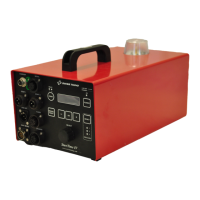
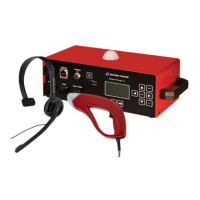
1.2 StartTime V with Start & Microphone unit (SMU) ............................................................ 2
1.3 StartTime V with ............................................................................................... 2
1.4 StartTime V Recaller with ................................................................................. 2
1.5 Wireless Recaller ............................................................................................................... 2
1.6 Front panel ........................................................................................................................ 3
1.7 Rear panel and cover ........................................................................................................ 4
1.8 Start & Microphone unit (SMU) ........................................................................................ 4
1.9 ........................................................................................................................... 5
1.10 Wireless Recaller ............................................................................................................... 6
2 INSTALLATION ..................................................................................................................... 7
2.1 Connecting the installation ............................................................................................... 7
Connections overview ........................................................................................ 7
External loudspeakers connection ..................................................................... 8
Extension cables ................................................................................................. 8
2.2 Operation .......................................................................................................................... 9
Stand alone operation with TIMER (Quantum, ARES) ....................................... 9
Independent operation .................................................................................... 10
Recaller operation ............................................................................................ 11
Power ON sequence ......................................................................................... 12
Audio levels ...................................................................................................... 12
Battery level ..................................................................................................... 12
3 GETTING STARTED ............................................................................................................. 13
3.1 First use ........................................................................................................................... 13
3.2 Main menu ...................................................................................................................... 13
3.3 Setup menu ..................................................................................................................... 14
Audio menu ...................................................................................................... 14
Sport configuration menu ................................................................................ 14
Setup menu ...................................................................................................... 15
Summary setup menu ...................................................................................... 16


 To Next Page