12
3.
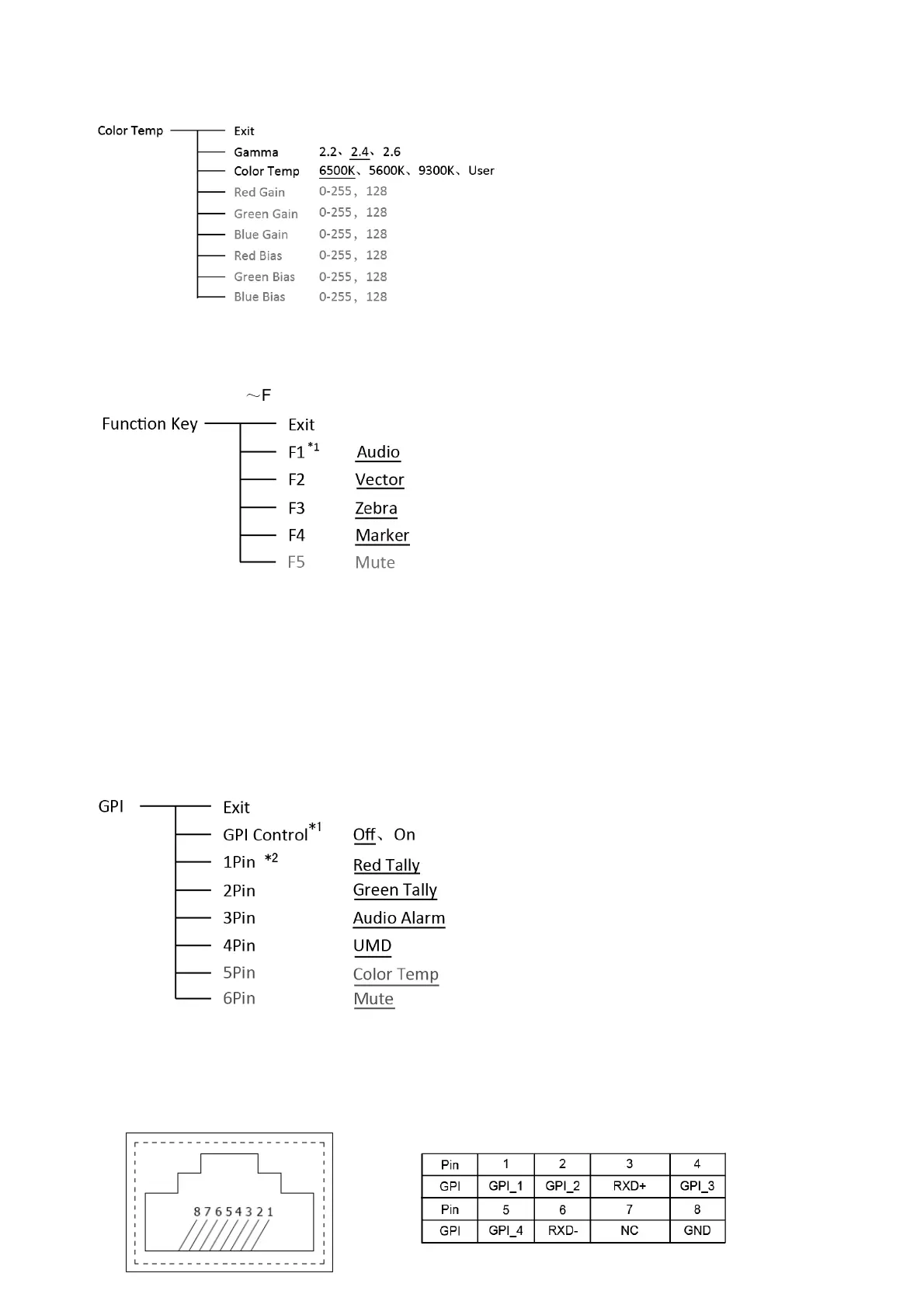
Color Temp
To select different color temperature or setup user-defined color parameters
* Only “Color Temp” is set to “User”, the Red/Blue/Green Gain or Red/Blue/Green Bias can be
adjusted.
4. Function key
To define the F1
~
F4 function keys
*1 Function keys F1-F4 can be setted as the down below functions:
Audio Bar, Histogram, False Color, AFD, H/V Delay, R/G/B/Mono, Marker, Color Bar, UMD, Audio
Alarm, Max backlight, Focus Assist, Aspect Ratio, Scan Mode, Zoom Mode, Mute, Freeze Frame, Flip
Mode, Waveform, Color Temp, Timecode, Zebra, Vector.
For example: Set F3 to “R/G/B/Mono” under “Function key” submenu. User can press F3 on the
front panel to adjust the parameters of “R/G/B/Mono”, and the “R/G/B/Mono” will change and follow the
sequence: Blue Only →Red Only →Green Only →Mono →Off.
5. GPI
User can set GPI pins to relevant functions to turn on or off this function.
*1 When “GPI control” is set to “On”, the monitor can be operated through external GPI control unit.
*2 The GPI pins can be setted to the down below functions:
Red Tally, Green Tally, Yellow Tally, Aspect Ratio, Scan Mode, Zoom Mode, Mute, Freeze Frame,
Flip Mode, Color Temp, Time code, Zebra, Vector, Audio Bar, Histogram, False Color, AFD, H/V Delay,
R/G/B/Mono, Marker, Color Bar, UMD, Audio Alarm, Max backlight, Focus Assist.



 To Next Page