Home
Sylvania
MP3 Player
SMPK1021
Page 26
Sylvania SMPK1021 - Page 26
36 pages
Manual
Save Page as PDF
To Next Page
To Next Page
To Previous Page
To Previous Page
Loading...
26
z
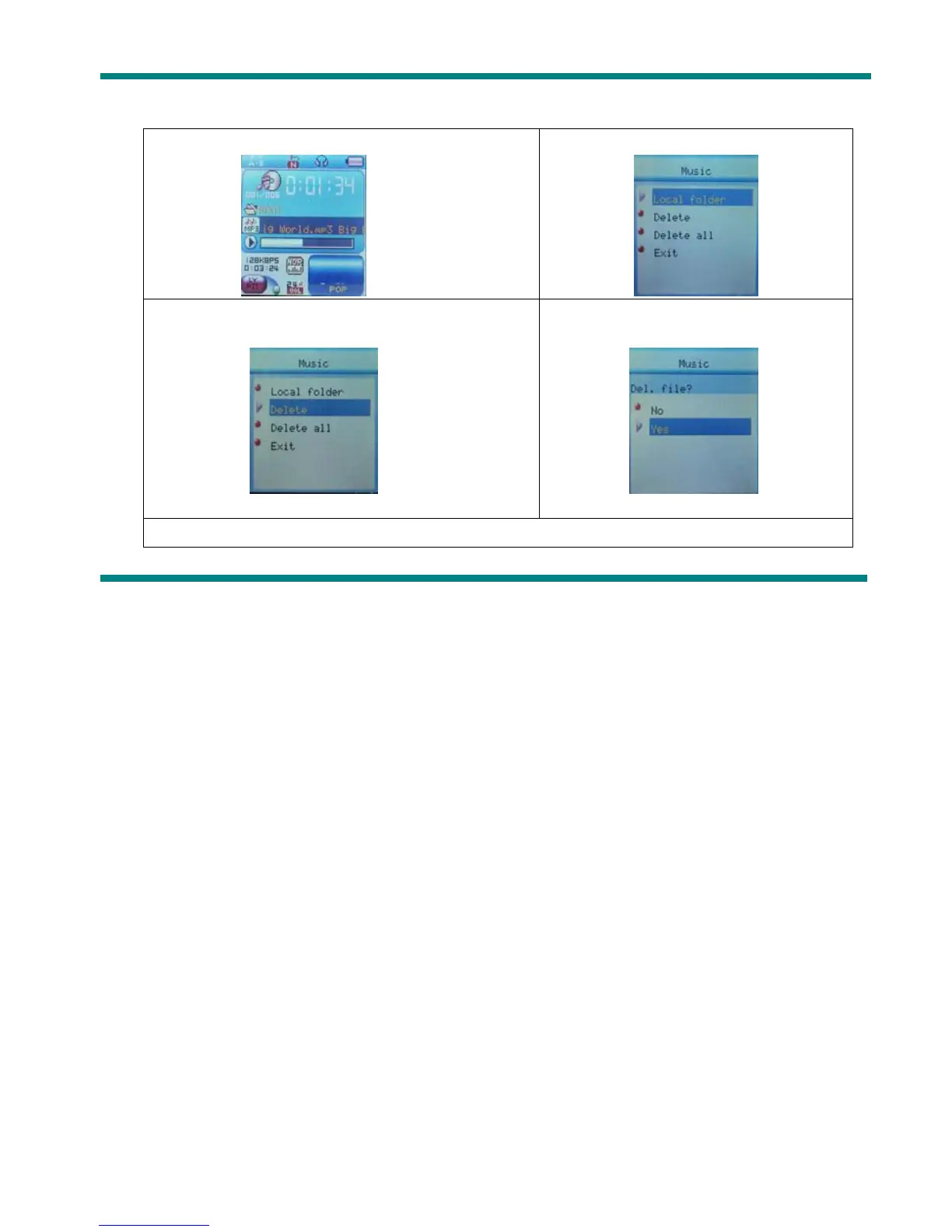
Delete file (S
top submenu)
Y
ou delete correspond files
。
1.When S
topped.
2.Press
Mode
to enter S
top submenu
4. Press
Next
or
PREVIOUS
to choose ‘Delete ’
or
‘Delete
all’.
4. Press
Next
to choose ‘YES’
5.Press
Mode
to confirm delete.
25
27
Table of Contents
Main Page
Know Your Player
3
Exterior and Key
3
Battery Level
4
Basic Functions
5
Access to Menus
5
List of Menus
5
Volume Adjust
7
Keys Processing
8
Play Music
9
Simple Actions
9
Equalizer Mode
9
Synchronous Lyric Display
10
Voice Recording
11
Select Record Type
13
Play Recorded Files
14
Convert ACT Files into WAV Format
14
Enter Settings
17
Options Introduction
17
List of Menus
18
Browsing Pictures
22
Using USB Disk
23
Other Settings
24
Play Mode (Play Submenu)
27
Replay Times (Play Submenu)
29
Replay Gap(Play Submenu)
29
New Function Recommends
30
Convert Video Files into AMV
33
Troubleshooting
35
Technical Specifications
36
Related product manuals
Sylvania SMPK2312
17 pages
Sylvania SMPK4230
22 pages
Sylvania SMPK4066
42 pages
Sylvania SMPK4600
29 pages
Sylvania SMP2200
1 page
Sylvania SMP2012
1 page
Sylvania SMP4200
1 page
Sylvania SMPS2050
24 pages
Sylvania SMP2002 2GB
4 pages



 To Next Page