EasyManua.ls Logo

Sylvania SRT902A - SYLVANIA SRT902 A Appearance and Ports

Sylvania SRT902A
19 pages
Print Icon
To Next Page IconTo Next Page
To Previous Page IconTo Previous Page
Loading...
III Appearance
-3-
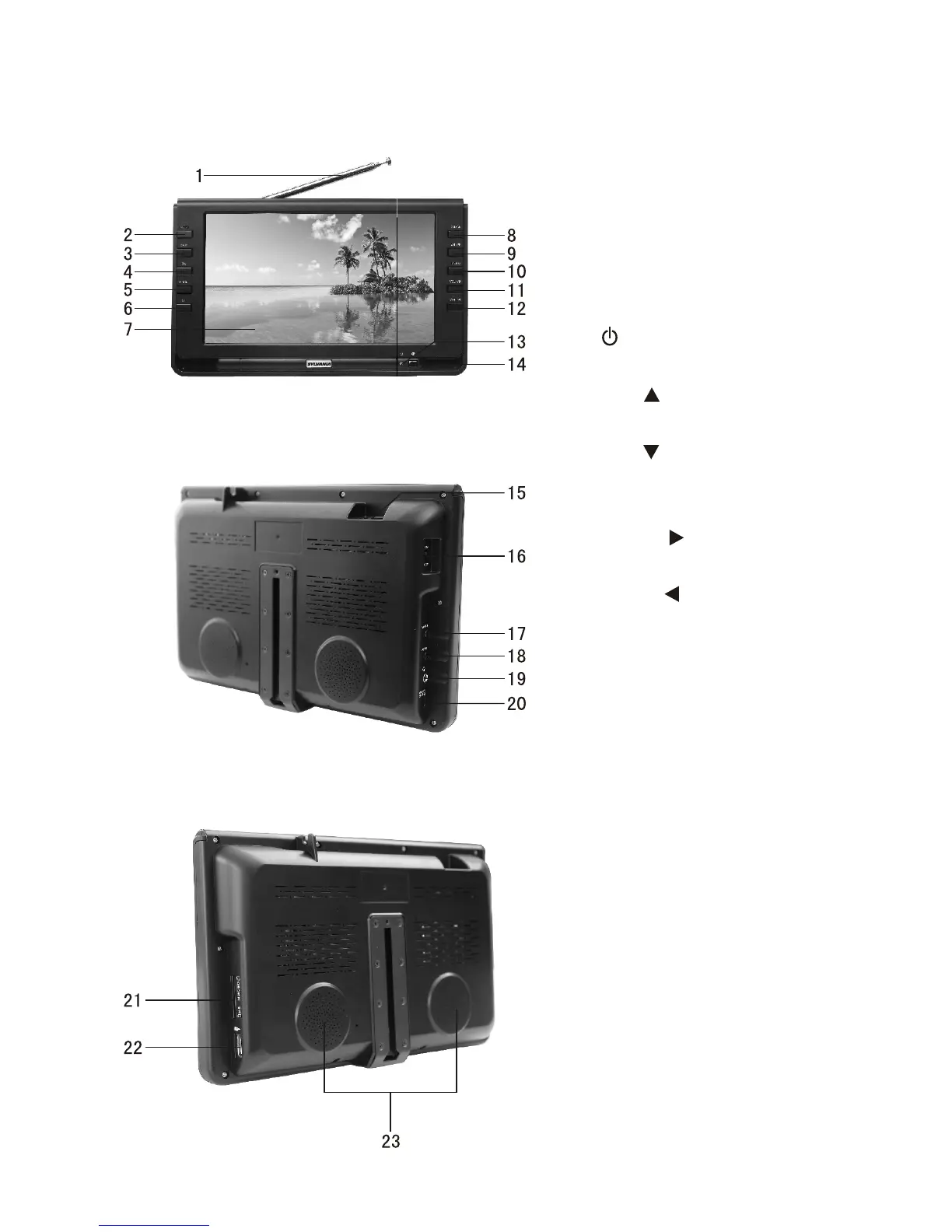
1. Telescopic antenna
2. MUTE: Mute button
3. EXIT: Exit button
4
MENU: Menu button
11.
. Power indicator
Red: Standby
Flashing green: Charging
Persistent: Charged
14.
. OK: Confirm button
5. MODE: Mode shift button
6. : Standby button
7. TFT-LCD screen
8. CH+/ : Channel Select/
Upward button
9. CH-/ : Channel Select/
Downward button
10.
VOL+/ : Volume up/
Rightward button
12. VOL-/ : Volume down/
Leftward button
13
Remote-control receive
window
15. Antenna input Jack
16. Power on/off
17. AV Output
18. AV Input
19. Headphone jack
20. DC Input
21. SD/MMC/MS type CARD
input port
22. USB connect Jack
23. Speaker

Related product manuals