-5-
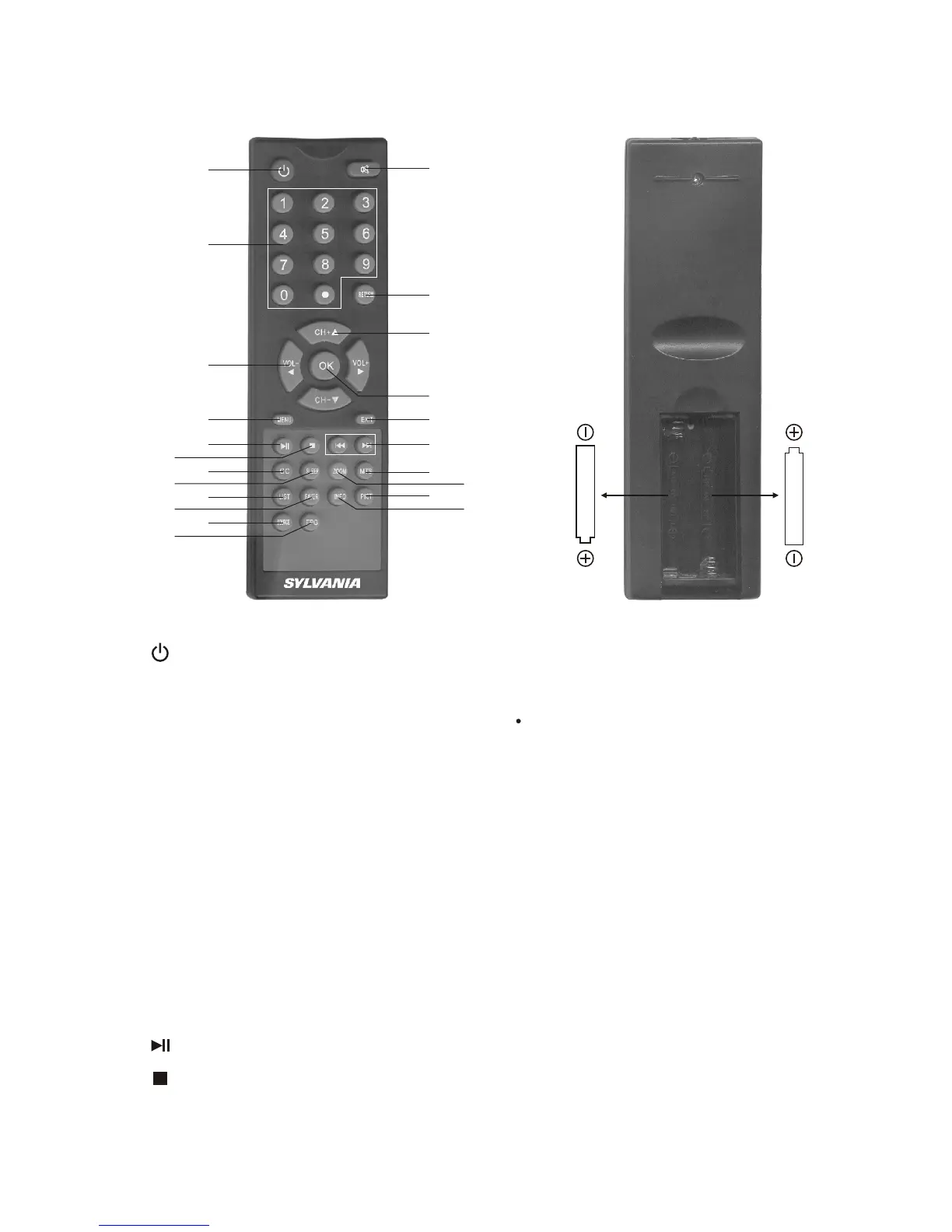
1. (Power Switching Key): When you press this key, the TV set will
be turned off, and press again it will be turned on.
2. Channel Key(Number key (0-9) and ): Press relevant key directly
when you want to change channel.
3. VOL+/VOL- (Volume control key, left and right direction key):
Press VOL+ to turn up the volume. Press this key to choose menu
rightward if it is in the system menu.
Press VOL- to turn down the volume. Press this key to choose
menu leftward if it is in the system menu.
4. MENU: Menu key. When you press this key, the main menu will
display. When the system enters a multilevel submenu, press this
key and return to previous menu step by step.
5. : Play/Pause.
6. : Stop.
7. CC: Close/Open Caption.
8. SLEEP: 240 minutes sleep shutdown settings.
V Remote Controller Operation Instruction
1
2
5
7
8
10
12
13
15
16
17
18
3
4
9
6
11
19
20
21
22
14
LR03 "AAA" SIZE
LR03 "AAA" SIZE



 To Next Page